21
What troubleshooting I can try if my Makeblock robot
cannot connect to my phone App
This article applies to: mBot, mBot Ranger, Starter, Ultimate, Ultimate 2.0
We now have developed Makeblock App which allows us to control and program for Makeblock
robots in one App. Also, Makeblock App supports all Makeblock robots except neuron. So, you
are suggested to download Makeblock App. Also mBlock App is under construction, which
supports mBot, Ranger, Codey Rocky, Neuron, Motion Block, Halocode (soon).
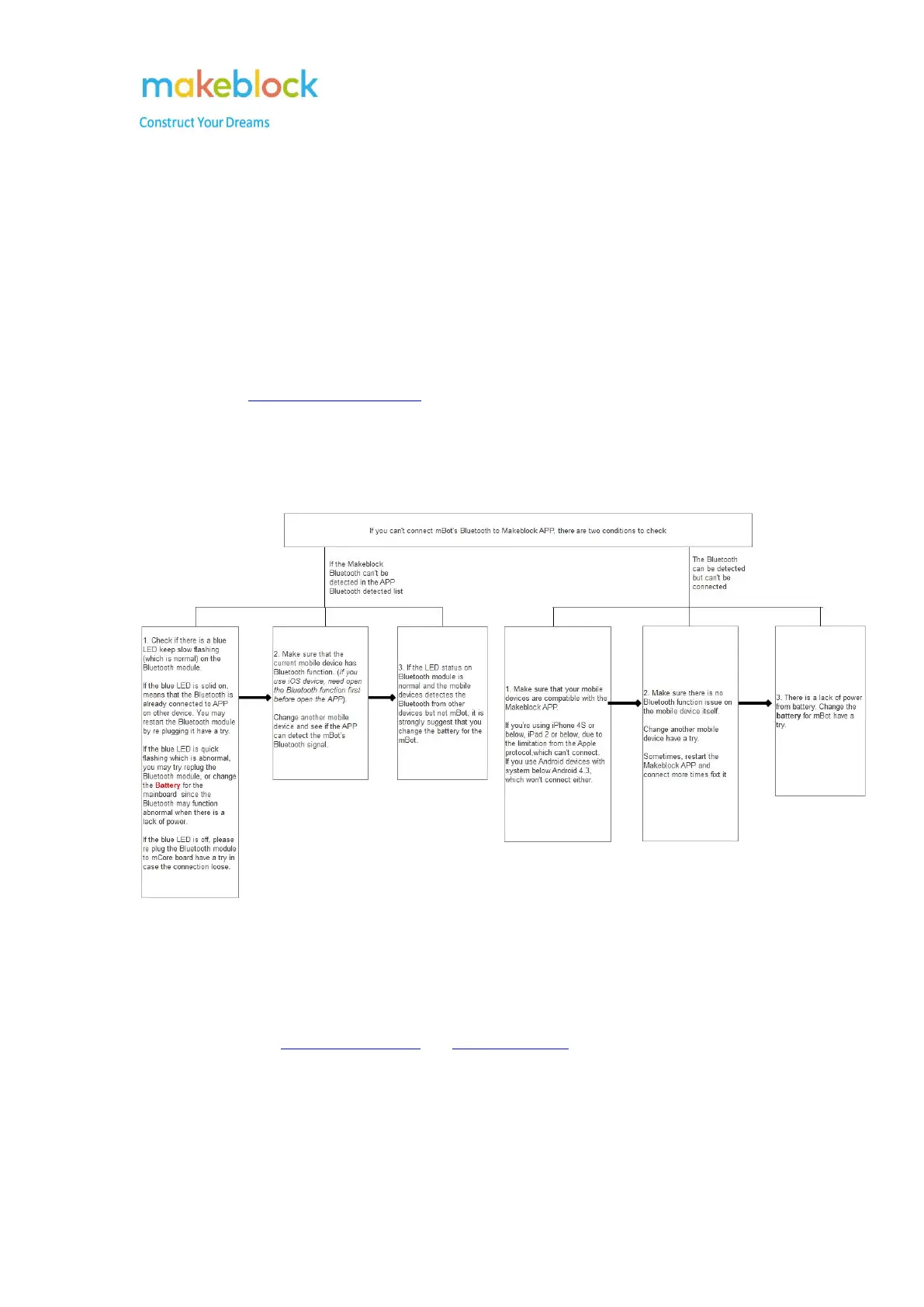
If you find Bluetooth cannot be connected to Makeblock App, please refer to below chart to do
some troubleshooting.
Notes:
1. For starter, we use Me Bluetooth Module, so also check if anything wrong with the port and
RJ25 cable when this issue happens.
2. We can also try to reset default program and upgrade firmware with USB cable connection on
PC mBlock first, and then connect Bluetooth to Makeblock App.
3. Enable GPS and location permission are useful and important sometimes.



 To Next Page