44
Why my Ranger moves once I turn it on
Problem:
Once I turn on my Ranger, it moves very fast. Everything connected well, and I reset default
program with PC software mBlock 3, it doesn’t help.
Cause:
This Ranger was set to Nervous Bird in the Makeblock App (or in mBlock3) and was turned off,
then the Ranger is assembled to another form like Land Ralder, at this time, once we turn on the
power, it will move automatically and won’t listen to the command.
Reset default program or upgrade firmware won’t help this issue.
Solution:
1) Through Makeblock App: turn on the robot though it is moving (you can hold it), go to
Makeblock App, choose the correct mode (instead of Nervous Bird) when connect Bluetooth.
Once connected, it will stop moving.
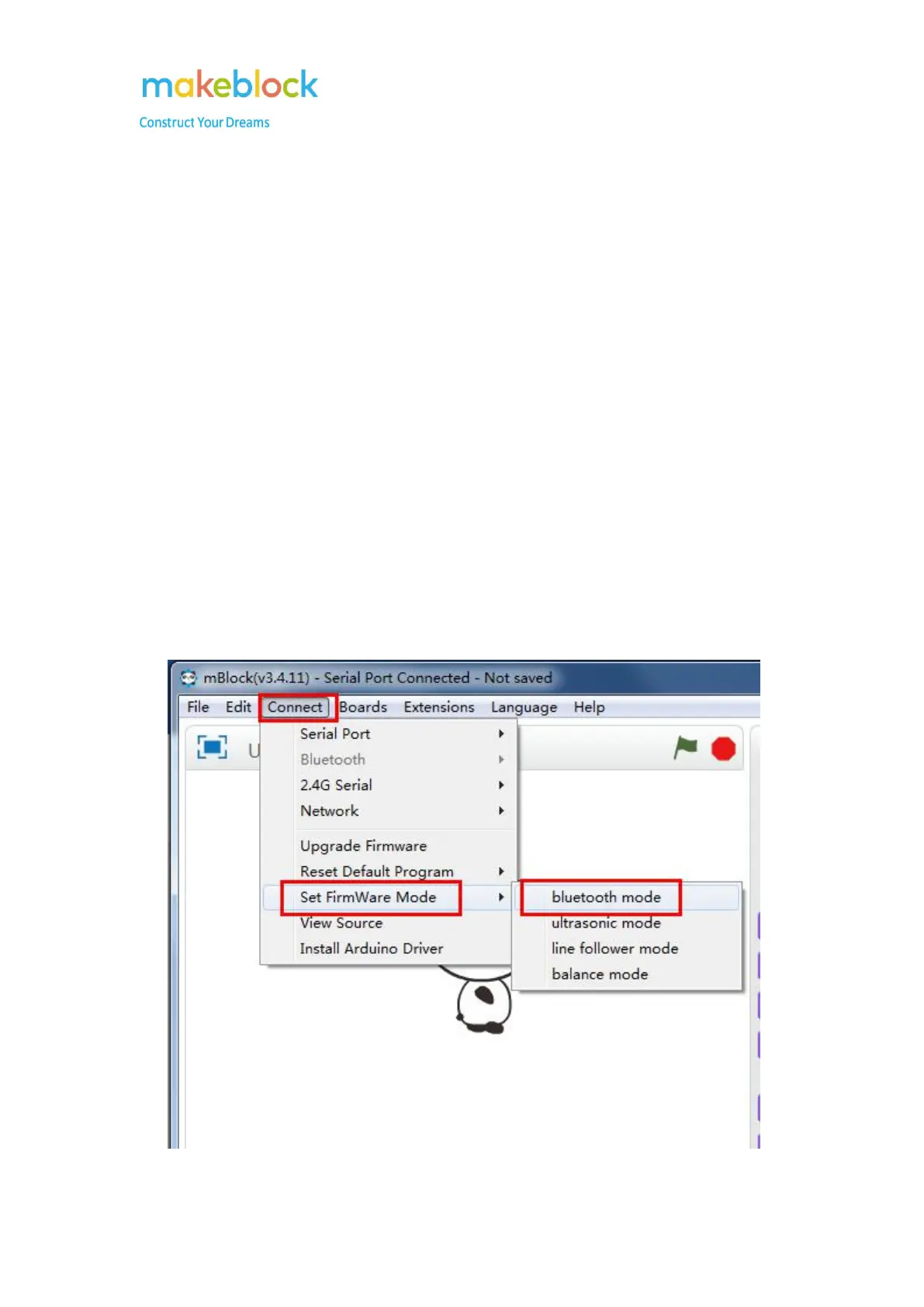
2) Through mBlock 3: connect robot to mBlock as this guide, then go to connect>set firmware
mode>Bluetooth mode or the mode you need instead of balance mode (nervous bird). After
that, it won’t move once you turn it on.



 To Next Page