24
R8 PRO SERVICE GUIDE
1
2
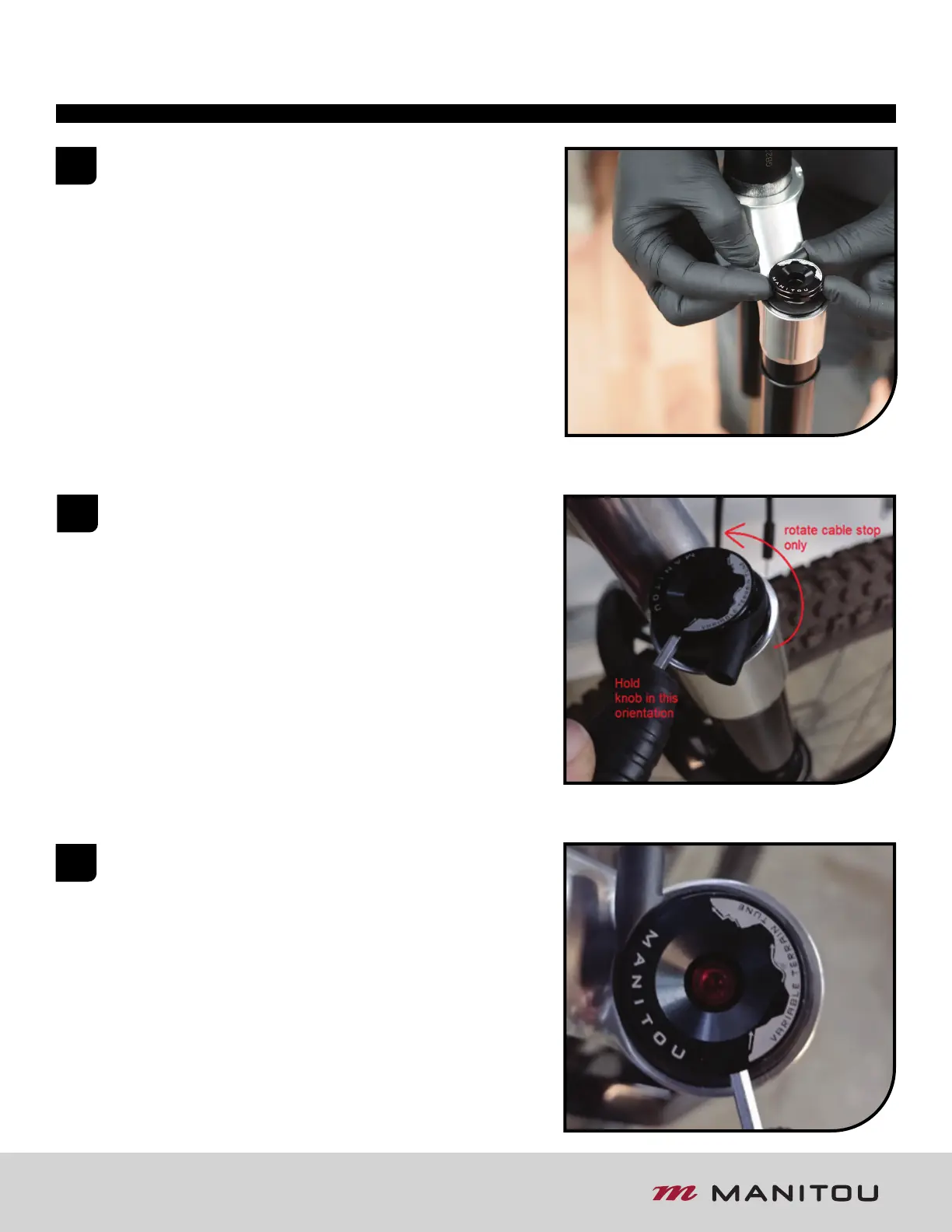
If not already assembled, insert the torsion spring straight
end into the small hole on the bottom of the remote knob.
Insert the knob and torsion spring into the cable stop so
that the set-screw threads are oriented on either side of the
cable stop housing without tension on the torsion spring.
Install the hooked end of the torsion spring into the closest
corresponding slot on the bottom of the cable stop.
SET VTT adjuster to the “OPEN” position
(Counter-Clockwise).
Align the knob assembly so the cable housing is oriented
opposite of the crown beam. Partially insert the cable stop
and knob into topcap, so cable stop spline is NOT engaged
into the spline of the topcap. Insert a 3mm hex wrench into
the first set-screw thread. Holding the knob steady relative
to the fork, rotate the cable stop Counter-Clockwise
120-150 degrees.
3
When the cable housing is aligned adjacent to the crown,
push down on both the remote knob and the cable stop so
the cable stop spline is engaged with top-cap and remote
knob hex is engaged with adjuster hex. Some minor
rotational adjustment may be needed to allow
engagement between all components.
R8 PRO REMOTE KNOB INSTALL



 To Next Page