21
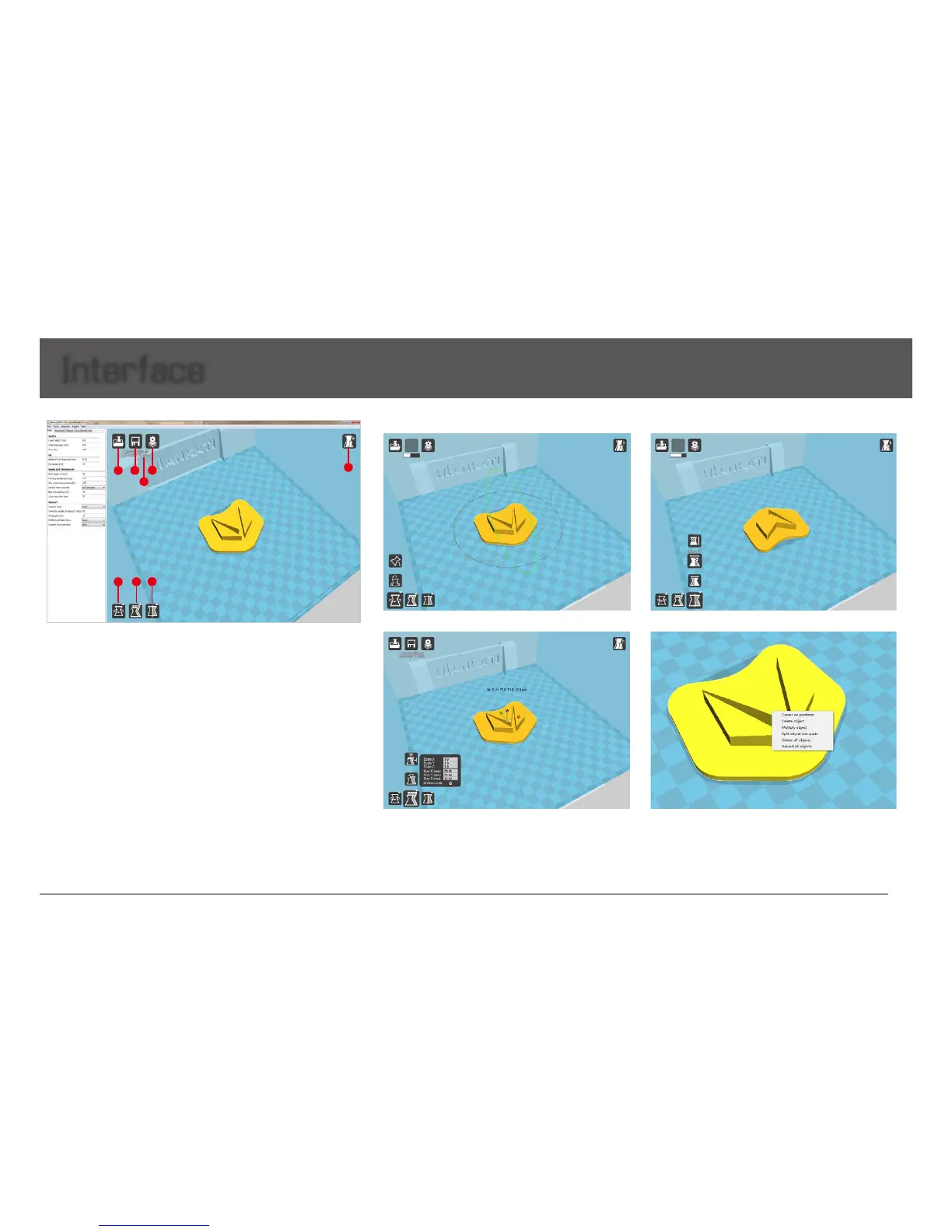
1. Load 3D model, supporting the files of STL/OBJ/DAE/AMF.
Note: MankatiUM also can recognize planar images, and transfer
them to 3D model files. Supporting the files of JPG/BMP/PNG.
2. Save as Gcode file
3. If change any slicing setting, please click this "Slice" button to show
the real printing time and filament requirement.
4. Printing time, the length and weight of filament consume.
5. Simulate the printing process under different modes.
5.1Normal:Defaultstate
5.2Overhang:Measuretheangleofoverhang,andjudgeifitis
necessary to generate the support structure
5.3X-Ray:X-rayvision
5.4Layers:Layerbylayertosimulatetheprintingprocess
Fiveoptionsforchoice:
- Center on platform
- Delete object
- Multiply object
6. Rotate the model 8. Mirror image of the model
9. Other operation
7. Change the size of the model
Interface
-Splitobjectintoparts(Itwilltake
too much time, so it is better to do
this in modeling software)
- Delete all objects
1
2
3
4
5
6
7
8


 To Next Page