31
Leveling Build Plate
Why Leveling Build Plate is
Important?
Frequent build plate leveling can keep Mankati
Fullscale XT Plus best performance. Re-leveling cannot
hurt the printer but without leveling will decrease your
success rate of printing.
• If the build plate is too far from the extruder nozzle,
or if one part of the build plate is further from the
nozzle than another part, your object might not stick
to the build plate.
• If the build plate is too close to the extruder nozzle,
the build plate will block the extruding of filament
from the nozzle. The nozzle will scratch the build plate
• Frequent build plate leveling will help to ensure that
objects always stick well to the hot bed.
Notice:
• Tightening the black screw (turning them to the right) to reduce
plate height.
• Loosening the black screw (turning them to the left) to increase
platform height.
• The gap between the nozzle and the build plate should be
about 75% of the layer thickness you set in the software.
Plate Leveling Guide
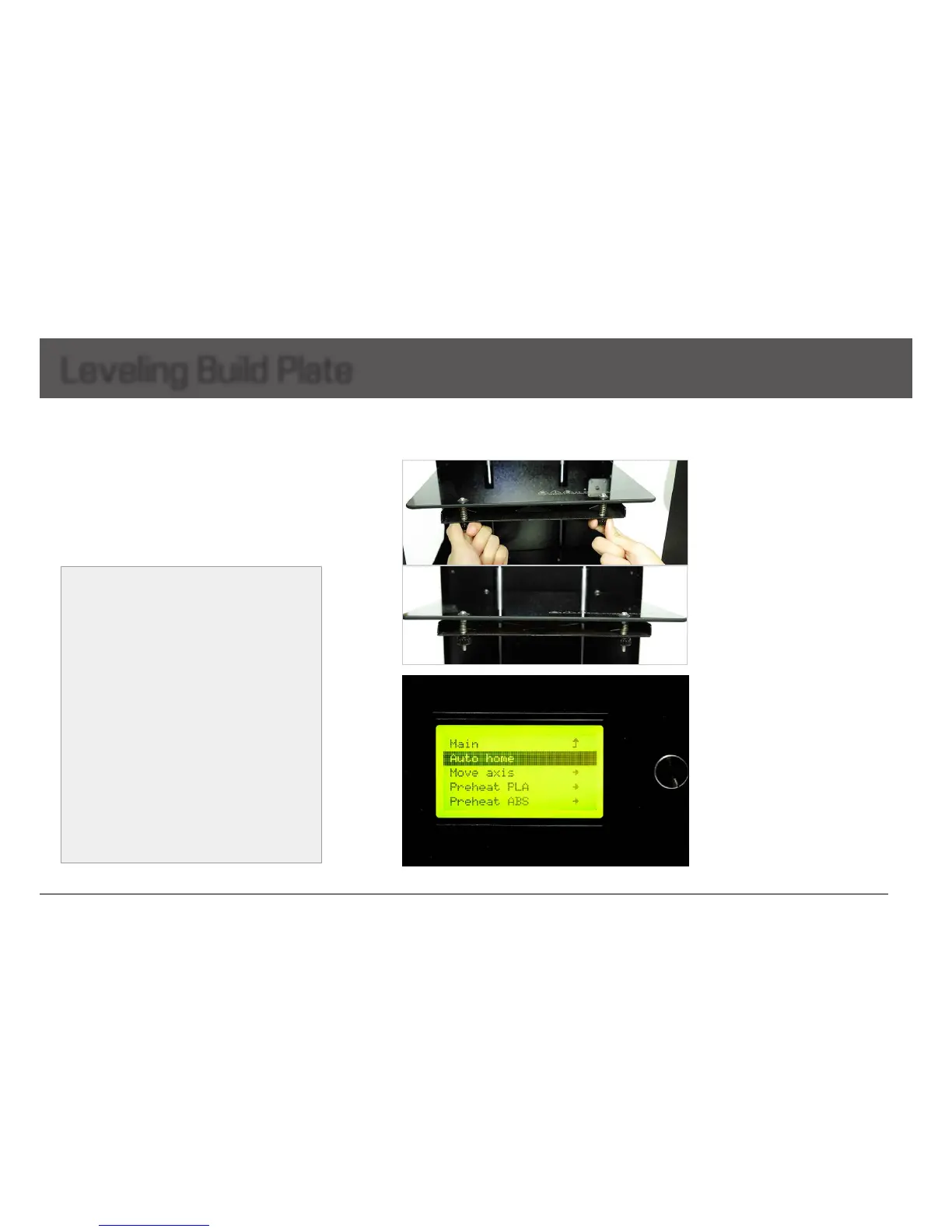
1. Twisting the four black screws tight
properly to reduce the build plate height
and avoid collision between nozzle and
plate.
Note:Twistingscrewstootightmaycause
the glass cracking!
2. Lifting the build plate to the top of the
Z-axis.Gotomenu"Prepare"-choose
"Autohome"intheLCD,theextruder/print
head will go to the original point, the build
platewillgouptothetopofZ-axis.


 To Next Page