33
Feed the Filament
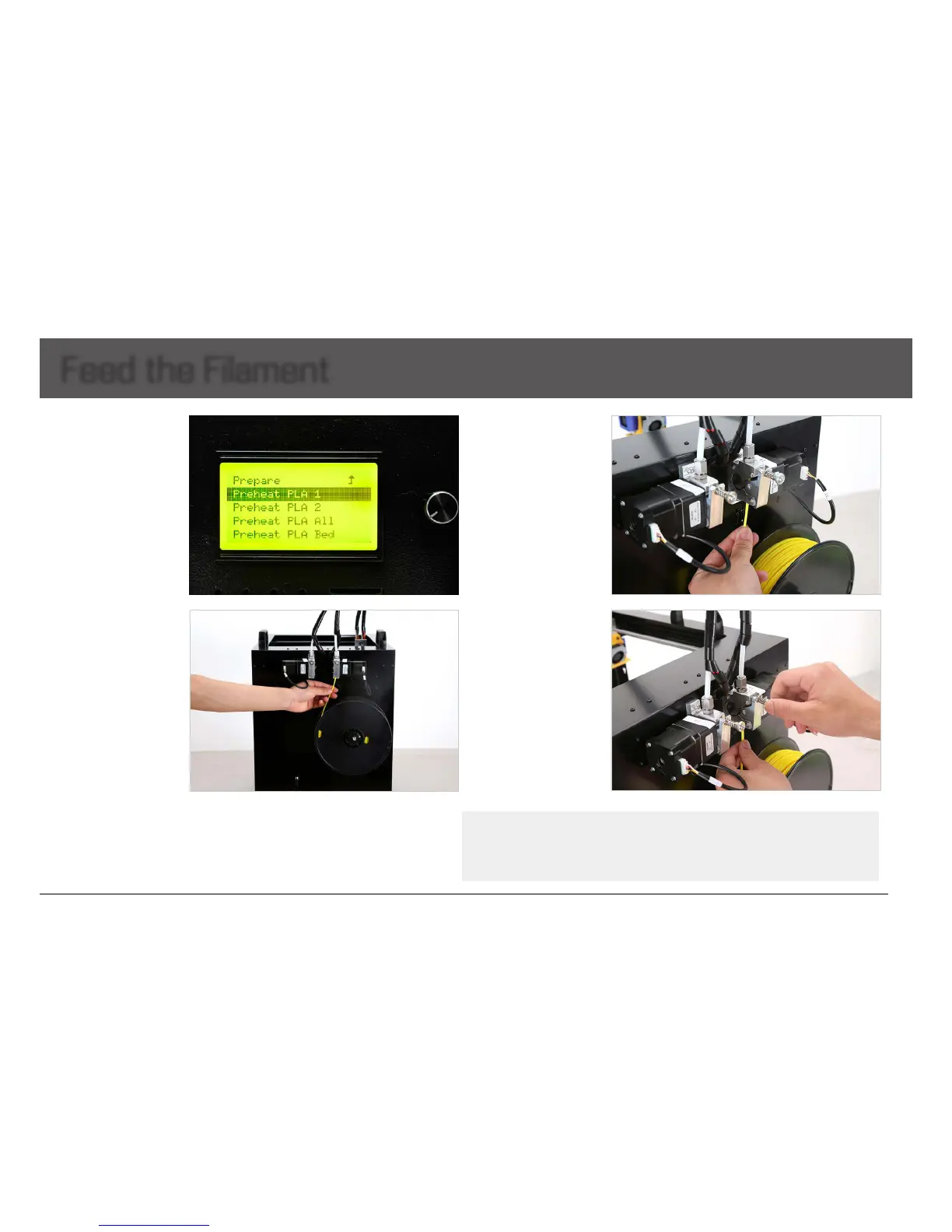
1. Preheatthenozzle:
Choose”Prepare”>”preheat
PLA(orABS)”onLCD.
Choose the nozzle you want
topreheat.
3. Continue to feed the
lamentinuntilitemerges
fromthenozzle.
Note: Please DO push the lament
GENTLY.
If lament attaches the nozzle, just
keep them attached, stop pushing
hardly. Otherwise, the nozzle
connection could be broken.
After the nozzle is preheated
enough, the lament will ow out
from nozzle naturally.
4. Tighten the black screw
toxthelamentwiththe
clamp, making it not too
looseortootight.
Caution:
1. Ensure the clamp is not too tight or too loose, otherwise, filament feeding will have problem causing failure prints.
2. After feeding successfully, check if filament has twining and knotting to ensure filament feeding smoothly.
3. Lubricate the XY axis and sliding blocks to avoid motion stuck.
2. Feed the end of the
spooledlamentintothe
lamentguidetube,whereit
attachestotheextruder.


 To Next Page