22
Note: Function prompt will be shown when
you point the cursor on the tab.
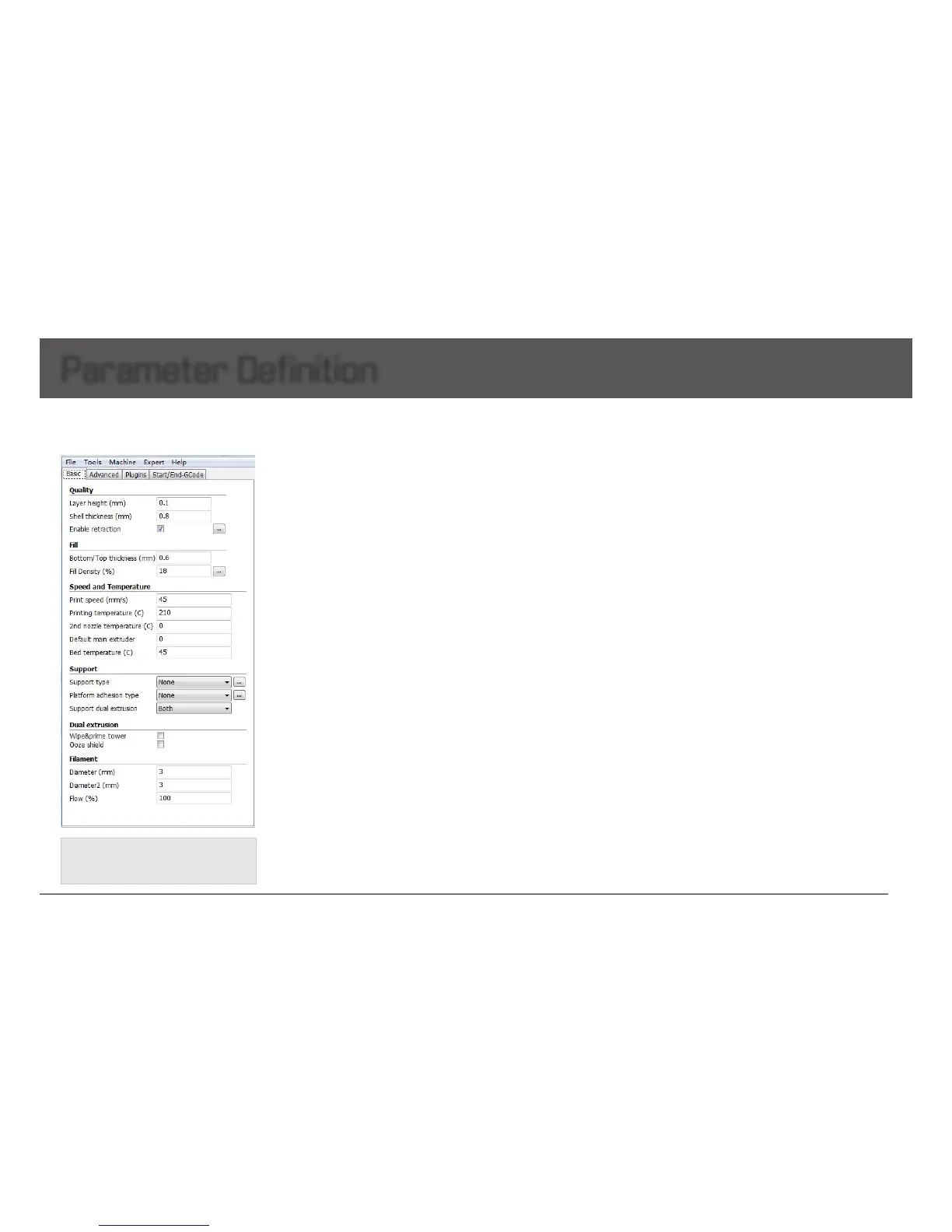
Basic Setting
Parameter Definition
Quality
Layer height: The lower layer height, the higher printing accuracy
within certain limits
Super accuracy printing: Recommendedsetas0.1mm
High accuracy printing: Recommendedsetas0.2mm
Giving consideration to both printing speed and accuracy printing:
recommended0.2mm
High speed printing: Recommended0.3mm
Higher precision printingisavailableas0.04mm,butbecausethe
lamentextrudedat0.04mmistoosoftandthin,whichcannot
printcomplicatedmodel.Meanwhile,thespeedwillgetlowtoo
much.
Soherewedon'trecommendtheprintinglessthan0.1mmunless
itisinevitable.
Shell thickness: Thickness of the outside shell in the horizontal
direction.Commonsettingasintegralmultiplesofnozzlediameter
torepresenttheouterwallprintlaps.
Flow: Flow compensation, the amount of material extruded is
multipliedbythisvalue.
Fill
Bottom/Top thickness: Usedasthemodelneedcapping.Common
setting as integral multiples of layer height, keep it near your wall
thicknesstomakeanevenlystrongpart.
Fill Density: Meansthenetsupportstructureinsidethemodel.The
higherllpercentage,thehigherdensityofnetsupport.0means
non-ll,and100%meanssolidll.
Speed and Temperature
Printing Speed: Meanstheextruder’smovingspeed.Printingspeed
decidesthequalityofprintingmodelquality.MankatiFullscaleXT
Plus’sdefaultspeedis30mm/s.Highspeedprintingcanbesetas
50-70mm/s.
Higher speed printing needs a balance by increasing nozzle
temperature,otherwisemayeasilycauseshortageoflament’s
feeding.Printingspeedalsodependsontheshapeofmodeland
manyotherfactors.Recommendedspeedis≤70mm/s.≥70mm
may cause the step motor losing steps, which will reduce the model
printingaccuracy.
Printing Temperature: Mainextrudertemperature(defaultasleft
extruder), setting according to the different melting temperatures of
differentlaments.
2nd extruder temperature: Viceextrudertemperature(default
as right extruder), setting according to the different melting
temperaturesofdifferentlaments.
Default main extruder: Choosewhichonetobethemainextruder.
Defaultasleftextruder.Afternishingamodelandyouwant
toprintanothermodelindifferentlament(differentcolorsand
differentmaterials).Changingviceextruderasmainextrudercan
solvefrequentchanginglamentproblem.Thisfunctioncancome
effectiveonlywhenprintingsinglecolorlament.
Bed temperature: Setting according to the different melting
temperaturesofdifferentlaments.
Close bed after layer: Closebedtemperatureaftercertainlayers.
Notonlyenergy,butalsocanprolongthelifeofthehotbed.0
disablethisfeature.


 To Next Page