23
Note: Function prompt will be shown when
you point the cursor on the tab.
Advanced Setting
Parameter Definition
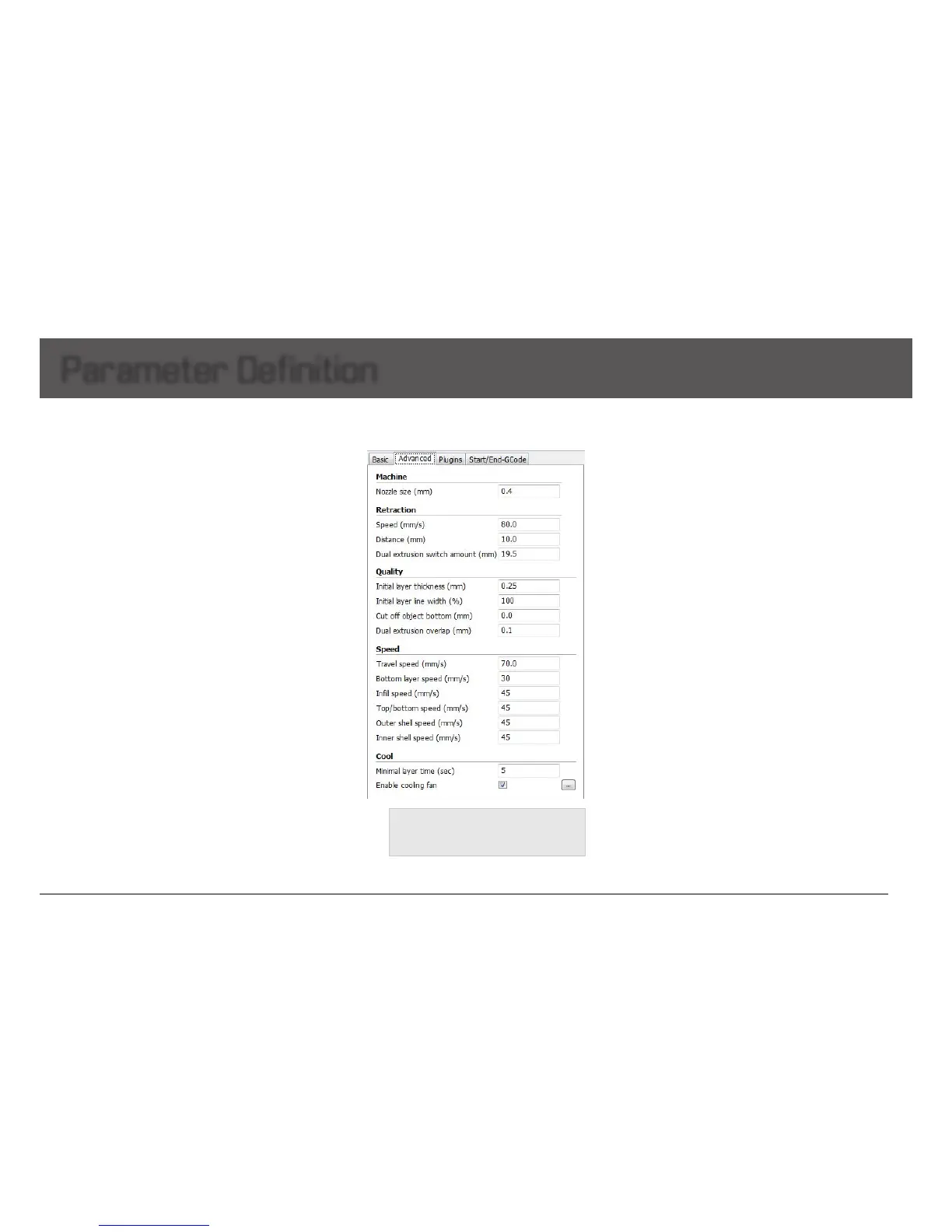
Retraction
Enable retraction:
Retractthelamentwhenthenozzleismovingoveranon-printed
areatoavoiddroppingandbrushed.Detailsabouttheretractioncan
beconguredintheadvancedtab.
-Speed: Speedatwhichthelamentisretracted,ahigher
retractionspeedworksbetter.Commonlyusedas80mm/s.Avery
highretractionspeedcanleadtolamentgrindingorbreaking.
-Distance: Amountofretraction.Setat0fornoretractionatall.A
valueof5usuallygeneratesgoodresult.
- Dual extrusion switch amount: Amount of retraction when
switchingnozzlewithdual-extrusion.
Quality
-Initial layer thickness: Layerthicknessofthebottomlayer.Athicker
bottomlayermakesstickingtothebedeasier.100meanssettingthe
bottomthicknessthesameasotherlayers.
-Initial layer line width: Extra width factor for the extrusion on the
rstlayer.
-Cut off object bottom: Whichsinkstheobjectintoplatform.This
canbeusedforobjectsthatdonothaveaatbottomorcuttingoff
thealreadynishedmodelheightinordertostickormontagewith
otherpartseasily.
-Dual extrusion overlap: Adding a certain amount of overlapping
extrusionondual-extrusionprints.
Support
Support type: For the model with parts hanging in the air, support
structure is a must when printing to ensure the parts hanging in the
airwillnotcollapse.
-None: No support, if you print model with parts hanging in the
air but choose structure as none, the parts hanging in the air may
droop.
-Touching Build Plate: Most commonly used support type, means
the support will only been created when the support structure
touchesthebuildplate.
-Everywhere: Create support wherever there is part hanging in the
air.
Note:
Support structure may affect the smoothness of
model surface and printing speed.
If not essential, it's recommended to modify or split model
to reduce the use of support.
Platform adhesion type: Different options that help in preventing
cornersfromliftingduetowarping.
- None: Defaultformofusingoutsiderlining.
- Brim: Addsasinglelayerthickatareaaroundyourobjectwhich
iseasytocutoffafterwards,andtherecommendedoption.
- Raft: Adds a thick raster at below the object and a thin interface
betweenthisandyourobject.
Note:
Enabling the brim or raft disables the skirt.
Support dual extrusion: Whichextrudertouseforsupportmaterial.
Foreasybreak-awaysupportyoucanuseeitherextruder.
Youcanchoosemainextruder(leftextruder)toprintmainstructure,
2ndextruder(rightextruder)toprintsolublesupportmaterial.


 To Next Page