19
Simple version Advanced version Information
ENGLISHDEUTSCHFRANÇAISITALIANOESPAÑOLNEDERLANDSSVENSKA
Basic version
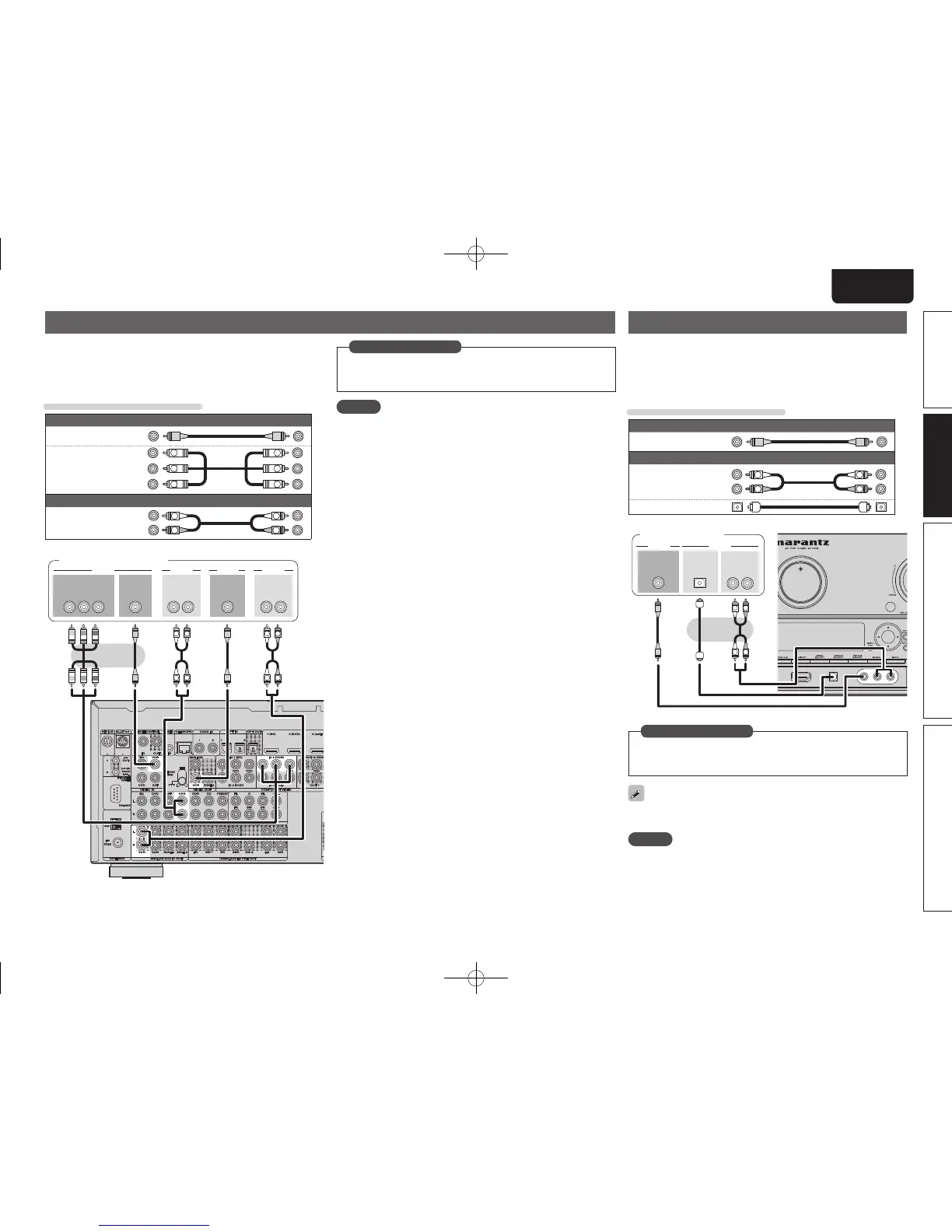
Connecting a video cassette recorder
• You can record video onto a video cassette tape.
• Select the connector to use and connect the device.
• When recording analog audio, use the analog connection.
• For instructions on HDMI connections, see “Connecting an HDMI-
compatible device” (vpage15).
Cables used for connections
Video cable (sold separately)
Video cable
(Yellow)
Component
video cable
Y
PB
PR
Y
PB
PR
(Green)
(Blue)
(Red)
Audio cable (sold separately)
Audio cable
(White)
(Red)
R
L
R
L
R
L
R
L
R
L
R
L
RL RL
OUT
IN
AUDIOAUDIO VIDEOVIDEO
IN
AUDIOAUDIO
OUT
VIDEO VIDEOCOMPONENT VIDEO
Y P
B PR
OUT
Video cassette recorder
Set this to change the digital input connector or component video
input connector to which the input source is assigned.
“Input Assign” (vpage68)
in Set as Necessary
NOTE
To record video signals through this unit, use the same type of video
cable for connection between this unit and the player as used for
connection between this unit and the recorder.
Connecting a digital camcorder
• You can enjoy video and audio from a digital camcorder.
• You can enjoy games by connecting a game machine via the AUX1
input connector. In this case, select the input source to “AUX1”.
• For instructions on HDMI connections, see “Connecting an HDMI-
compatible device” (vpage15).
Cables used for connections
Video cable (sold separately)
Video cable
(Yellow)
Audio cable (sold separately)
Audio cable
(White)
(Red)
R
L
R
L
Optical cable
R
L
R
L
OUT
VIDEO
VIDEO
RL
AUDIO
OUT
OPTICAL
OUT
AUDIO
Digital camcorder
Set this to change the digital input connector to which the input
source is assigned.
“Input Assign” (vpage68)
in Set as Necessary
The front panel OPTICAL input terminal is displayed as “OPT3” in the
“Input Setup” – “Input Assign” setting (vpage68) in the menu.
NOTE
When a non-standard video signal from a game machine or some other
source is input, the video conversion function might not operate. In
this case, use the monitor output of the same connector as the input.
1.AV7005U_ENG.indd 19 2010/08/23 18:32:22




 To Next Page