89
Basic versionSimple version Information
ENGLISHDEUTSCHFRANÇAISITALIANOESPAÑOLNEDERLANDSSVENSKA
Advanced version
Other settings
Remote control settings
• When you connect a remote control receiver unit (purchased
separately) to the REMOTE CONTROL IN terminal of this unit, use
the following procedure to disable the remote sensor function of
this unit.
• The remote sensor function of remote control signals is enabled by
default.
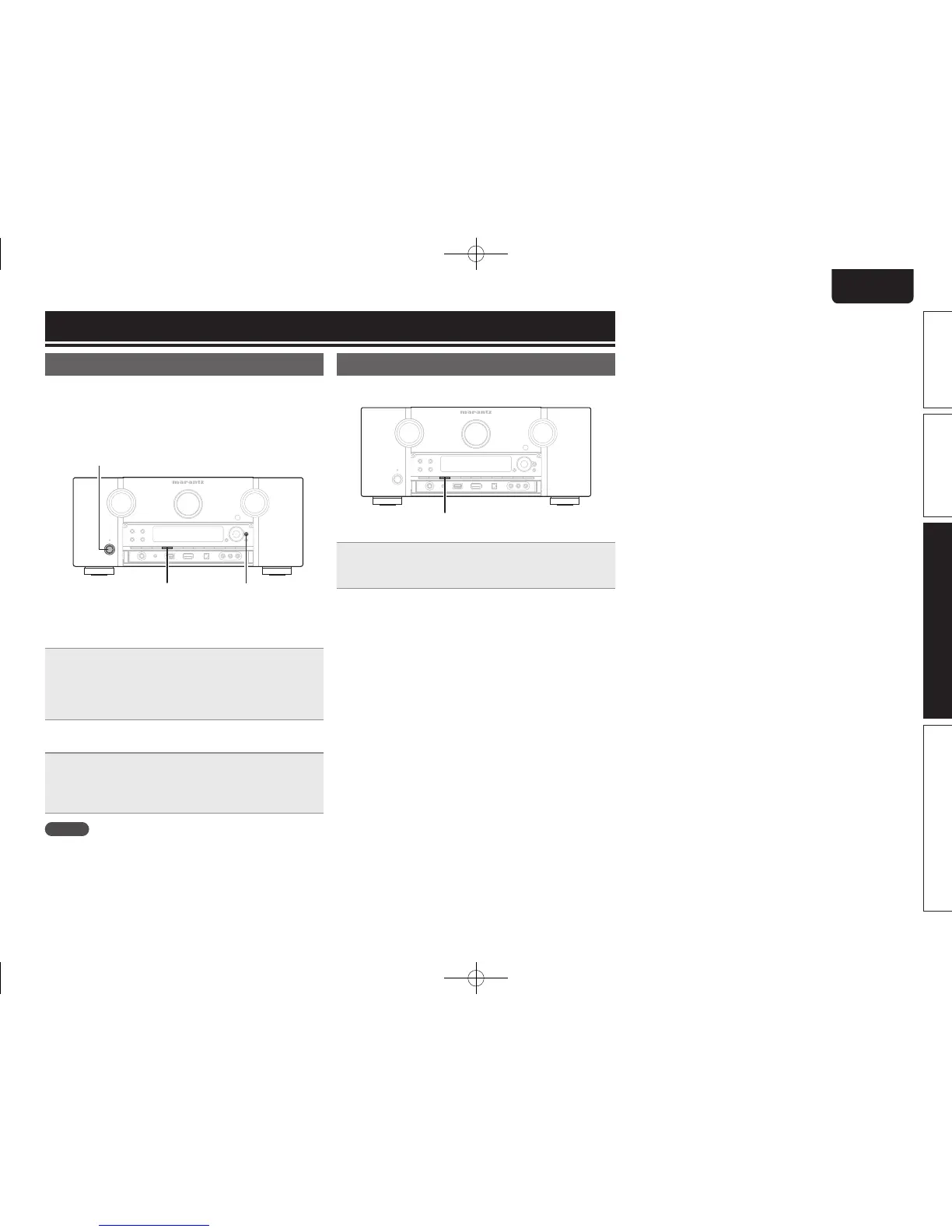
STATUS ENTER
n Disabling the sensor function of the remote
control unit
When the main unit is in standby mode, press ON/
STANDBY
while holding down STATUS and ENTER on
the main unit.
“Remote Lock:ON” is shown on the display, and the infrared light
receiving function is disabled.
n Enabling the remote sensor function
When the main unit is in standby mode, press ON/
STANDBY
while holding down STATUS and ENTER on
the main unit.
The infrared light receiving function on the main unit is enabled.
NOTE
If a remote control receiver unit (purchased separately) is not
connected, do not perform this setting. If you do, you will not be able
to operate this unit using the remote control unit.
Switches light illumination on/off
You can switch the lighting around the main display on or off.
• The factory setting is “ON”.
DISPLAY
Press and hold DISPLAY on the main unit for 3 seconds.
• Carry out the same procedure if you want to change the settings
again.
1.AV7005U_ENG.indd 89 2010/08/23 18:33:16




 To Next Page