27
Simple version Advanced version Information
ENGLISHDEUTSCHFRANÇAISITALIANOESPAÑOLNEDERLANDSSVENSKA
Basic version
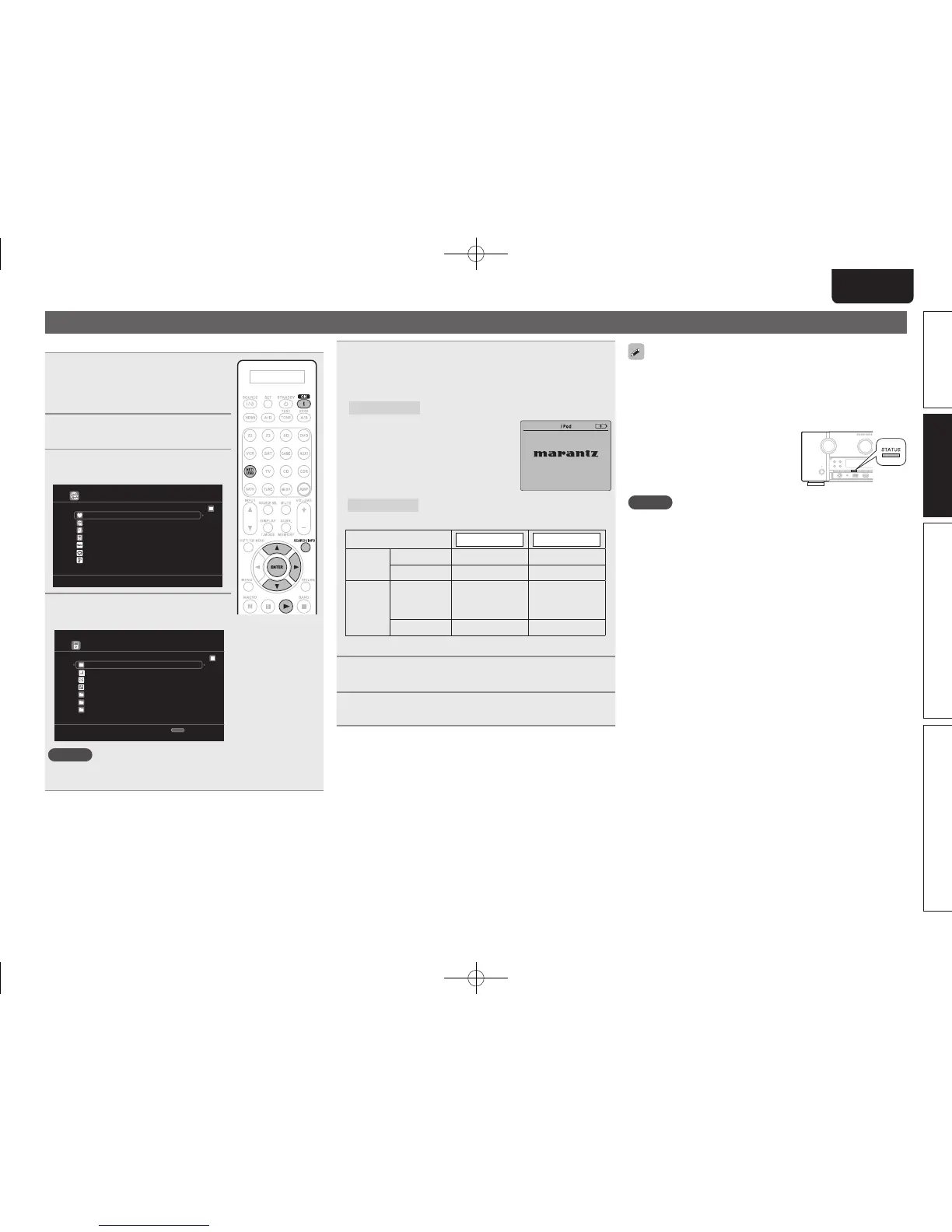
Playing an iPod
®
You can play back both video, photo and audio.
1
Connect the iPod
®
to the USB
port (vpage 20 “Connecting an
iPod or USB memory device to
the USB port”).
2
Press ON to turn on power to the
unit.
3
Press NET/USB twice to switch
the input source to “NET/USB”.
Favorite
Internet Radio
Media Server
iPod
[1/8]
Flickr
Napster
Pandora
4
Use ui to select “iPod”, then
press ENTER or p.
iPod
Playlists
Artists
Podcasts
Genres
Composers
Albums
Songs
[1/8]
SEARCH
Search
NOTE
If the connections screen is not displayed, the iPod may not be
properly connected. Reconnect it.
5
Press SEARCH/INFO and hold it down for 2 seconds
or more to select the display mode.
• There are two modes for displaying the contents recorded on the
iPod.
Remote mode
Display iPod information on the TV screen.
• The unit display shows single-byte
alphanumeric characters and some
symbols only. “.” is displayed in place
of incompatible characters.
• In ”Remote mode”, the iPod display is
as shown at right.
OK to disconnect.
Direct mode
Display iPod information on the iPod screen.
• “Direct iPod” is displayed on the display of this unit.
Display mode
Remote mode Direct mode
Playable
fi les
Music fi le
P P
Video fi le
z
Active
buttons
Remote
control unit
(This unit)
P P
iPod
®
P
zOnly the sound is played.
6
Use ui to select the item, then press ENTER or p
to select the le to be played.
7
Press ENTER, p or 1.
Playback starts.
• You can specify the duration of the on-screen display to be displayed
(default: 30 sec) at menu “NET/USB” (vpage85). Press uio p
to return to the original screen.
• To play back compressed audio with extended bass or treble
reproduction, we recommend playback in M-DAX mode (vpage76).
The default setting is “OFF”.
• In Remote mode, press
STATUS during
playback to check the title name, artist
name, and album name.
NOTE
• Depending on the type of iPod and the software version, some
functions may not operate.
• Note that Marantz will accept no responsibility whatsoever for any
problems arising with the data on an iPod when using this unit in
conjunction with the iPod.
1.AV7005U_ENG.indd 27 2010/08/23 18:32:36





 To Next Page