83
Basic versionSimple version Information
ENGLISHDEUTSCHFRANÇAISITALIANOESPAÑOLNEDERLANDSSVENSKA
Advanced version
Setting items Setting details
Other
(Continued)
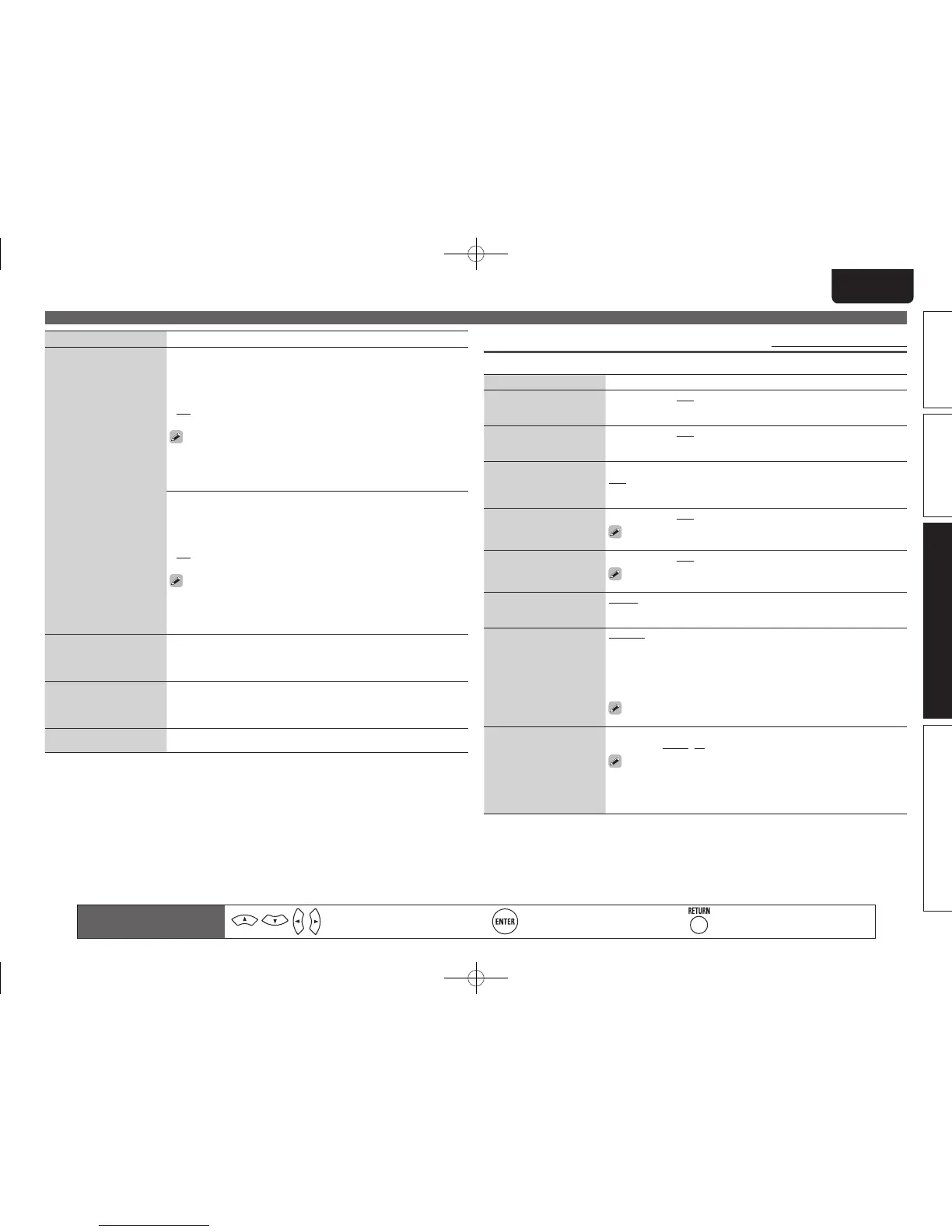
Update Notification : Displays a notification message on this unit’s menu
screen when the latest firmware is released with “Firmware Update”. The
notification message is displayed for about 20 seconds when the power
is turned on. Connect to broadband Internet (vpage24) when using this
function.
• ON : Display update message.
• OFF : Do not display update message.
• When you press ENTER during display of the notification message,
the “Check for Update” screen is displayed. (Refer to page 86 for more
information on “Firmware Update”)
• Press RETURN to erase the notification message.
Upgrade Notification : Display a notification message on this unit’s
menu screen when downloadable firmware is released with “Add New
Feature”. The notification message is displayed for about 20 seconds
when the power is turned on. Connect to broadband Internet (vpage24)
when using this function.
• ON : Display upgrade message.
• OFF : Do not display upgrade message.
• When you press ENTER during display of the notification message,
the “Add New Feature” screen is displayed. (Refer to page 86 for more
information on “Add New Feature”)
• Press RETURN to erase the notification message.
Rhapsody Account
Set or change Username
and Password (vpage42
“Listening to Rhapsody”).
Username / Password / Account Number / Merge / Clear
• For character input, see page 65.
Napster Account
Set or change Username
and Password (vpage39
“Listening to Napster”).
Username / Password
• For character input, see page 65.
Network Information
Display network information.
Friendly Name / DHCP= ON/OFF / IP Address / MAC Address
Manual Setup
Remote control operation
buttons
Move the cursor
(Up/Down/Left/Right)
Confirm the setting Return to previous menu
Zone Setup Default settings are underlined.
Set the audio to play back with multi-zone (ZONE2, ZONE3).
Setting items Setting details
Bass
Adjust low frequency range
(bass).
–10dB – +10dB (0dB)
Treble
Adjust high frequency range
(treble).
–10dB – +10dB (0dB)
HPF
Make settings for cutting
the low range to reduce
distortion in the bass.
ON : The low range is attenuated.
OFF : The low range is not attenuated.
Level Lch
Adjust the left channel
output level.
–12dB – +12dB (0dB)
The “Level Lch” can be set when “Channel“ (vpage83) is set to
“Stereo“.
Level Rch
Adjust the right channel
output level.
–12dB – +12dB (0dB)
The “Level Rch” can be set when “Channel“ (vpage83) is set to
“Stereo“.
Channel
Set the signal output from
multi-zone.
Stereo : Select stereo output.
Mono : Select mono output.
Volume Level
Set the volume output level.
Variable : Volume adjustment is enabled by main unit and remote control
unit.
–40dB (41) : Fix volume at –40 dB. Set when adjusting volume by external
amplifier.
0dB (81) : Fix volume at 0 dB. Set when adjusting volume by external
amplifier.
When “Amp Assign” (vpage78) is set to “ZONE2” or “ZONE3”, the
“Volume Level” setting is automatically set to “Variable”.
Volume Limit
Make a setting for
maximum volume.
OFF : Do not set a maximum volume.
–20dB (61) / –10dB (71) / 0dB (81)
• This can be set when the multi-zone “Volume Level” setting (vpage83)
is “Variable”.
• This is displayed from 0 to 99 when “Volume Display” (vpage84) is set
to “Absolute”.
1.AV7005U_ENG.indd 83 2010/08/23 18:33:15





 To Next Page