20
ENGLISH DEUTSCH FRANÇAIS ITALIANO ESPAÑOL NEDERLANDS SVENSKA
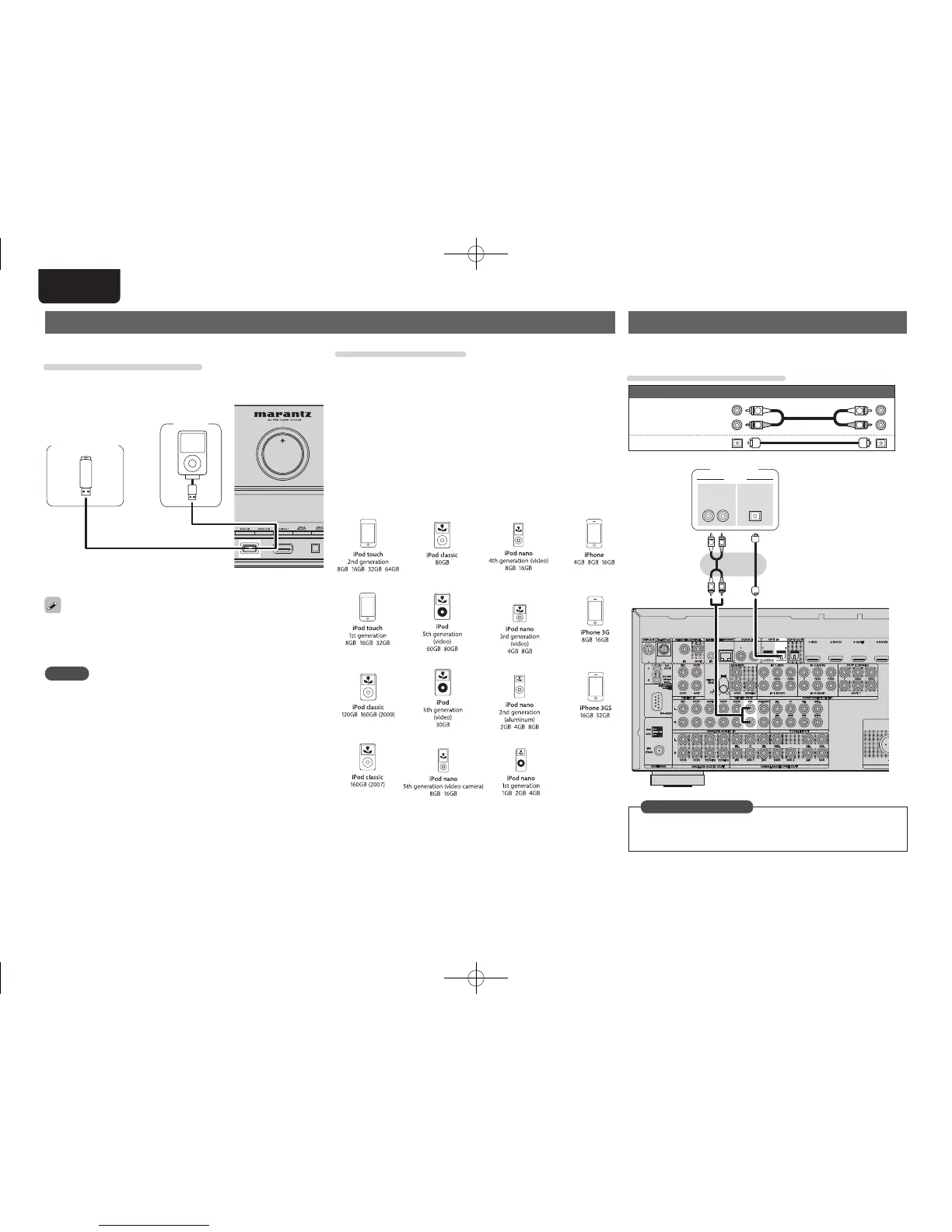
Supported iPod models
Made for
• iPod touch (2nd generation)
• iPod touch (1st generation)
• iPod classic
• iPod with video
• iPod nano (5th generation)
• iPod nano (4th generation)
• iPod nano (3rd generation)
• iPod nano (2nd generation)
• iPod nano (1st generation)
• iPhone
• iPhone 3G
• iPhone 3GS
Connecting an iPod or USB memory device to the USB port
You can enjoy music stored on an iPod or USB memory device.
Cables used for connections
To connect an iPod to this unit, use the USB cable supplied with the
iPod.
USB
memory
device
iPod
or
Marantz does not guarantee that all USB memory devices will operate
or receive power. When using a portable USB connection type HDD
of the kind to which an AC adapter can be connected to supply power,
use the AC adapter.
NOTE
• USB memory devices will not work via a USB hub.
• Do not use an extension cable when connecting a USB memory
device. This may cause radio interference with other devices.
Connecting a CD player
• You can enjoy CD sound.
• Select the connector to use and connect the device.
Cables used for connections
Audio cable (sold separately)
Audio cable
(White)
(Red)
R
L
R
L
Optical cable
R
L
R
L
RL
OUT
AUDIO
OUT
OPTICALAUDIO
CD player
Set this to change the digital input connector to which the input
source is assigned.
“Input Assign” (vpage68)
in Set as Necessary
1.AV7005U_ENG.indd 20 2010/08/23 18:32:25




 To Next Page