42
ENGLISH DEUTSCH FRANÇAIS ITALIANO ESPAÑOL NEDERLANDS SVENSKA
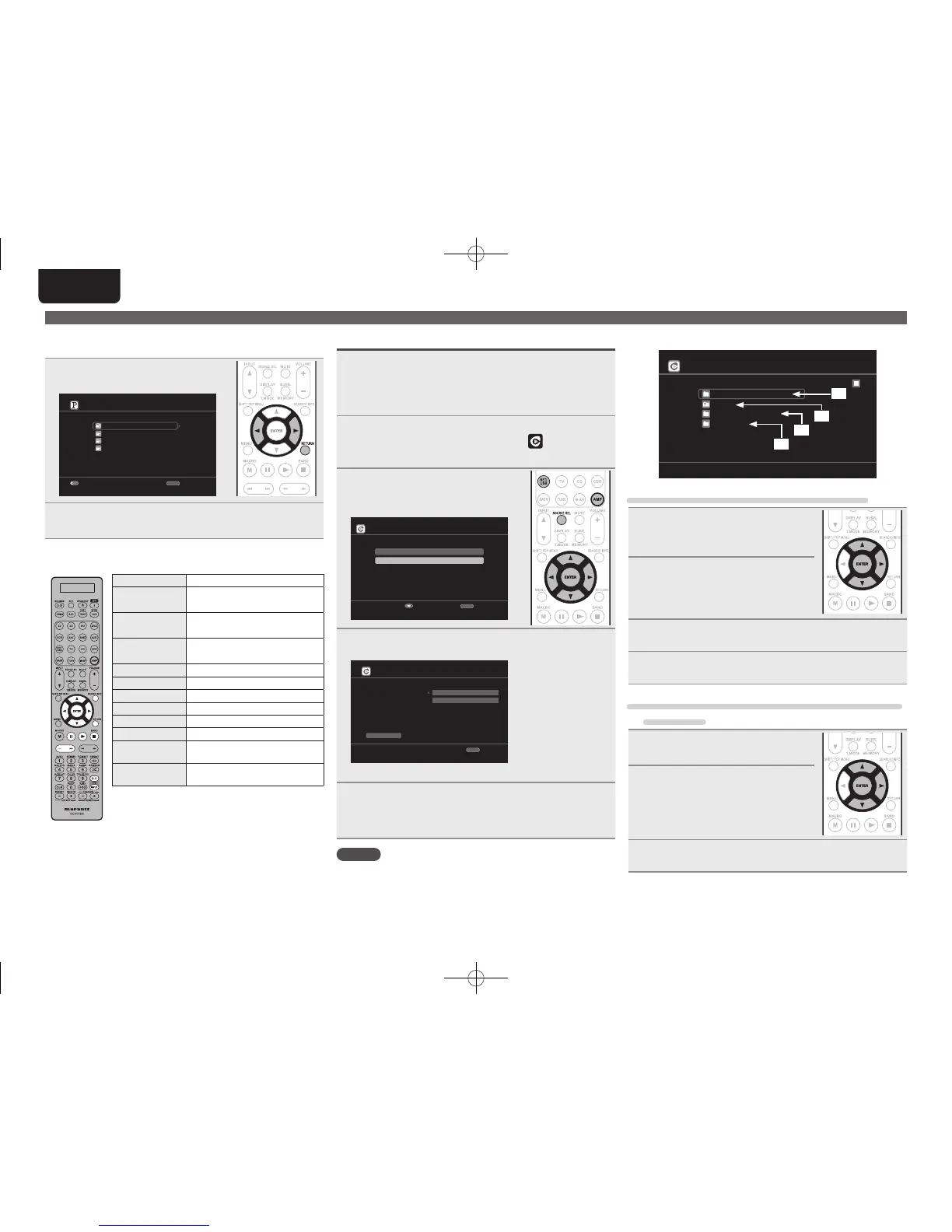
n Sign out
Disassociate this unit from your Pandora account.
1
While the Pandora top menu is
displayed, press RETURN.
My Station
New Station
Quick Mix
D&M1 Radio
D&M2 Radio
[1/4]
RETURN
Sign out
Exit
2
When the popup menu appears, press o p to select
“Yes”.
n Pandora operation
Operation buttons Function
uio p
Cursor operation /
Auto search (cue, i)
ENTER
(Press and release)
Enter / Pause
ENTER
(Press and hold)
Stop
SEARCH Page search
z
RETURN Return
1
Playback
9
Auto search (cue)
3
Pause
2
Stop
TV POWER
TV power on/standby
(Default : Marantz)
TV INPUT
Switch TV input
(Default : Marantz)
z When the menu screen is displayed, press
SEARCH, then press o (previous page) or p (next
page).
To cancel, press ui or SEARCH.
Playing a network audio
Listening to Rhapsody
1
Prepare for playback.
q Check the network environment, then turn on this unit’s
power (vpage24 “Connecting to a home network (LAN)”).
w If settings are required, make the “Network Connecting”
(vpage81).
2
Press AMP and then press SOURCE SEL to display
the Source Select menu, then select (vpage 25).
Then press NET/USB.
3
Use ui to select “Sign in to
your account”, then press ENTER
or p.
Rhapsody
Start a 30-day trial
Sign in to your account
Enter
RETURN
Cancel
4
Input Username and Password.
Rhapsody Account Sign In
OK
Enter Username
Username
Password
RETURN
Cancel
• For character input, see page 65.
5
After inputting the “Username” and “Password”,
select “OK”, then press ENTER.
If the “Username” and “Password” match, the top menu for
Rhapsody is displayed.
NOTE
• The password should be no longer than 99 characters.
• Press RETURN to cancel the input. When “Cancel input?” is
displayed, select “Yes”, then press ENTER.
n Select the search mode
Rhapsody
Rhapsody Music Guide
Search
Rhapsody Channels
My Library
[1/4]
q
w
e
r
q Search from Rhapsody latest information
1
Use ui to select “Rhapsody
Music Guide”, then press ENTER
or p.
2
Press ui to select the
information for track selection,
then press ENTER or p.
• For character input, see page 65.
3
Repeat step 2 until the track is displayed.
4
Use ui to select the track, then press ENTER or p.
w Enter a character search for the track you want
to listen to
1
Use ui to select “Search”, then
press ENTER or p.
2
Use ui to select the search item,
then press ENTER or p.
The search display appears.
• You can search by artist name, album name,
track name or keyword.
3
Enter the characters, then press ENTER.
1.AV7005U_ENG.indd 42 2010/08/23 18:32:43





 To Next Page