29
Simple version Advanced version Information
ENGLISHDEUTSCHFRANÇAISITALIANOESPAÑOLNEDERLANDSSVENSKA
Basic version
Playing a USB memory device
Playing fi les stored on USB memory
devices
1
Connect the USB memory device
to the USB port (vpage 20
“Connecting an iPod or USB
memory device to the USB port”).
2
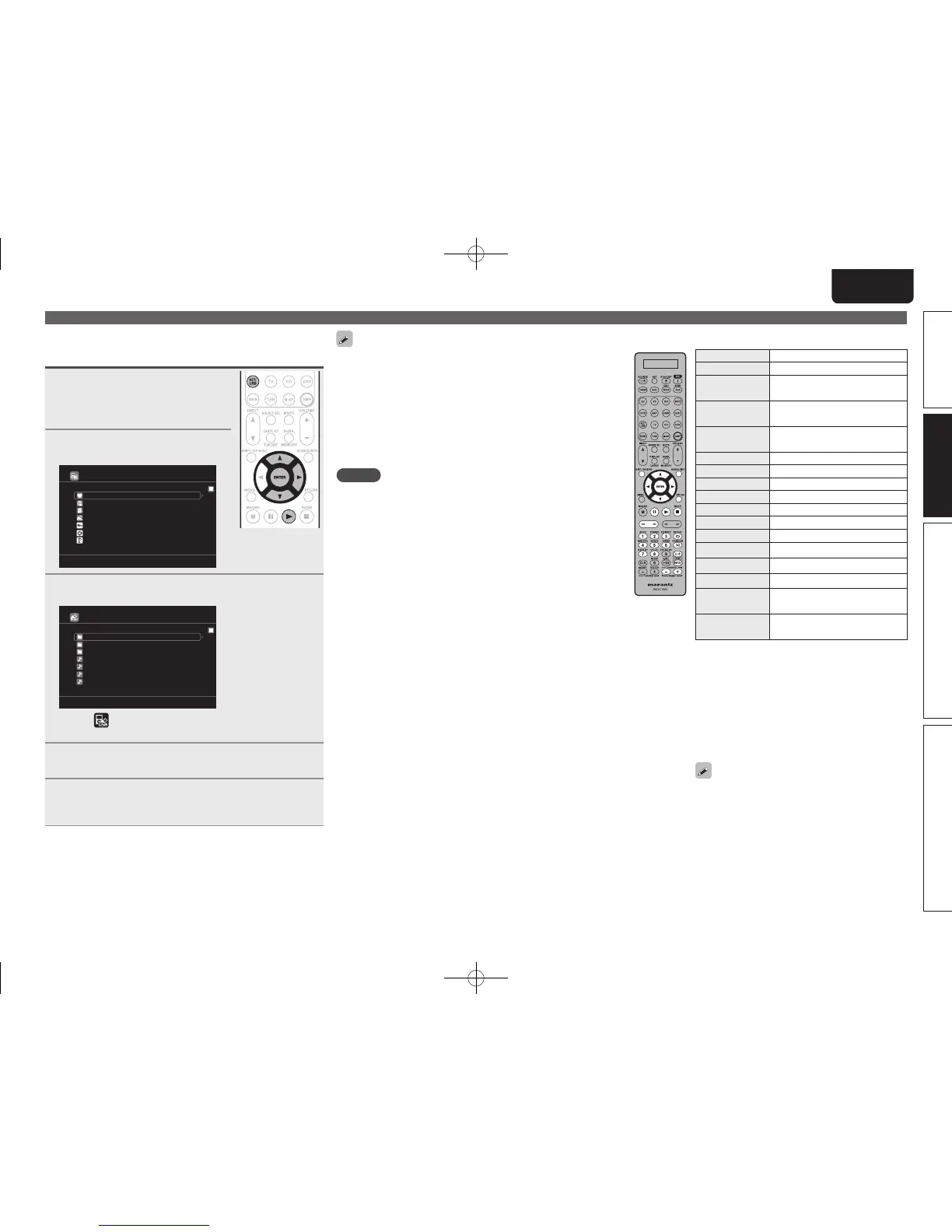
Press NET/USB twice to switch
the input source to “NET/USB”.
favorite
Internet Radio
Media Server
USB
[1/8]
Flickr
Napster
Pandora
3
Press ui to select “USB”, then press ENTER or p.
USB
D&M1
D&M2
Music2.mp3
Music3.m4a
Music4.m4a
D&M3
Music1.mp4
[1/7]
• Selecting in the “Source Select” menu, lets you directly select
“USB”.
4
Press ui to select the search item or folder, then
press ENTER or p.
5
Press ui to select the le, then press ENTER, p or
1.
Playback starts.
• You can specify the duration of the on-screen display to be displayed
(default: 30 sec) at menu “NET/USB” (vpage85). Press uio p
to return to the original screen.
• To play back compressed audio with extended bass or treble
reproduction, we recommend playback in M-DAX mode (vpage76).
The default setting is “OFF”.
• If the USB memory device is divided into multiple partitions, only the
top partition can be selected.
• This unit is compatible with MP3 fi les conforming to “MPEG-1 Audio
Layer-3” standards.
NOTE
• Note that Marantz will accept no responsibility whatsoever for any
problems arising with the data on a USB memory device when using
this unit in conjunction with the USB memory device.
• USB memory devices will not work via a USB hub.
• Marantz does not guarantee that all USB memory devices will
operate or be supplied power. When using a USB portable hard disk
that can draw power from an AC adapter, we recommend using the
AC adapter.
• It is not possible to connect and use a computer via the USB port of
this unit using a USB cable.
n USB operation
Operation buttons Function
PRESET +, – Preset channel selection
uio p
Cursor operation /
Auto search (cue, ui)
ENTER
(Press and release)
Enter / Pause
ENTER
(Press and hold)
Stop
SEARCH Page search
z1
/ Character search
z2
RETURN Return
1
Playback / Pause
8 9
Auto search (cue)
3
Pause
2
Stop
1 – 8 Preset channel selection
SHIFT Preset channel block selection
REPEAT Repeat playback
RANDOM Random playback
TV POWER
TV power on/standby
(Default : Marantz)
TV INPUT
Switch TV input
(Default : Marantz)
z1 When the menu screen is displayed, press
SEARCH/INFO, then press o (previous page) or
p (next page).
To cancel, press ui or SEARCH/INFO twice.
z2 When the menu screen is displayed, press
SEARCH/INFO twice, then press o p to select
the fi rst letter you want to search mode.
• If it is not possible to search the list, “unsorted
list.” is displayed.
To cancel, press ui or SEARCH/INFO.
• Repeat playback and shuffl e playback can also
be set from “Input Setup” – “Playback Mode”
(vpage71) in the menu.
• If the list is not in alphabetical order, you may not be
able to perform a character search.
1.AV7005U_ENG.indd 29 2010/08/23 18:32:36





 To Next Page