8
ENGLISH
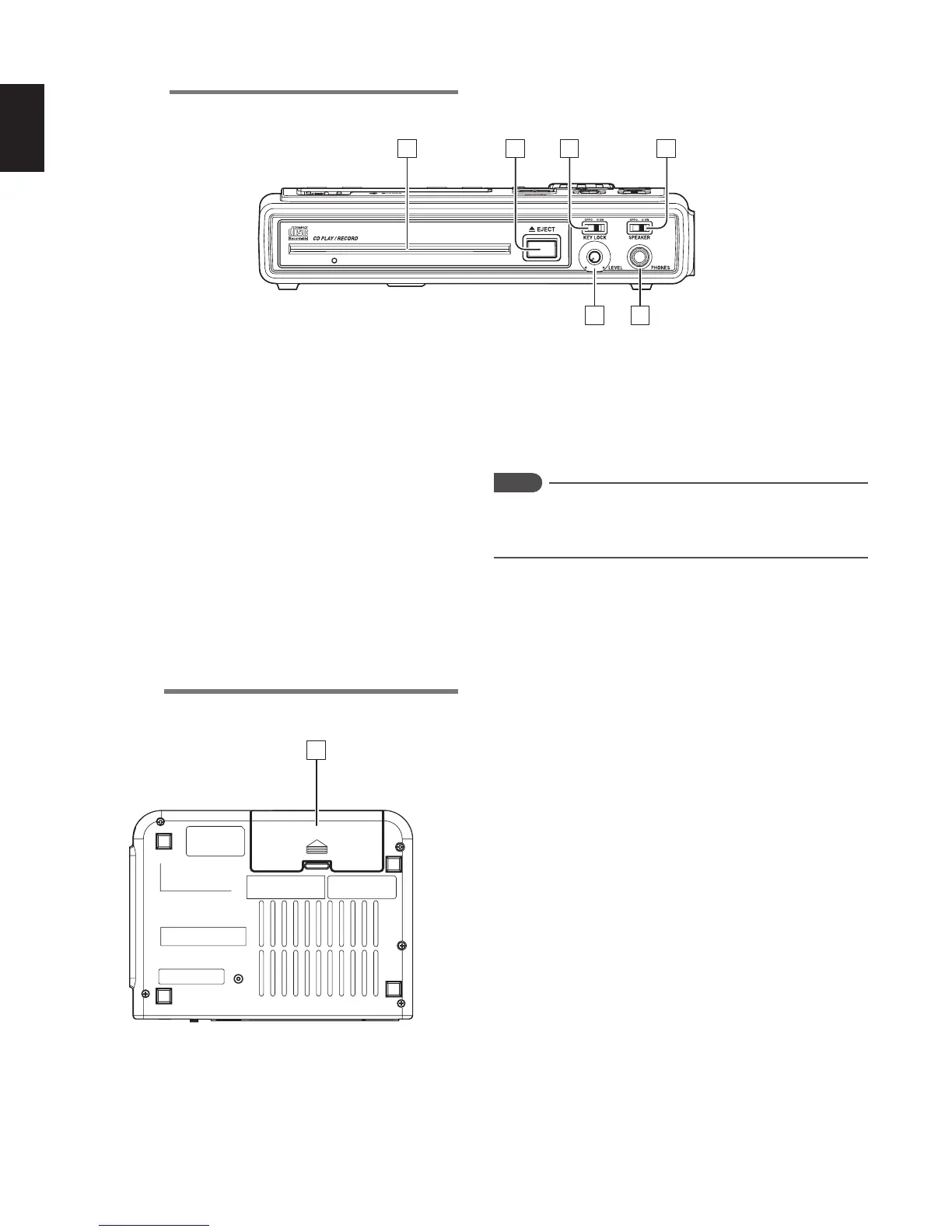
Front side
2 31
6 5
4
z CD slot
x EJECT button
Press this button to eject the CD that is inside the CD slot.
c KEYLOCK switch
Set this switch ON to set to the key-lock status. All of the
operating buttons and switches are locked, except for the
LIGHT button.
v SPEAKER switch
Set this switch to OFF to mute the output from the internal
speakers.
b Headphone (PHONES) jack
Insert the stereo headphones plug here.
n LEVEL volume
Turn this knob to adjust the internal speaker volume or
volume output from the headphone jack.
Notes
When recording with the internal microphone, switch the
SPEAKER switch OFF to avoid feedback between the
internal microphone and speakers.
Rear side
7
m Battery case
Open the battery cover case, and insert the supplied
battery holder (with alkaline batteries inserted), or the
commercially available Nickel-Cadmium battery or Nickel-
Metal Hydride battery.



 To Next Page