15
ENGLISH
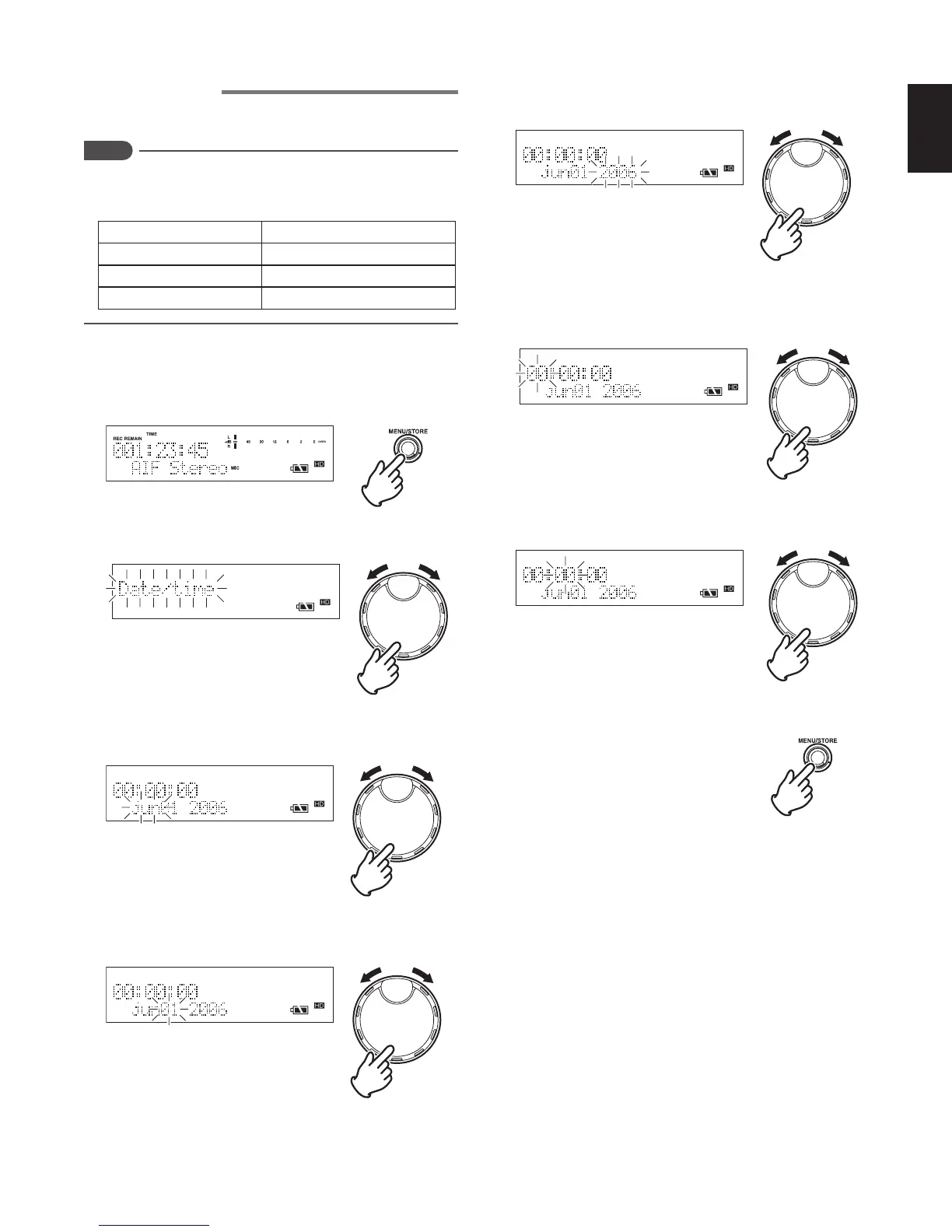
Setting the clock
Set the current time (year, month, date, hour, minute).
Notes
The setting order is different depending on the “DateForm”
settings in the menu. Check the “Date form settings”
setting. (
☞
P.16)
DateForm Setting order
M (Month) / D (Date) / Y (Year)
Month/Date/Year/Hour/Minute
D (Date) / M (Month) / Y (Year)
Date/Month/Year/Hour/Minute
Y (Year) / M (Month) / D (Date)
Year/Month/Date/Hour/Minute
< When DateForm: M/D/Y >
1 While the recorder is stopped, press the MENU/STORE
button.
2 Turn the JOG to select “Date/time” and press the JOG.
3 Turn the JOG to select [Month (Jan to Dec)], and press
the JOG.
4 Turn the JOG to select [Date (01 to 31)], and press the
JOG.
5 Turn the JOG to select [Year (2006 to 2099)], and press
the JOG.
6 Turn the JOG to select [Time], and press the JOG.
For 24 hour display : 0 ~ 23
For 12 hour display : 0am ~ 11pm
7 Turn the JOG to select [Minute (00 to 59)], and press the
JOG.
8 Press the MENU/STORE button to register the settings.



 To Next Page