40
ENGLISH
Playing Back CDs
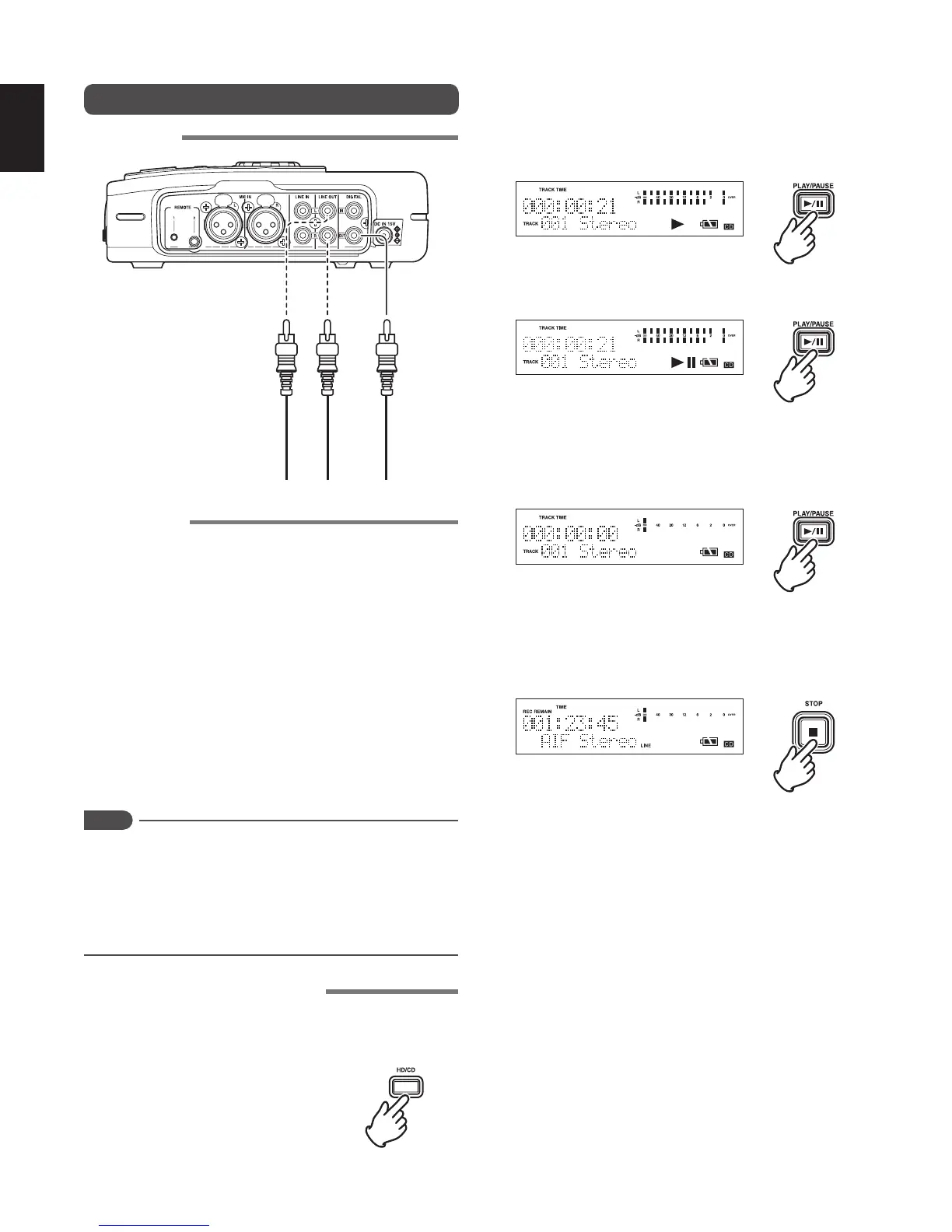
Schematics
LINE
OUT
DIGITAL
OUT
LR
CD Playback
Pay attention to the following points when playing back a CD
that was not created on the recorder.
• Data discs recorded in MP3, WAVE, and AIFF format may
contain a number of hierarchies (directory folders).
In this case, the tracks are played back in a decided order
because the recorder does not have an album (directory)
selection function.
• As the recorder does not have a file name display function,
only the track number starting from track 1 is displayed in
the display.
• Maximum number of hierarchies that can be played back : 8
• Maximum number of displayable file : 999
You can playback a CD using the same playback mode as
HD playback. (
☞
P.39)
Notes
• Do not attempt to playback or burn a CD while the recorder
is on a slant, standing on its edge, or on an unstable
surface.
• Do not move or carry the recorder while a CD is inserted
and operating. Doing so may cause damage to the
inserted CD.
Basic operations for playback
1 While the recorder is stopped, press the HD/CD button to
switch to CD playback mode.
2 Insert a CD into the recorder’s CD slot.
3 Press the PLAY/PAUSE button while the recorder is
stopped to restart playback.
• The following information is displayed during playback.
4 Press the PLAY/PAUSE button to pause playback.
5 Press the STOP button to stop playback.
• This display shows the stopped status of playback. If you
press the PLAY/PAUSE button again, the stopped track
starts playback again from the beginning of the track.
6 Press the STOP button once again to return to the
stopped status.
• In this state, press the PLAY/PAUSE button to play back
from the first track.
7 Press the EJECT button to eject the CD.
[Various CD playback operations]
When playing back a CD, you can perform the following
various operations just as when playing back HD data.
• Track access (
☞
P.38)
• Search
(
☞
P.38)
• Audible search
(
☞
P.38)
• Playback mode settings
(
☞
P.39)
The operating methods are the same as when playing back
HD data.



 To Next Page