22
ENGLISH
Detailed Settings for HD Recording
Input source settings
Set the input source (internal microphone, external
microphone, line input, digital input) for recording.
< Default value > Preset1 : MIC
Preset2 : MIC
Preset3 : MIC
Notes
If digital input is set, only the sampling frequency 44.1KHz
is available. Any other frequencies are displayed as
unlocked, and are not recorded.
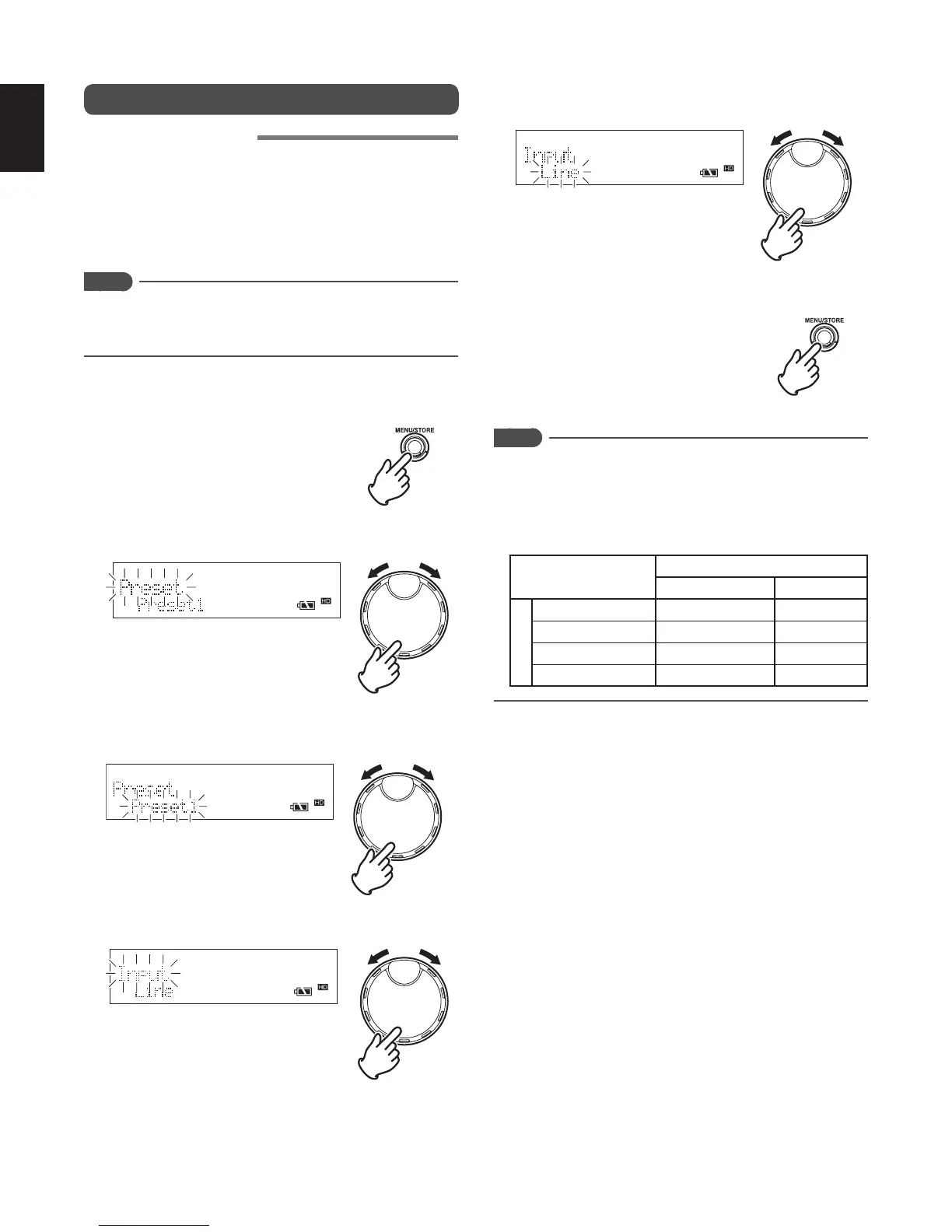
1 While the recorder is stopped, press the MENU/STORE
button.
2 Turn the JOG to select “Preset” and press the JOG.
3 Turn the JOG to select the preset number that you wish to
set, and press the JOG.
4 Turn the JOG to select “Input” and press the JOG.
5 Turn the JOG to select the type of input source (“MIC”,
“Line”, “Int.Mic”, “Dig-In”), and press the JOG.
6 Press the MENU/STORE button to register the settings.
Notes
Depending on the combination of input source
and recording format (channel), the input signal
stereo / monaural settings are as follows.
For details on the recording format settings, please refer to
[Recording format settings]. (
☞
P.23)
Recording format (channel)
Stereo Mono
Input source
External microphone
L/R Stereo L/R Mono Mix
Internal microphone
Same source in L/R
Mono
LINE Input L/R Stereo L/R Mono Mix
DIGITAL input L/R Stereo L/R Mono Mix



 To Next Page