18
ENGLISH
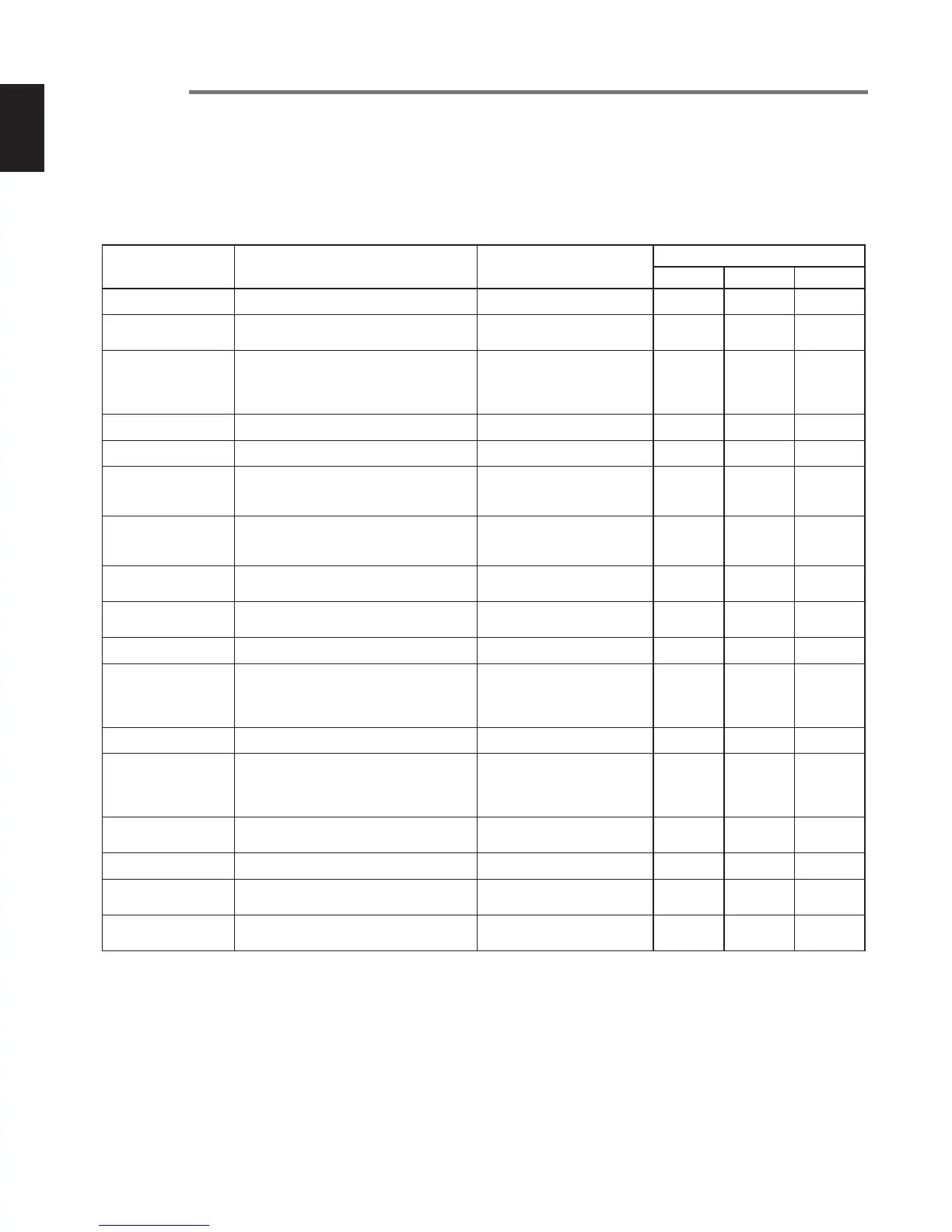
Preset menu
You can store to 3 detailed preset on the recorder for such settings as recording input, recording format, playback mode, remote
control, etc. There are 17 setting items in the preset menu, and 3 presets can be set with the desired conditions.
The contents of the preset menu are explained below.
Preset1 : High quality PCM recording
Preset2 : Meeting recording (monaural)
Preset3 : MP3 music recording
Preset menu Menu explanation Settings
Default settings
Preset1 Preset2 Preset3
Input (
☞
P.22)
Selects the input source. MIC, Line, Int. MIC, Dig-In MIC MIC MIC
RecFormat (
☞
P.23)
Sets the recording format.
Stereo, Mono
CD-DA, WAVE, MP3, AIFF
Stereo
CD-DA
Mono
MP3
Stereo
MP3
CD Split (
☞
P.36)
When burning HD data to CD-R, this sets
the saving procedure for the final track
when all of the contents will not fit onto one
CD-R.
On/Off On On On
PreRecord (
☞
P.29)
Sets PreRecord. Off/1−10 sec (1 sec steps) Off 4 sec 4 sec
Rec Level (
☞
P.25)
Sets the recording level operating method. Manual/ALC Manual Manual Manual
MIC-ATT-L (
☞
P.27)
External microphone
Sets the attenuator function for the left
channel side.
On/Off Off Off Off
MIC-ATT-R (
☞
P.27)
External microphone
Sets the attenuator function for the right
channel side.
On/Off Off Off Off
IntMicATT (
☞
P.27)
Sets the attenuator function for the internal
microphone.
On/Off Off Off Off
Phantom (
☞
P.28)
Sets the Phantom power supply when a
condenser microphone is connected.
On/Off Off Off Off
BkGrndRec (
☞
P.30)
Sets background recording. On/Off Off Off Off
SilentSkp (
☞
P.31)
Sets Silent Skip.
On/Off
Time : 1−5 sec (1 sec steps)
Level: -60− -20dB
(5dB steps)
Off
3 sec
-40dB
Off
3 sec
-40dB
Off
3 sec
-40dB
ManualTR (
☞
P.32)
Sets Manual Track. On/Off On On On
Auto TRK (
☞
P.33)
Sets Auto Track.
On/Off
Time : 1/5/10/15/30 min,
1/2/6/8/12/24 Hrs,
640/700 MB CD
Off
5 min
On
5 min
Off
5 min
Play Mode (
☞
P.39)
Sets the playback mode.
Normal, Repeat All,
Repeat TRK, Single
Normal Normal Normal
StopMonit (
☞
P.44)
Sets the Stop Monitor. On/Off Off Off Off
Remote (
☞
P.45)
Sets the operating mode controlled by the
opening and closing of a switch contact.
* StartPause, StartPauTR,
Manual TRK
Manual TRK StartPauTR StartPause
Default (
☞
P.46)
Returns the settings of the selected preset
number only to the default values.
(Execute) --- --- ---
* StartPause : Start / stop
StartPauTR : Start / stop + track increment
Manual TRK : Manual track



 To Next Page