17
NAMES AND FUNCTIONSBASIC CONNECTIONSBASIC OPERATIONS
ADVANCED CONNECTIONS
ADVANCED OPERATIONSTROUBLESHOOTINGOTHERS
ADVANCED CONNECTIONS
ENGLISH
ADVANCED CONNECTIONS
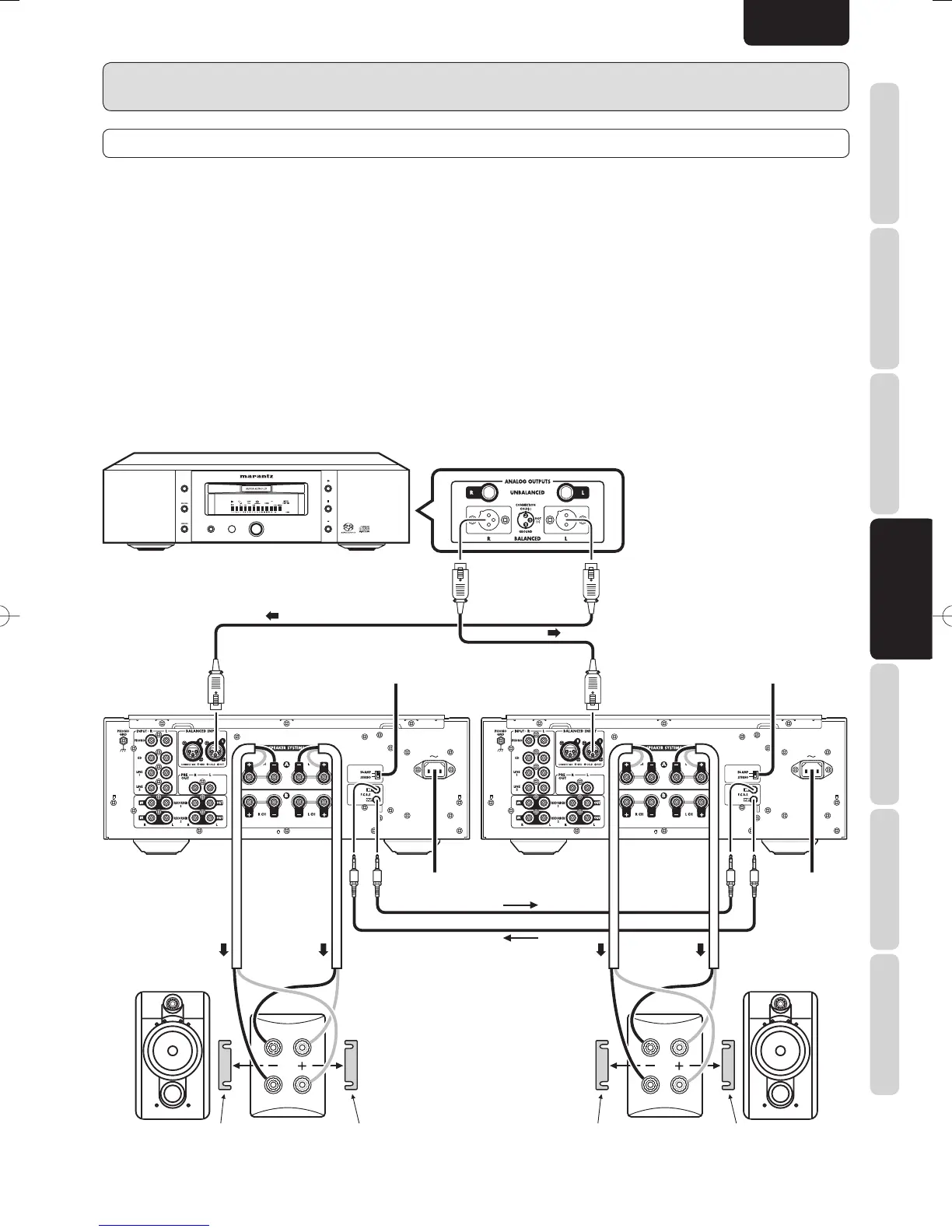
STEREO COMPLETE BI-AMP CONNECTION
q The two amplifiers are connected by F.C.B.S. for synchronized use. For F.C.B.S. connection, connect with commercially available
monaural ⇔ monaural miniplugs or stereo ⇔ stereo miniplugs as described in F.C.B.S. (page. 20).
w Set the ID numbers as explained in HOW TO SET ID NUMBERS (page. 21). When the ID1 amplifier is operated, the ID 2
amplifier will operate in sync.
e Connect the analog output of the CD player etc. to the L ch input jacks of both pre-amps.
As both pre-amps operate as monaural pre-amps in BI-AMP mode, do not use the R channel of the input jacks on these units.
¶ About Complete Bi-Amp
Proposed by Marantz, the complete bi-amp connection is an advanced technique that enhances sound quality. The low and mid/high
amplifiers are separated and independent of the preamplifier, therefore interference between low and mid/high sounds is reduced
to a minimum. As a result, a wide sound environment can be reproduced.
Note:
Speaker systems connected using complete bi-amp connections must support bi-amp connections. Before connecting your
speakers, check in the instruction manual that came with the speakers or contact the manufacturer to confirm whether they
support bi-amp connection.
AC IN
3
1
2
3
1
2
AC IN
3
1
2
3
1
2
PAUSEPAUSE
STOPSTOP
PLAYPLAY
DISPLAY OFF
OPEN/OPEN/
SOUNDSOUND
POWER ON/OFFPOWER ON/OFF
SUPER AUDIO CD PLAYER SA-11S1SUPER AUDIO CD PLAYER SA-11S1
CLOSECLOSE
MODEMODE
MF
/
HF
LF
MF
/
HF
LF
Set SPEAKER
A button on front
panel in ON
position.
Set PM-11S2 for L
CH to ID 1.
Set to “BI-AMP”.
Set SPEAKER
A button on front
panel in ON
position.
Set PM-11S2 for R
CH to ID 2.
Set to “BI-AMP”.
To power outlet To power
outlet
Remove shorting bar. L CH speaker Remove shorting bar. Remove shorting bar. R CH speaker Remove shorting bar.
PM-11S2UN01Eng.indd17PM-11S2UN01Eng.indd17 08.8.76:42:21PM08.8.76:42:21PM






 To Next Page