Front panel Rear panel IndexRemote
Network audio player operations
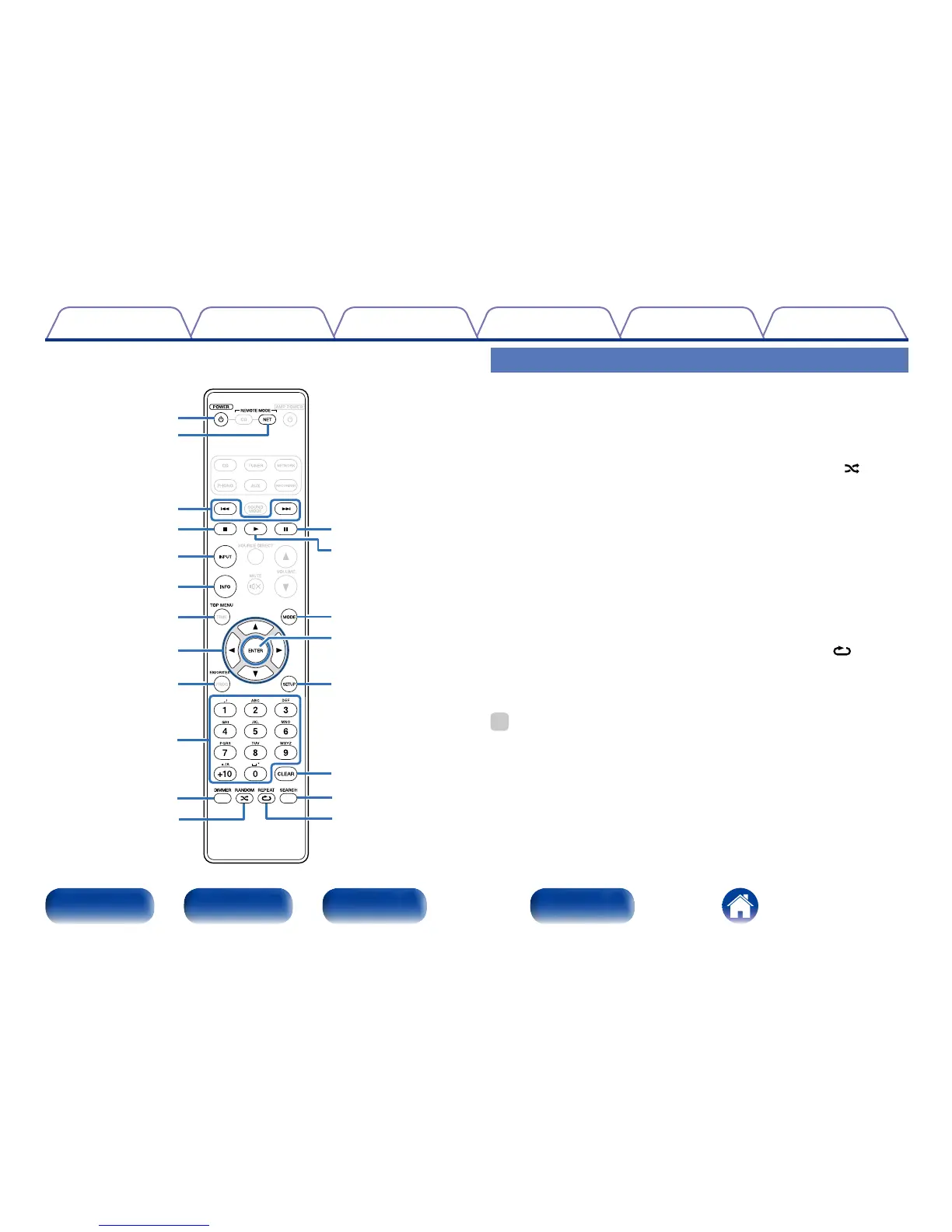
To operate Marantz network audio player, press REMOTE MODE NET
button to switch the remote control to the NETWORK operation mode.
•REMOTE MODE NET button lights for approximately two seconds.
q POWER button (X)
w Remote mode select button
(REMOTE MODE NET)
e Reverse-skip/Forward-skip
buttons (8, 9)
r Stop button (2)
t Input source select button
(INPUT)
y Information button (INFO)
u TOP MENU button
i Cursor buttons (uio p)
o FAVORITES button
Q0 Number buttons (0 – 9, +10)
%
•The amp can be operated with the amp operation buttons even when the remote
control mode is NET. When using this remote control, also refer to the operating
instructions of the other devices.
Q4
Q5
Q3
Q7
Q8
Q6
Q9
W0
e
q
w
r
y
i
u
t
Q0
Q1
Q2
o
Q1 DIMMER button
Q2 RANDOM button ( )
Q3 Pause button (3)
Q4 Play button (1)
Q5 Playback mode switching
button (MODE)
Q6 ENTER button
Q7 SETUP button
Q8 CLEAR button
Q9 SEARCH button
W0 REPEAT button ( )



 To Next Page