8
NAMES AND FUNCTIONS
Rear Panel
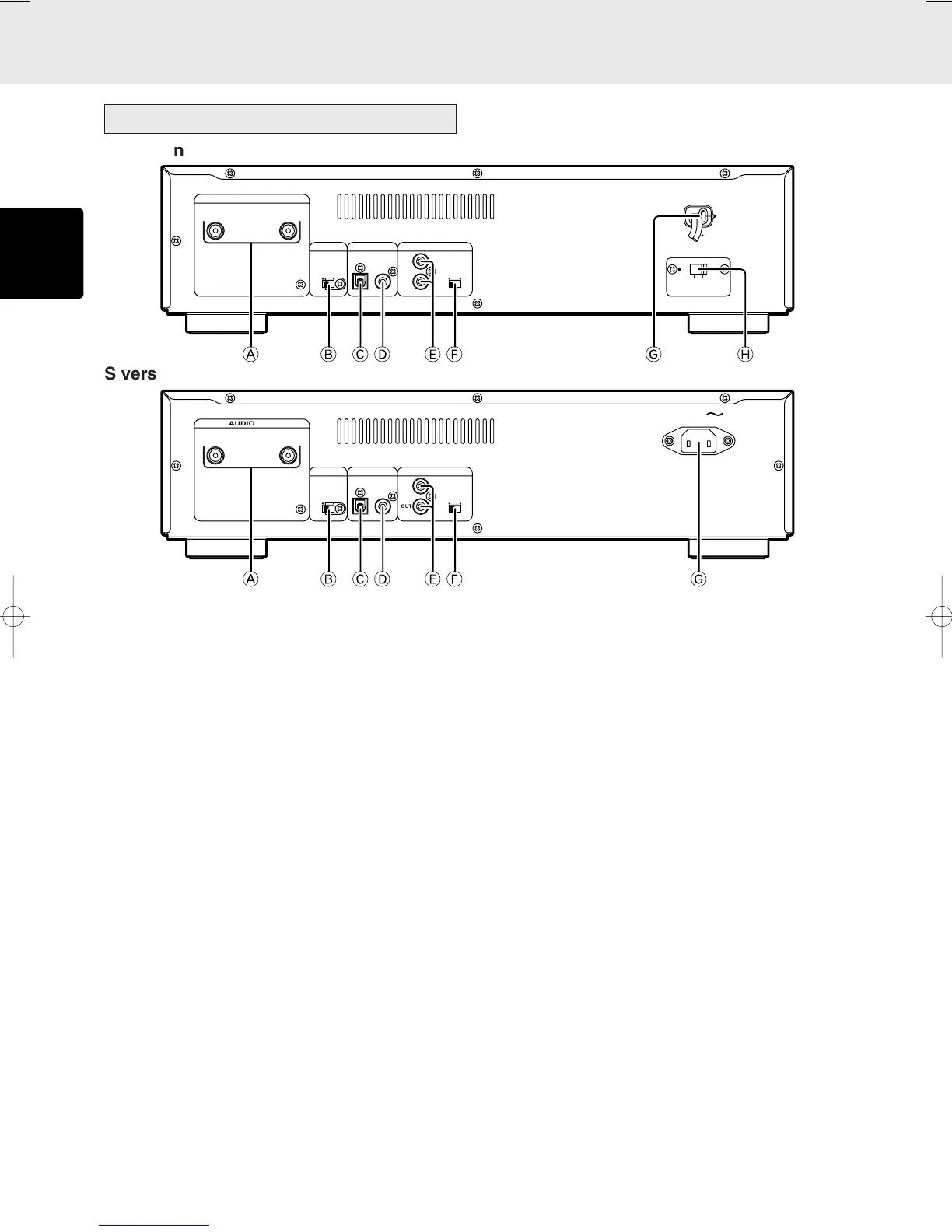
A
STEREO AUDIO OUT (analog output) connectors
B FILTER STANDARD/CUSTOM
(Filter standard/custom switch)
Set this switch according to the amplifier and speakers to
be connected. For more details, refer to “Filter Switch”
section on page 17.
* Switching the filter setting has to be done while the unit
is in stand-by mode. If the setting is switched while
playing, noise may occur.
C DIGITAL OUT OPTICAL
It outputs the playing CD signal in digital format. This jack
is to be connected with a recording device, amplifier, D/A
converter, etc that has optical digital input using an optional
square type optical digital cable.
* No signal will be output when a Super Audio CD is played.
D DIGITAL OUT COAXIAL
It outputs the playing CD signal in digital format. This jack
is to be connected with a recording device, amplifier, D/A
converter, etc that has coaxial digital input using an
optional coaxial digital cable.
* No signal will be output when a Super Audio CD is played.
E REMOTE CONTROL IN, OUT (input and
output) connectors
When the remote control connectors on the player and on
a Marantz AV component are connected using the
accessory remote control connecting cables, the
components can be operated as a system by remote
control.
• When connecting to a component which is equipped
with remote control connectors, the player’s REMOTE
CONTROL IN connector must always be connected to
the REMOTE CONTROL OUT connector on the other
component to be connected.
• When connecting a component which is not equipped
with an infrared remote sensor, this component must
always be connected to the player’s REMOTE CONTROL
OUT connector.
F EXT./INT. (External/Internal switch)
When this unit is used as a standalone component, set
this switch to the INT. side. When it is used connected to
external component by a remote connecting cable and to
audio component with a remote sensor that supports
remote controls by Maranz, set this switch to the EXT. side.
* If the unit is used as standalone and the switch is set to
EXT. position, remote control unit cannot be used.
G AC POWER INPUT JACK
Connect the supplied power cord to this jack and a
household AC power outlet.
H VORTAGE SELECTOR (K version only)
This unit can be powered from 110 V or 220 V AC.
Before plugging the provided AC cord into a power outlet,
be sure to set this switch to your local voltage. If it is set
otherwise, set it to the correct position using a flat-blade
screwdriver or similar tool.
(This switch has been set to 220 V at the factory.)
AC INAC IN
OUT
AUDIO OUT
EXT.
DIGITAL AUDIO OUT
INT.
REMOTE CONTROL
IN
LR
OPT.
COAX.
STAN-
DARD
CUS-
TOM
FILTER
220V220V 110V110V
VOLTAGEVOLTAGE
SELECTORSELECTOR
+*),.- / 0
OUT
AUDIO OUT
EXT.
DIGITAL AUDIO OUT
INT.
REMOTE CONTROL
IN
LR
OPT.
COAX.
STAN-
DARD
CUS-
TOM
FILTER
AC IN
+*),.-/
K version
S version



 To Next Page