6
NAMES AND FUNCTIONS
OPEN/CLOSE
/
PLAY
PAUSE
STOP
/
LEVEL
+
PHONES
-
ON/OFF
POWER
DISPLAY
OFF
TIME
DISPLAY
TEXT
SOUND MODE
bxznvm,.Ú0
Ú2 Ú1Ú3Ú4c
Ú7 Ú5Ú6
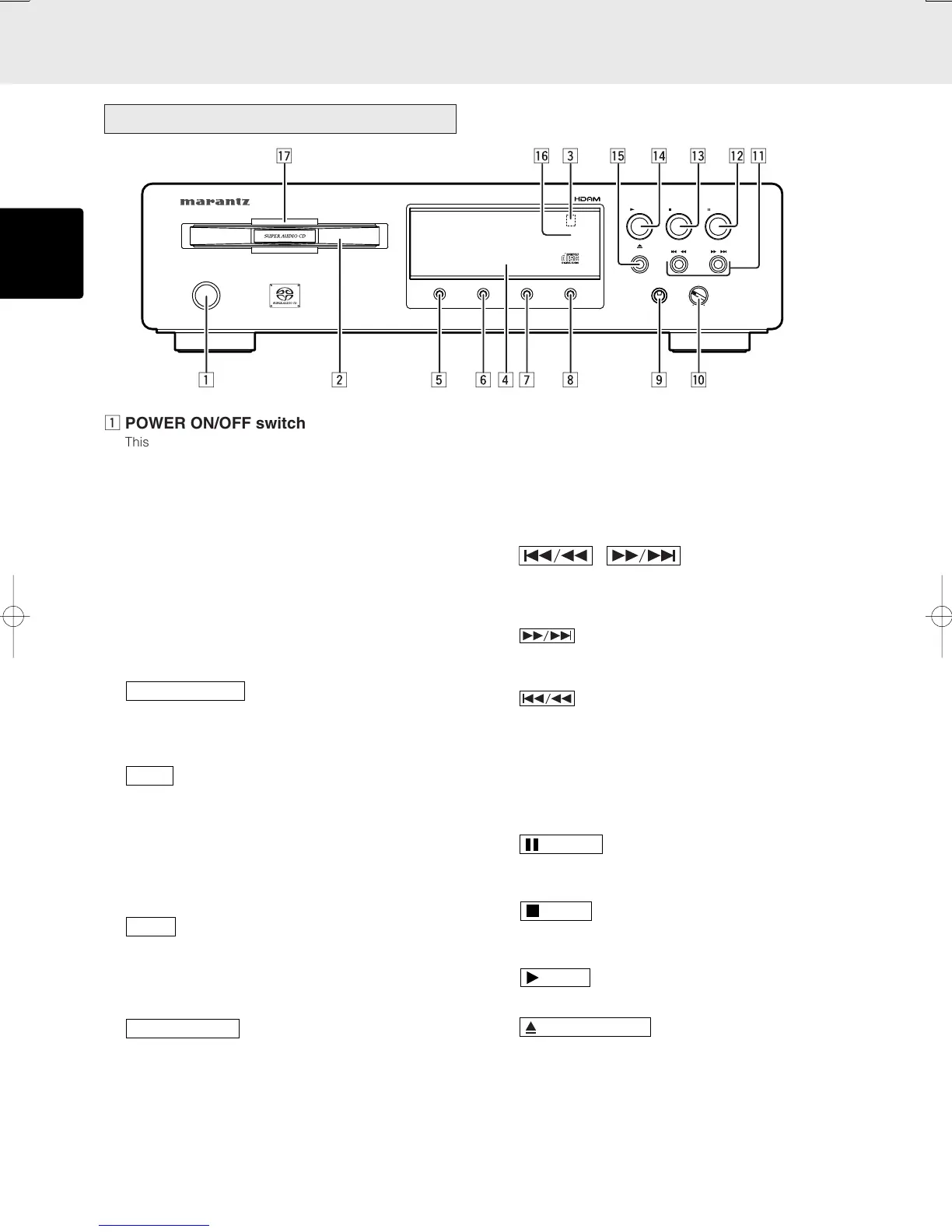
z POWER ON/OFF switch
This switch is used to turn the power ON and OFF. When
it is pressed, the display window lights up, and the power
comes on. When it is pressed again, the display window
is extinguished, and the power goes off.
x Disc tray
The disc to be played is placed on the tray.
c Remote sensor
The infrared control signal emitted from the remote control
unit are sensed here.
v DISPLAY WINDOW
This window shows status of the unit.
b
button
This button is used to select the Super Audio CD sound
mode. Super Audio CD (stereo) or CD (if discs are
supported) (See page 12)
n
button
This button is used to change the player’s display from
“text information” to “time information” while a Super Audio
CD disc that supports TEXT is in use. It is also pressed to
change the time display. Each time this button is pressed,
the display changes as follows: “Track elapsed time” →
“Track remaining time” → “Total remaining time” → “Track
time elapsed.” (See page 12)
m
button
This button is used to change the player’s display from
“time information” to “text information” while a Super Audio
CD disc that supports text is in use.
(See page 16)
,
button
This button is used to turn lighting ON and OFF of the
display window.
Pressing this button once darkens the display. The third
time this button is pressed, the display will be extinguished
and the indicator in ⁄6 lights.
. PHONES (headphones)jack
The headphones are connected to this jack.
* Use headphones with a standard plug.
⁄0 LEVEL (headphone volume) control
This control is used to adjust the headphone volume. Turn
it clockwise to increase the headphone volume.
⁄1 , (Track Skip/Search
buttons)
These buttons can be used as both track skip and track
search buttons. (The buttons on the main unit only.)
: Each time this button is pressed, the track
being played is skipped forward. When this
button is held down, tracks are searched
forward (Fast Forward).
: When this button is pressed, the unit goes
back to the beginning of the current track. If
the button is pressed more times, the track
being played is skipped back. When this
button is held down, tracks are searched
backward (Fast Rewind).
In program play, Fast Forward and Fast Rewind can be
done in the playing track only.
⁄2
button
Press this button to pause playback. If pressed again, the
unit returns to playback.
⁄3
button
Press this button to stop playback. Also this button is used
to clear all programs.
⁄4
button
Press this button to start playback.
⁄5
button
Press this button to open the tray. Put on a disk label side
up. Press the button again to close the tray.
⁄6 DISPLAY OFF
It lights up when display window is turned off.
⁄7 Illumination lamp
This lamp lights when the display window lights.
Front panel



 To Next Page