EasyManua.ls Logo

Marantz SR7000 - Remote Control Learning and Programming; Programming Remote Control Codes; Rewriting and Erasing Remote Functions; Rewriting Function Names

Marantz SR7000
40 pages
Print Icon
To Next Page IconTo Next Page
To Previous Page IconTo Previous Page
Loading...
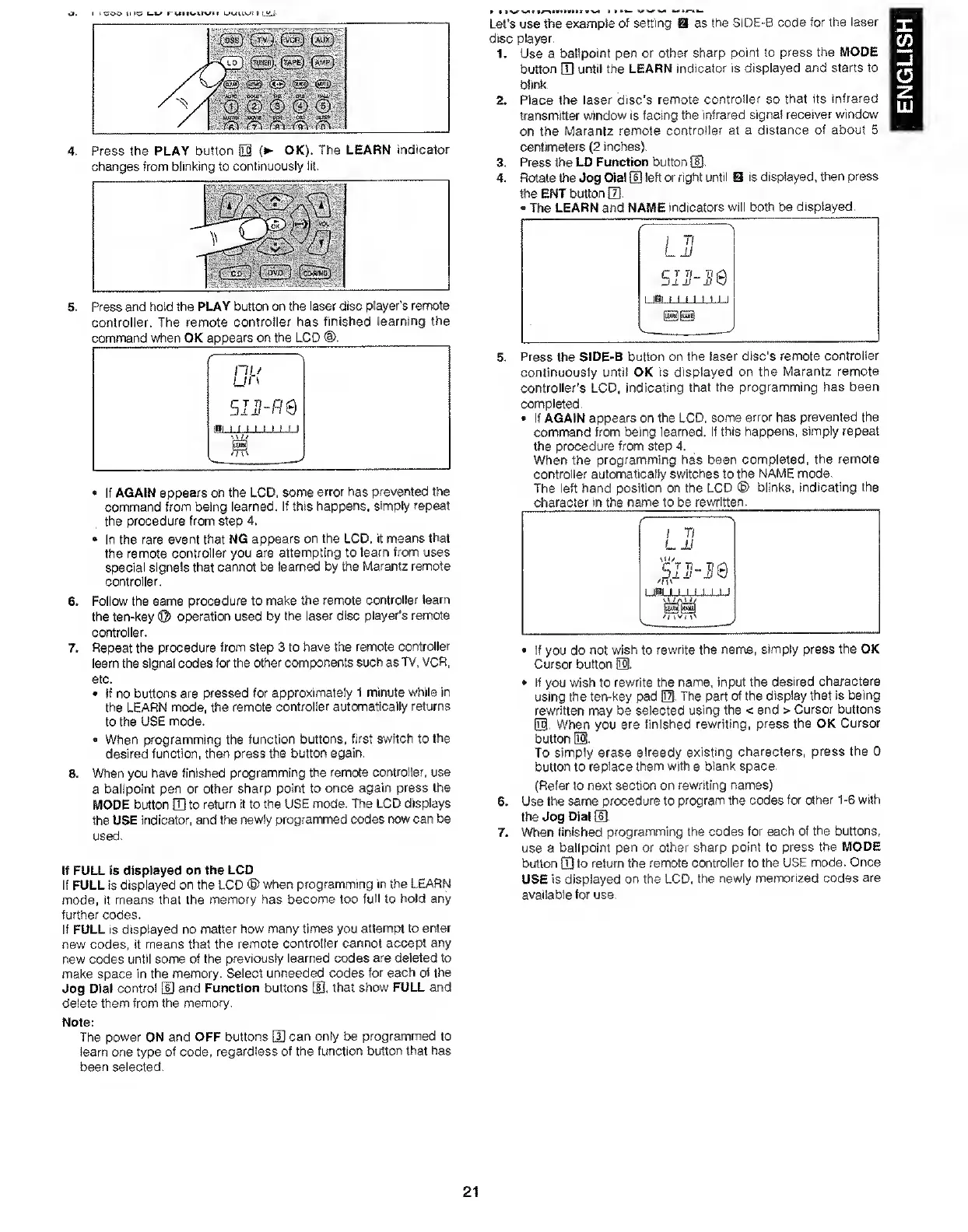
4.
5.
)
il
LJUUN-^t
1
I
(tvj
[vct}
[mjxI
A
—\
[AMPJ
^
a
rfM
Ay
fiM
Press
the
PLAY
button
0
(
OK),
The
LEARN
indicator
changes
from
blinking
to
continuously
lit.
Press
and
hold
the
PLAY
button
on
the
laser
disc
player’s
remote
controller.
The
remote
controller
has
finished
learning
the
command
when
OK
appears
on
the
LCD
<D.
If
AGAIN
appears
on
the
LCD,
some
error
has
prevented
the
command
from
being
learned.
If
this
happens,
simply
repeat
the
procedure
from
step
4,
In
the
rare
event
that
NG
appears
on
the
LCD.
it
means
that
the
remote
controller
you
are
attempting
to
learn
from
uses
special
signals
that
cannot
be
learned
by
the
Marantz
remote
controller,
6
.
Follow
the
same
procedure
to
make
the
remote
controller
learn
the
ten-key
©
operation
used
by
the
laser
disc
player’s
remote
controller,
7.
Repeat
the
procedure
from
step
3
to
have
the
remote
controller
learn
the
signal
codes
for
the
other
components
such
as
TV.
VCR.
etc,
If
no
buttons
are
pressed
for
approximately
l
minute
while
in
the
LEARN
mode,
the
remote
controller
automatically
returns
to
the
USE
mode.
When
programming
the
function
buttons,
first
switch
to
the
desired
function,
then
press
the
button
again.
8.
When
you
have
finished
programming
the
remote
controller,
use
a
ballpoint
pen
or
other
sharp
point
to
once
again
press
the
MODE
button
Q]
to
return
it
to
the
USE
mode.
The
LCD
displays
the
USE
indicator,
and
the
newly
programmed
codes
rtow
can
be
used.
If
FULL
is
displayed
on
the
LCD
If
FULL
is
displayed
on
the
LCD
©
when
programming
in
the
LEARN
mode,
it
means
that
the
memory
has
become
too
full
to
hold
any
further
codes.
if
FULL
is
displayed
no
matter
how
many
times
you
attempt
to
enter
new
codes,
it
means
that
the
remote
controiter
cannot
accept
any
new
codes
until
some
of
the
previously
learned
codes
are
deleted
to
make
space
in
the
memory.
Select
unneeded
codes
for
each
of
the
Jog
Dial
control
[U
and
Function
buttons
U],
that
show
FULL
and
delete
them
from
the
memory.
Note:
The
power
ON
and
OFF
buttons
E]
can
only
be
programmed
to
learn
one
type
of
code,
regardless
of
the
function
button
that
has
been
selected.
Let’s
use
the
example
of
setting
disc
player.
as
the
SIDE-B
code
for
the
laser
1
.
2
.
Use
a
ballpoint
pen
or
other
sharp
point
to
press
the
MODE
button
Q]
until
the
LEARN
indicator
is
displayed
and
starts
to
Wirt<.
Place
the
laser
disc’s
remote
controller
so
that
its
infrared
fransmitter
window
is
facing
the
infrared
signal
receiver
window
on
the
Marantz
remote
controller
at
a
distance
of
about
5
centimeters
(2
inches).
3,
Press
the
LD
Function
button
d).
4.
Rotate
the
Jog
Dial
ID
left
or
right
until
S
is
displayed,
then
press
ttie
ENT
button
(7].
The
LEARN
and
NAME
indicators
will
both
be
displayed.
1
Tl
L
11
siJj'-i'e
1
IB!
M
1
1
1
1
1
1
Press
the
SIDE-B
button
on
the
laser
disc's
remote
controller
continuously
until
OK
is
displayed
on
the
Marantz
remote
controller's
LCD,
indicating
that
the
programming
has
been
completed.
If
AGAIN
appears
on
the
LCD,
some
error
has
prevented
the
command
from
being
learned.
If
this
happens,
simply
repeat
the
procedure
from
step
4,
When
the
programming
has
been
completed,
the
remote
controller
automatically
switches
to
the
NAME
mode.
The
left
hand
position
on
the
LCD
©
biinks,
indicating
the
character
in
the
name
to
be
rewritten.
/
s
/
Tl
LJJ
-•nv
1
IBM
1
1
M
1
1
1
O
/A
W/
If
you
do
not
wish
to
rewrite
the
name,
simply
press
the
OK
Cursor
button
US.
If
you
wish
to
rewrite
the
name,
input
the
desired
characters
using
the
ten-key
pad
0.
The
part
of
the
display
that
is
being
rewritten
may
be
selected
using
the
<
and
>
Cursor
buttons
03.
When
you
are
finished
rewriting,
press
the
OK
Cursor
button
0.
To
simply
erase
already
existing
characters,
press
the
0
button
to
replace
them
with
a
blank
space.
(Refer
to
next
section
on
rewriting
names)
6.
Use
the
same
procedure
to
program
the
codes
for
other
1-6
with
the
Jog
Dial
(11.
7.
When
finished
programming
the
codes
for
each
of
the
buttons,
use
a
ballpoint
pen
or
other
sharp
point
to
press
the
MODE
button
Q]
to
return
the
remote
controller
to
the
USE
mode.
Once
USE
is
displayed
on
the
LCD,
the
newly
memorized
codes
are
available
tor
use.
21
ENGLISH

Other manuals for Marantz SR7000

Related product manuals