EasyManua.ls Logo

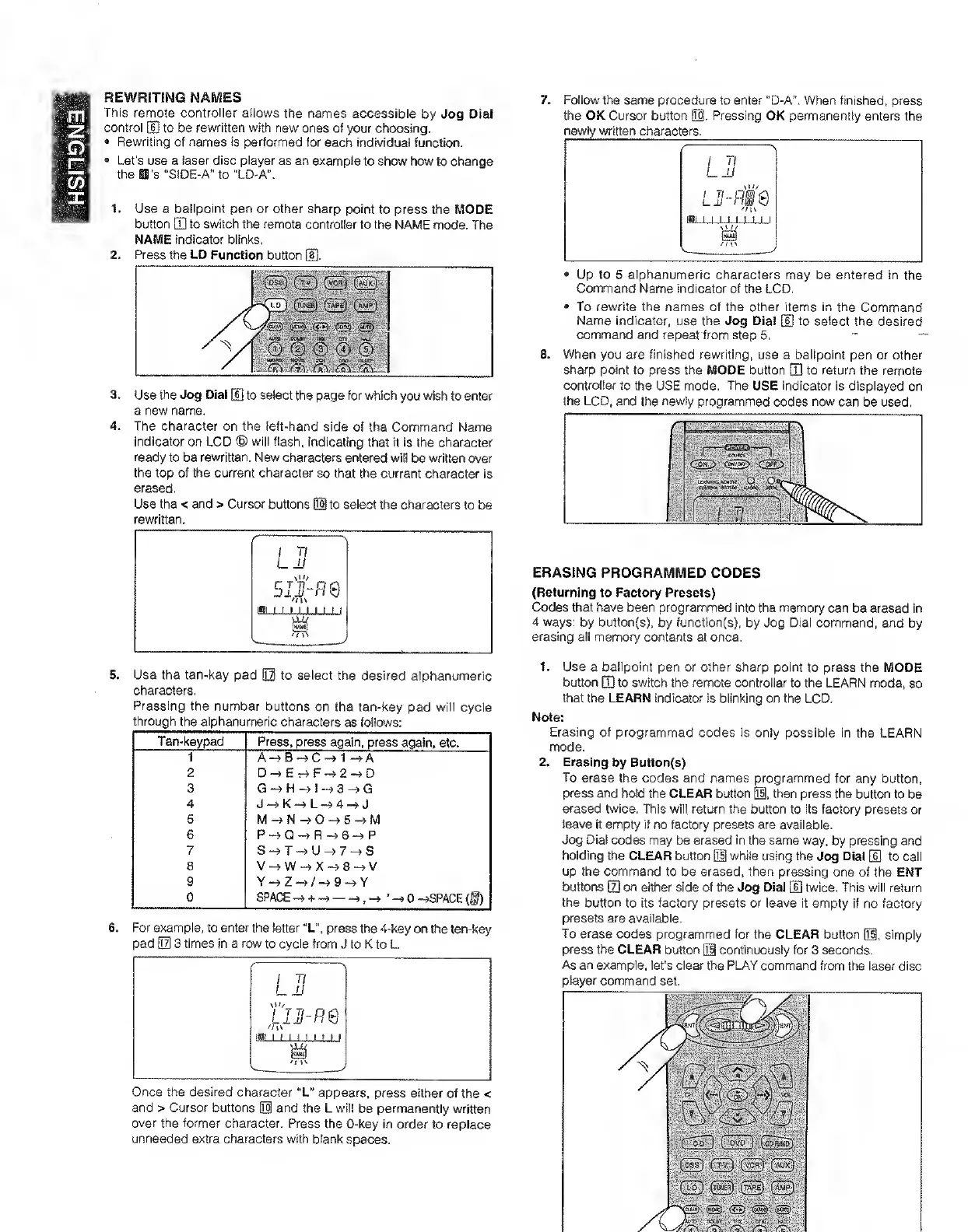
Marantz SR7000 - Rewriting Remote Names; Selecting Alphanumeric Characters for Names; Erasing Programmed Codes; Erasing Codes by Button or Function

Marantz SR7000
40 pages
Print Icon
To Next Page IconTo Next Page
To Previous Page IconTo Previous Page
Loading...
ENGLISH
REWRITING
NAMES
This
remote
controller
allows
the
names
accessible
by
Jog
Dial
control
[S
to
be
rewritten
with
new
ones
of
your
choosing.
•
Rewriting
of
names
is
performed
for
each
individual
function.
•
Let’s
use
a
laser
disc
player
as
an
example
to
show
how
to
change
the
11's
“SIDE-A"
to
“LD'A",
1.
Use
a
ballpoint
pen
or
other
sharp
point
to
press
the
MODE
button
[Tj
to
switch
the
remote
controller
to
the
NAME
mode.
The
NAME
indicator
blinks,
2.
Press
the
LD
Function
button
[H.
3.
Use
the
Jog
Dial
[6]
to
select
the
page
for
viitiich
you
wish
to
enter
a
new
name.
4.
The
character
on
the
left-hand
side
of
the
Command
Name
indicator
on
LCD
®
will
flash,
indicating
that
it
is
the
character
ready
to
be
rewritten.
New
characters
entered
will
be
written
over
the
top
of
the
current
character
so
that
the
current
character
is
erased.
Use
the
<
and
>
Cursor
buttons
iH
to
select
the
characters
to
be
rewritten.
5.
Use
the
ten-key
pad
0
to
select
the
desired
alphanumeric
characters,
Pressing
the
number
buttons
on
the
ten-key
pad
will
cycle
through
the
alphanumeric
characters
as
follows:
Ten-keypad
Press,
press
again,
press
again,
etc.
1
A-^B^C-»1-»A
2
D~>Er4F->2--?D
3
4
J
K
L
A
J
5
M-^N—>0^5-^M
6
P->Q-^R-^6^P
7
S->T-»U^7^S
8
V^W-^X-^8^V
9
0
SPACE
—>
+
-90
—>SPACE(§)
6.
For
example,
to
enter
the
letter
“L",
press
the
4-key
on
ttte
len4:ey
pad
03
3
times
in
a
row
to
cycle
from
J
to
K
to
L
Once
the
desired
character
“L"
appears,
press
either
of
the
<
and
>
Cursor
buttons
0
and
the
L
will
be
permanently
written
over
the
former
character.
Press
the
0-key
in
order
to
replace
unneeded
extra
characters
with
blank
spaces.
7.
Follow
the
same
procedure
to
enter
"D-A".
When
finished,
press
the
OK
Cursor
button
0-
Pressing
OK
permanently
enters
the
newly
written
characters.
•
Up
to
5
alphanumeric
characters
may
be
entered
in
the
Command
Name
indicator
of
the
LCD,
•
To
rewrite
the
names
of
the
other
items
in
the
Command
Name
indicator,
use
the
Jog
Dial
[H
to
select
the
desired
command
and
repeat
from
step
5.
8.
When
you
are
finished
rewriting,
use
a
ballpoint
pen
or
other
sharp
point
to
press
the
MODE
button
[T]
to
return
the
remote
controller
to
the
USE
mode.
The
USE
indicator
is
displayed
on
the
LCD.
and
the
newly
programmed
codes
now
can
be
used.
ERASING
PROGRAMMED
CODES
(Returning
to
Factory
Presets)
Codes
that
have
been
programmed
into
the
memory
can
be
erased
in
4
ways:
by
button(s).
by
function(s),
by
Jog
Dial
command,
and
by
erasing
all
memory
contents
at
once,
1.
Use
a
ballpoint
pen
or
other
sharp
point
to
press
the
MODE
button
Q]
to
switch
the
remote
controller
to
the
LEARN
mode,
so
that
the
LEARN
indicator
is
blinking
on
the
LCD.
Note:
Erasing
of
programmed
codes
is
only
possible
in
the
LEARN
mode.
2.
Erasing
by
Button(s)
To
erase
the
codes
and
names
programmed
for
any
button,
press
and
hold
the
CLEAR
button
0.
then
press
the
button
to
be
erased
twice.
This
will
return
the
button
to
its
factory
presets
or
leave
it
empty
if
no
factory
presets
are
available.
Jog
Dial
codes
may
be
erased
in
the
same
way.
by
pressing
and
holding
the
CLEAR
button
0
while
using
the
Jog
Dial
U]
to
call
up
the
command
to
be
erased,
then
pressing
one
of
the
ENT
buttons
d]
on
either
side
of
the
Jog
Dial
(D
twice.
This
will
return
the
button
to
its
factory
presets
or
leave
it
empty
if
no
factory
presets
are
available.
To
erase
codes
programmed
for
the
CLEAR
button
0,
simply
press
the
CLEAR
button
0
continuously
for
3
seconds.
As
an
example,
let’s
clear
the
PLAY
command
from
the
laser
disc
player
command
set.

Other manuals for Marantz SR7000

Related product manuals