EasyManua.ls Logo

Marantz SR7000 - Erasing Codes by Function; Clearing All Codes and Names; Programming and Editing Macros; Macro Programming Steps

Marantz SR7000
40 pages
Print Icon
To Next Page IconTo Next Page
To Previous Page IconTo Previous Page
Loading...
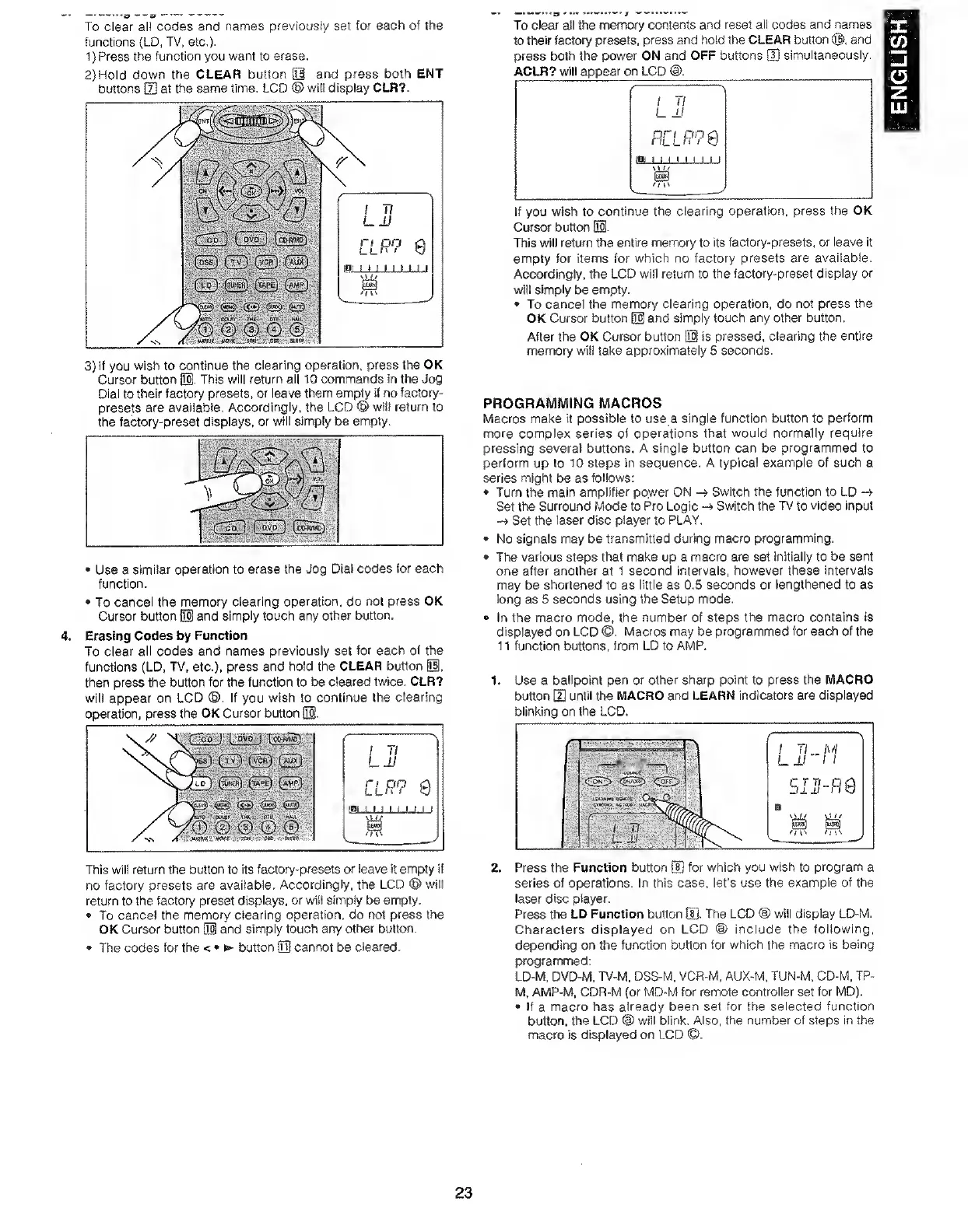
To
clear
all
codes
and
names
previously
set
for
each
of
the
functions
(LD,
TV,
etc,).
1)
Press
the
function
you
want
to
erase,
2)
Hold
down
the
CLEAR
button
01
and
press
both
ENT
buttons
H]
at
the
same
time,
LCD
®
will
display
CLR?.
3)
If
you
wish
to
continue
the
clearing
operation,
press
the
OK
Cursor
button
01.
This
will
return
all
10
commands
in
the
Jog
Dial
to
their
factory
presets,
or
leave
them
empty
if
no
factory-
presets
are
available.
Accordingly,
the
LCD
®
will
return
to
the
factory-preset
displays,
or
will
simply
be
empty.
Use
a
similar
operation
to
erase
the
Jog
Dial
codes
for
each
function.
To
cancel
the
memory
clearing
operation,
do
not
press
OK
Cursor
button
iH
and
simply
touch
any
other
button.
4.
Erasing
Codes
by
Function
To
clear
all
codes
and
names
previously
set
for
each
of
the
functions
(LD.
TV,
etc.),
press
and
hold
the
CLEAR
button
01.
then
press
the
button
for
the
function
to
be
cleared
twice,
CLR?
will
appear
on
LCD
(©.
If
you
wish
to
continue
the
clearing
operation,
press
the
OK
Cursor
button
53.
This
will
return
the
button
to
its
factory-presets
or
leave
it
empty
if
no
factory
presets
are
available.
Accordingly,
the
LCD
®
will
return
to
the
factory
preset
displays,
or
will
simply
be
empty.
To
cancel
the
memory
clearing
operation,
do
not
press
the
OK
Cursor
button
Q1
and
simply
touch
any
other
button.
The
codes
for
the
<
>
button
03
cannot
be
cleared.
To
clea'
all
the
memory
contents
and
reset
ail
codes
and
names
to
their
factory
presets,
press
and
hold
the
CLEAR
button
©,
and
press
both
the
power
ON
and
OFF
buttons
[H
simultaneously.
ACLR?
will
appear
on
LCD
If
you
wish
to
continue
the
clearing
operation,
press
the
OK
CurscH"
button
01.
This
will
return
the
entire
memory
to
its
factory-presets,
or
leave
it
empty
for
items
for
which
no
factory
presets
are
available.
Accordingly,
the
LCD
will
return
to
the
factory-preset
display
or
will
simply
be
empty.
To
cancel
the
memory
clearing
operation,
do
not
press
the
OK
Cursor
button
03
and
simply
touch
any
other
button.
After
the
OK
Cursor
button
03
is
pressed,
clearing
the
entire
memory
will
take
approximately
5
seconds.
PROGRAMMING
MACROS
Macros
make
it
possible
to
use
a
single
function
button
to
perform
more
complex
series
of
operations
that
would
normally
require
pressing
several
buttons.
A
single
button
can
be
programmed
to
perform
up
to
10
steps
in
sequence.
A
typical
example
of
such
a
series
might
be
as
follows:
Turn
the
main
amplifier
power
ON
Switch
the
function
to
LD
Set
the
Surround
Mode
to
Pro
Logic
-4
Switch
the
TV
to
video
input
-»Set
the
laser
disc
player
to
PLAY,
No
signals
may
be
transmitted
during
macro
programming.
The
various
steps
that
make
up
a
macro
are
set
Initially
to
be
sent
one
after
another
at
1
second
intervals,
however
these
intervals
may
be
shortened
to
as
little
as
0,5
seconds
or
lengthened
to
as
long
as
5
seconds
using
the
Setup
mode.
In
the
macro
mode,
the
number
of
steps
the
macro
contains
is
displayed
on
LCD
©.
Macros
may
be
programmed
for
each
of
the
11
function
buttons,
from
LD
to
AMP.
1.
Use
a
ballpoint
pen
or
other
sharp
point
to
press
the
MACRO
button
[2]
until
the
MACRO
and
LEARN
indicators
are
displayed
blinking
on
the
LCD.
series
of
operations.
In
this
case,
let’s
use
the
example
of
the
laser
disc
player.
Press
the
LD
Function
button
tS.
The
LCD
@
wiil
display
LD-M.
Characters
displayed
on
LCD
<D
include
the
following,
depending
on
the
function
button
for
which
the
macro
is
being
fxogrammed:
LD-M.
DVD-M,
TV-M,
DSS-M,
VCR-M,
AUX-M,
TUN-M,
CD-M,
TP-
M,
AMP-M,
CDR-M
(or
MD-M
for
remote
controller
set
for
MD),
If
a
macro
has
already
been
set
for
the
selected
function
button,
the
LCD
@
wiil
blink.
Also,
the
number
of
steps
in
the
macro
is
displayed
on
LCD
©.
23
ENGLISH

Other manuals for Marantz SR7000

Related product manuals