9
ENGLISH
CONNECTING THE AMPLIFIER
Note
• If you want to enjoy listening to the digital output audio of
the DAB, connect to an amplifier outfitted with a digital
optical or coaxial input.
• Do not plug in the mains cord until all connections have
been completed.
• When making connections, also refer to the operating
instructions of the other components.
• Be sure to connect the left and right channels properly
(left with left, right with right).
• Note that binding pin-plug cords together with mains cords
or placing them near a power transformer will result in
generating hum or other noise.
7
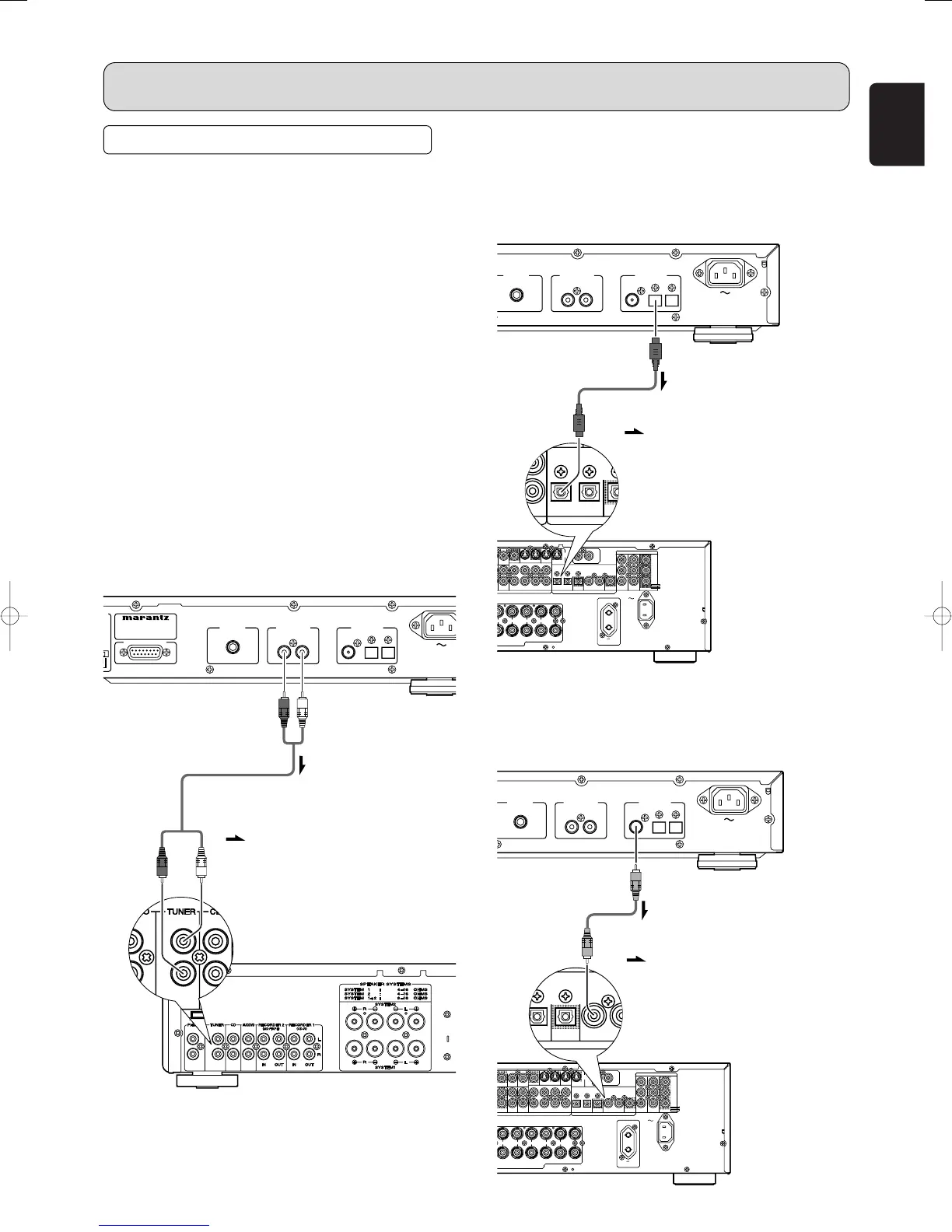
Connecting the analog output
connector
Use the audio connecting cord to connect the unit with a
stereo amplifier or AV amplifier. Do not connect the unit to
the PHONO input connectors on the amplifier.
When making the connections, insert the plugs securely into
the connectors. Failure to insert the plugs securely may
result in noise.
CONNECTIONS
7
Connecting the optical output
connector
Use an optical digital connecting cable available on the
market. Insert the plug firmly in until it clicks into place. Do
not bend or bundle the optical digital connecting cable.
7
Connecting the coaxial output
connector
Use a coaxial digital connecting cable available on the
market.
SERVICE PORT
MODEL NO. ST7001
ANTENNA
REMOTE CONTROL
IN
OUT
INTERNAL
EXTERNAL
R L
COAX.DAB
(
75
Ω
)
OPT. RDI
ANTENNA ANALOG OUT DIGITAL OUT
AC INAC IN
FM(75
Ω
) GND AM
ININ OUTOUT
MONITORMONITOR
VCR1VCR1
MONITORMONITOR
RSR
C
SW SBR
SL SBLL
RR
SYSTEMS 6SPEAKER SYSTEMS 6
--
8 OHMS8 OHMS
CENTERCENTER
R
NTFRONT SURROUND BACKSURROUND BACK
S. SPEAKER BS. SPEAKER B
SURROUNDSURROUND
LL LLLLRR
DVDDVD
OUTOUT
ININ
MONITORMONITOR
TVTVDVDDVDR1VCR1
OUTOUTIN
DSS
/
VCR2
OUT
VIDEO
IN
YY
DSSDSS
//
VCRVCR
22
DVDDVD
COAX.COAX.
OUTOUT
4433OPT.OPT.
OUT OUT
2211
7.1CH INPUT7.1CH INPUT
LL SLSL CC SBLSBL
SBRSBRSWSWSRSRRR
TVTVDVDDVDR1VCR1
OUTOUTININ OUT
DSS
/
VCR2
IN OUT
CDR/MDTAPE
PRE OUT
OUTIN
CD
R
L
FM
(
75
Ω
)
GND AM
CC
BB
//
PP
BB
CC
RR
//
PP
RR
AUDIO
ANTENNA
RC-5RC-5
DIGITALDIGITAL
COMPONENT VIDEOCOMPONENT VIDEO
AUDIO
AC OUTLETAC OUTLET
AC INAC IN
100W MAX.100W MAX.
2
3
0
V
5
0
H
230V 50H
ZZ
SWITCHEDSWITCHED
S-S-
VIDEOVIDEO
(Red) (White)
Audio connecting cord (supplied)
(Red) (White)
Signal flow
Optical digital connecting cable
(available on the market)
Signal flow
Coaxial digital connecting cable
(available on the market)
Signal flow



 To Next Page