16
ENGLISH
7
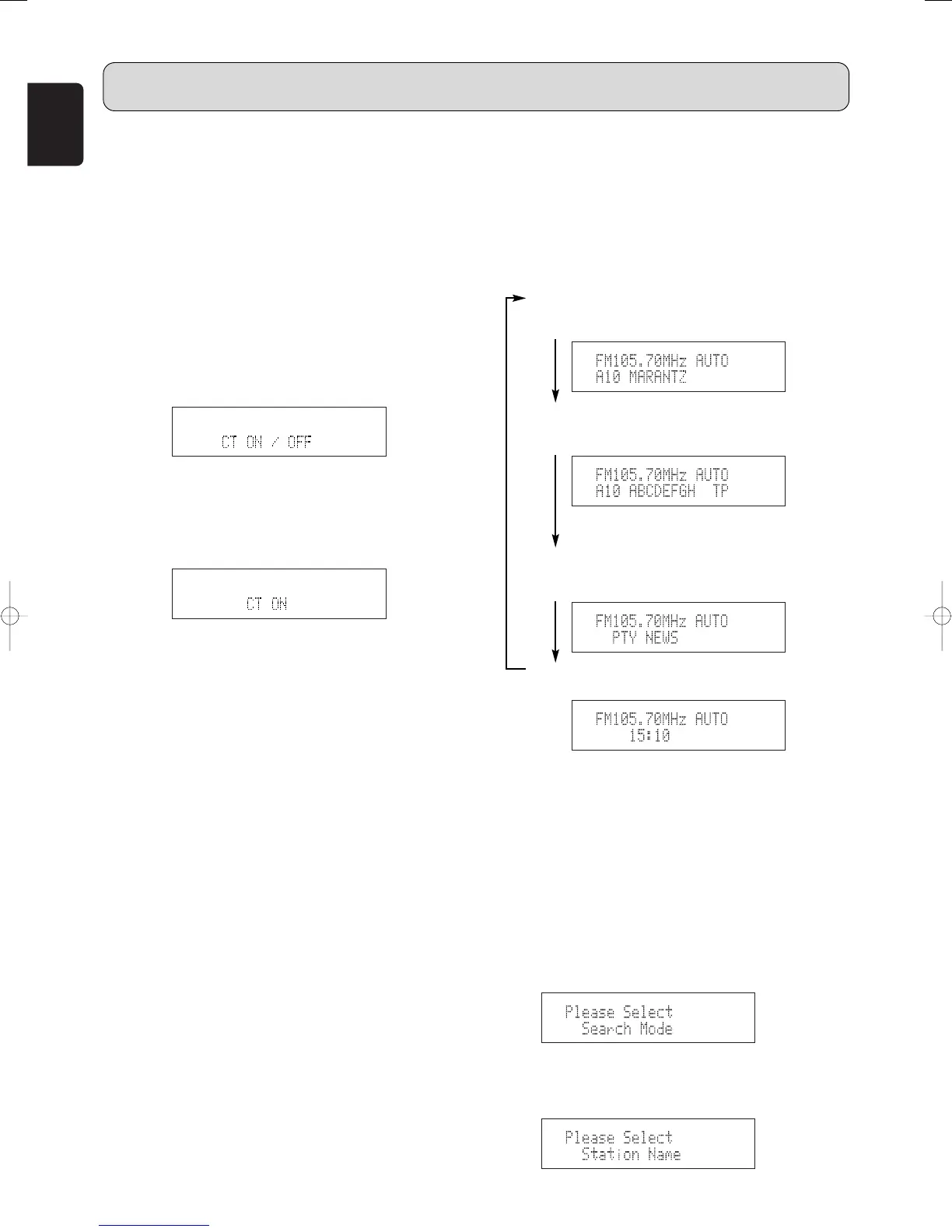
Switching RDS information display
1. Use the procedure described at “Auto tuning”, “Manual
tuning” or “Recalling preset stations” to tune in a
frequency with an RDS station.
2. Press the DISPLAY button t or . to switch the RDS
reception information.
• The display switches as shown below each time the
DISPLAY button t or . is pressed.
q STATION NAME:
Only displayed when the search mode is set to
PRESET and the station name has been registered.
w PS:
The program service name and frequency of the
station tuned in is displayed.
The above is an example for when there is TP
data but no RT data.
e PTY:
The program type of the tuned in broadcast is
displayed.
r CT:
The current time is displayed.
• When the “STATION NAME” is not registered, q is
not displayed.
7
Registering station names
(FM/AM only)
1. Use the procedure described at “Auto tuning”, “Manual
tuning” or “Recalling preset stations” to tune in the
desired frequency.
Example: To register “MARANTZ” as the FM station
name at preset channel “A2”.
2. Press the MENU button u or ⁄2 to select menu.
3. Either turn the TUNING/PRESET knob !4 or press the
CHANNEL/CONTROL button ⁄4 to display “Station
Name”.
7
CT (Clock Time)
• You can set clock time automatically by using the RDS
stations broadcasting Clock Time (CT) information.
This unit picks CT information up and automatically resets
itself, when you set “CT ON”.
1. Press the MENU button u or ⁄2 to select menu.
2. Either turn the TUNING/PRESET knob !4 or press the
CHANNEL/CONTROL button ⁄4 to display “RDS”.
3. Press the TUNING/PRESET knob !4 or ENTER button
v to set the RDS search selection mode.
4. Either turn the TUNING/PRESET knob !4 or press the
CHANNEL/CONTROL button ⁄4 to display “CT
ON/OFF”.
5. Press the TUNING/PRESET knob !4 or ENTER button
v to set the CT ON/OFF selection mode.
6. Either turn the TUNING/PRESET knob !4, press the
CHANNEL/CONTROL button ⁄4 to choose the “CT ON”
or “CT OFF”.
7. Press the TUNING/PRESET knob !4 or ENTER button
v to set whether enable or stop the CT function.
• If you live close to the border with another country, the
CT information may have been taken from a radio
station in another time zone.
In this case you should select “CT OFF”.
In this mode, although “CT” data are entered, the time
is not changed to the current time.
OPERATION



 To Next Page