22
ENGLISH
SORT MODE
(SORTING COMPONENTS)
•
You can sort and list scanned components by Alphanumeric,
S. component or program type.
• You can then select the component you want to listen to
from the list.
7
Alphanumeric
The “S.Component” is sorted in alphanumerical order.
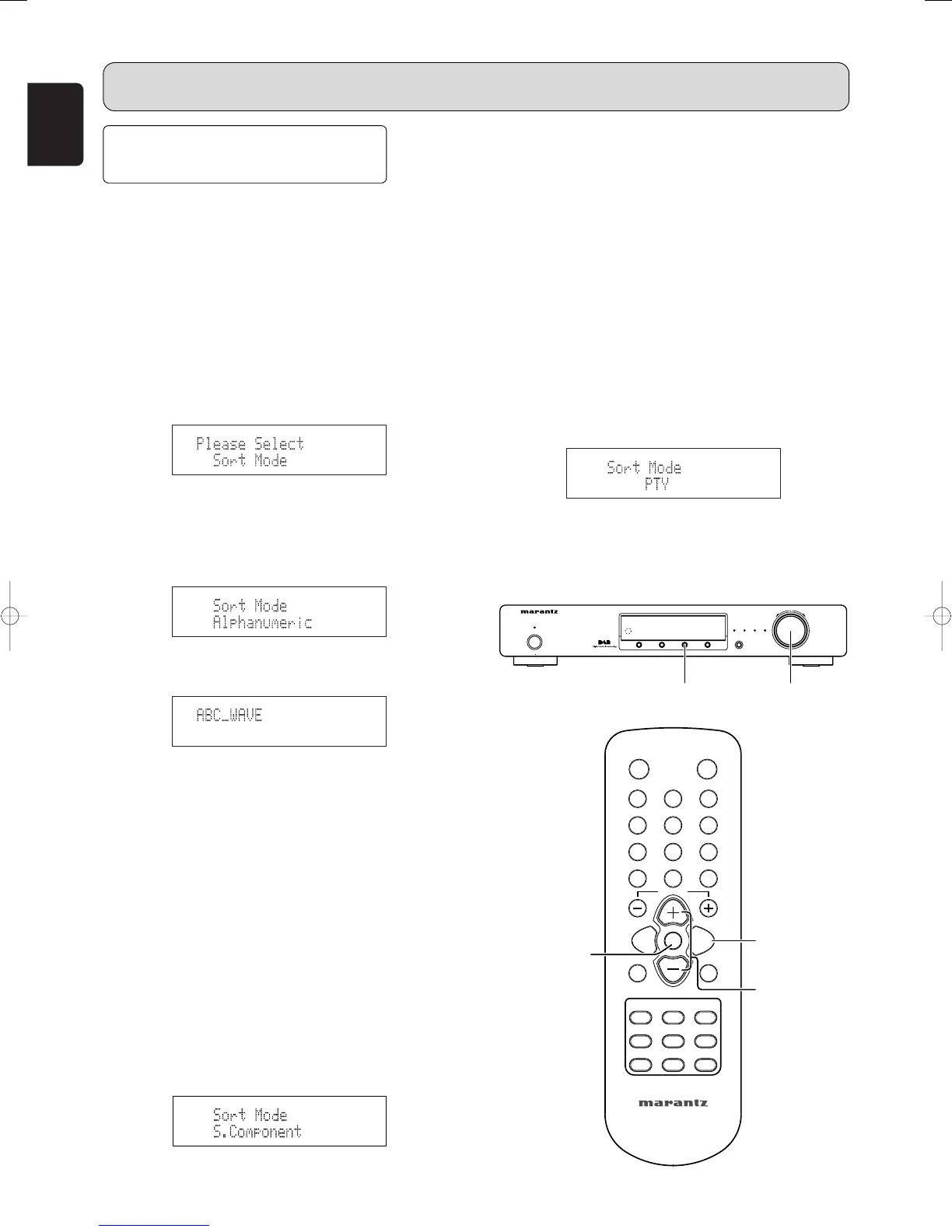
1. Press the MENU button u or ⁄2 to select menu.
2. Either turn the TUNING/PRESET knob !4 or press the
CHANNEL/CONTROL button ⁄4 to display the sort
mode selection screen.
3. Press the TUNING/PRESET knob !4 or ENTER button
v to set the sort mode.
4. Either turn the TUNING/PRESET knob !4 or press the
CHANNEL/CONTROL button ⁄4 to select “Sort Mode
(Alphanumeric)”.
5. Press the TUNING/PRESET knob !4 or ENTER button
v to set the sort mode to “Sort Mode (Alphanumeric)”.
• You can select any component from the sorted list.
7
S. component
• You can select an S.component for listening from the list
of scanned S.components produced by using the “Tuning
in DAB broadcasts” (
☞
page 19)
• The “S. Component” is sorted in the order of the Service
component frequencies.
1. Press the MENU button u or ⁄2 to select menu.
2. Either turn the TUNING/PRESET knob !4 or press the
CHANNEL/CONTROL button ⁄4 to display the sort
mode selection screen.
3. Press the TUNING/PRESET knob !4 or ENTER button
v to set the sort mode.
4. Either turn the TUNING/PRESET knob !4 or press the
CHANNEL/CONTROL button ⁄4 to select “Sort Mode
(S. Component)”.
5. Press the TUNING/PRESET knob !4 or ENTER button
v to set the sort mode to “Sort Mode (S. Component)”.
• You can select any component from the sorted list.
7
PTY
The “S.Component” is sorted in the order of the program
Type.
1. Press the MENU button u or ⁄2 to select menu.
2. Either turn the TUNING/PRESET knob !4 or press the
CHANNEL/CONTROL button ⁄4 to display the sort
mode selection screen.
3. Press the TUNING/PRESET knob !4 or ENTER button
v to set the sort mode.
4. Either turn the TUNING/PRESET knob !4 or press the
CHANNEL/CONTROL button ⁄4 to select “Sort Mode
(PTY)”.
5. Press the TUNING/PRESET knob !4 or ENTER button
v to set the sort mode to “Sort Mode (PTY)”.
• You can select any component from the sorted list.
OPERATION



 To Next Page