TS 910 TRANSFER SWITCH
PM140 REV 2 14/01/23 16 Thomson Power Systems
• Do not open covers to equipment until ALL power sources are disconnected
Failure to do so may cause personal injury or death
Once both Utility and Generator supplies are de-energized the following procedure can be
used to operate the Transfer Switch manually.
a) Up-plug the TSC 9 controller isolation plug (J4) to prevent automatic operation.
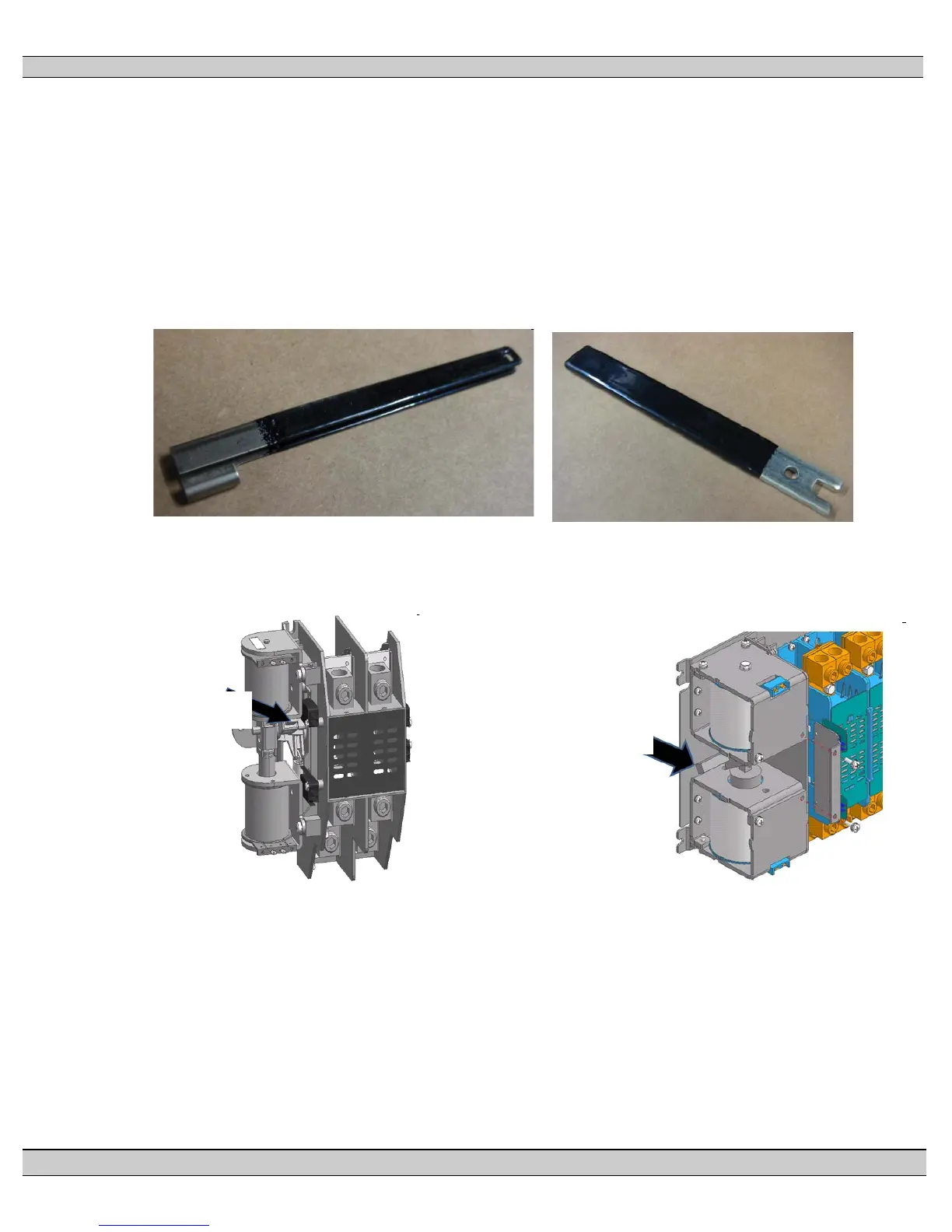
b) Open ATS enclosure and locate Manual Operation Handle provided with the transfer
switch (see photos below)
100A/200A ATS Handle 400A ATS Handle
c) Insert manual handles onto the transfer switch mechanism at locations shown in the
following diagrams.
100A/200A Contactor Mechanism 400A Contactor Mechanism
d) To manually operate mechanism to the utility supply position, rotate handle
upwards. Do not over-torque handle once position has been attained.
e) To manually operate mechanism to the generator supply position, rotate
handle downwards. Do not over-torque handle once position has been
attained.
f) Once ATS is manually operated to desired position, re-install enclosure cover,
then re-energize supply sources to re-energize the load.
Insert Manual Handle
on mechanism here
Insert Manual Handle
on mechanism here



 To Next Page