87
86
85
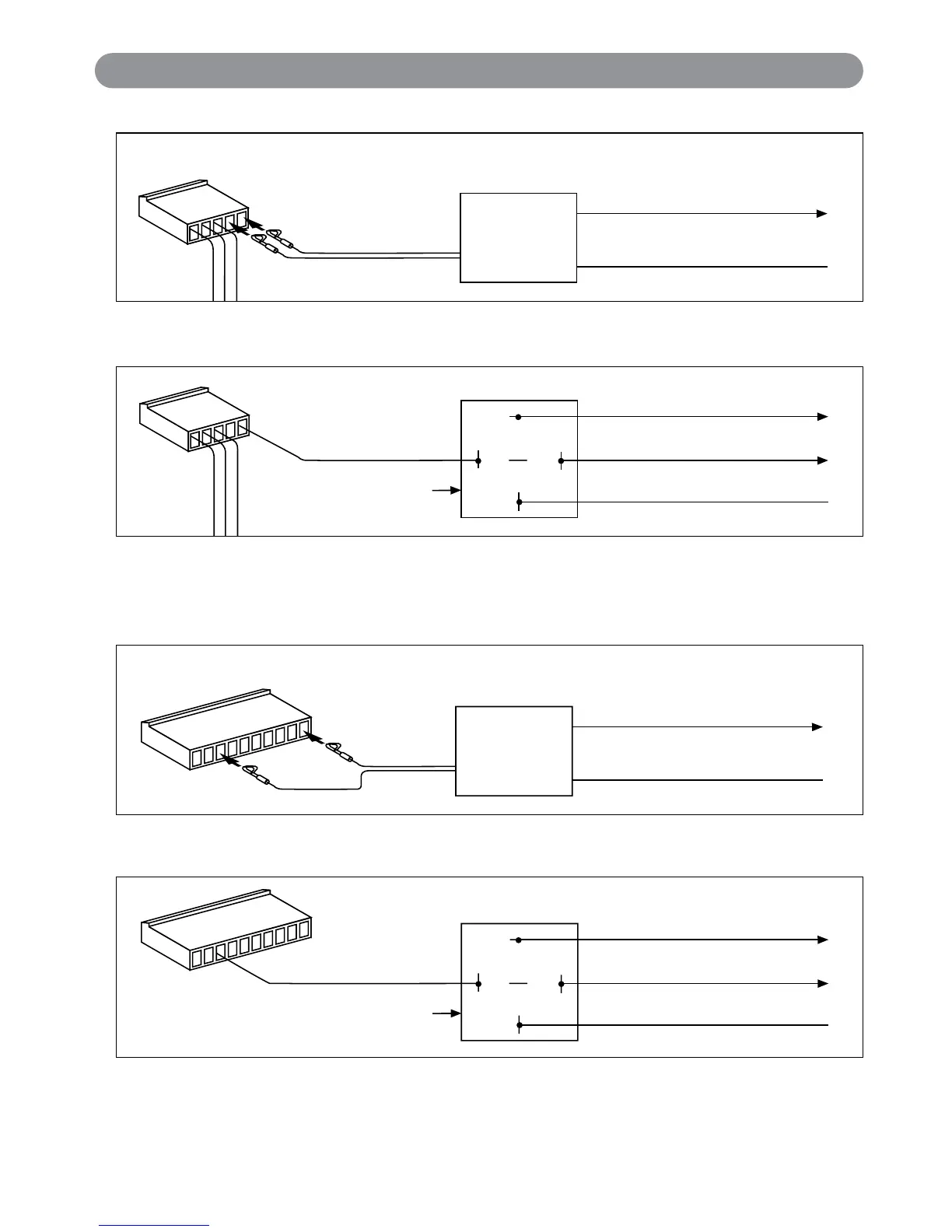
30
Red/White Wire
(SPST ALA984H
Relay Not Supplied)
Output to Power Trunk Switch
To Constant +12 Volts
Input to Relay (+ or
-
)
#2 Button Power Trunk Activation Using Optional 30 Amp Relay
Red Wire
ALA-RPT
Relay Pack
Orange Wire
Output to Trunk Switch
Purple Wire
Input to Relay (+ or
-
)
Insert Red Wire into the First Socket
Insert Black Wire into the Eighth Socket
Black Wire
#2 Button Power Trunk Activation Using Optional ALA-RPT Relay Pack
Dome Light Supervision Using Optional 30 Amp Relay:
87
86
85
30
Black/White Wire
(SPST ALA984H
Relay Not Supplied)
Output to Dome Light (+ or
-
)
To Constant +12 Volts
Input to Relay (+ or
-
)
Dome Light Supervision Using Optional ALA-RPT Relay Pack:
Red Wire
ALA-RPT
Relay Pack
Orange Wire
Output to Dome Light (+ or
-
)
Purple Wire
Input to Relay (+ or
-
)
Insert Black Wire into the First Socket
Insert Red Wire into the Second Socket
Black Wire
13
Optional Accessory Connection
X4-IM.qxp 3/6/08 10:53 AM Page 13


 To Next Page