Software service functions 17
Updating from firmware version 1.x.x to 2.0.0
Firmware versions 1.0.0 and 1.1.0 did not feature the FX in Extended mode and 16-bit RGB control in Basic
mode (as well as other improvements) that are available in v. 2.0.0. Updating to v. 2.0.0 will give you access
to these features, but bear in mind that v. 2.0.0 is a major update and that you cannot roll back to an earlier
firmware version once you have installed v. 2.0.0.
Pan and tilt adjustment after updating to version 2.0.0
Firmware version 2.0.0 introduces more precise pan/tilt control functionality. If you are running a fixture with
v. 1.0.0 or v. 1.1.0 and update to v. 2.0.0, the fixture will probably display a PTCM short error code and a P/T
SENSOR ADJUST message because of the new functionality. If the fixture displays this error code, you
must adjust pan and tilt before using the fixture. Adjustment takes approximately two minutes.
To adjust pan and tilt:
1. Make sure that the fixture is held securely and
apply power.
2. Enter the menus and go to SERVICE →
ADJUST → PAN/TILT AT END STOP.
3. Select STEP 1 and press ENTER.
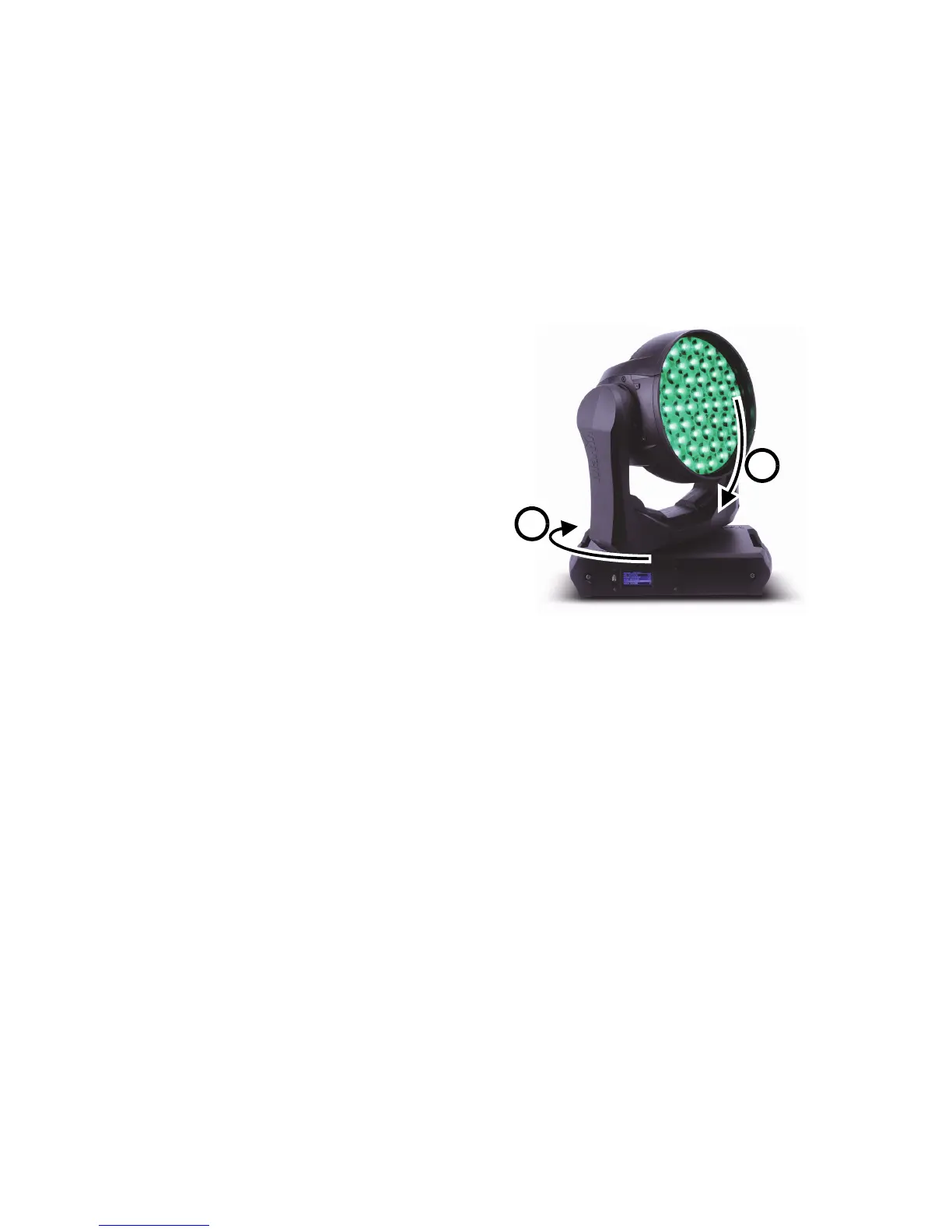
4. See Figure 3. Take the yoke in your hands
and rotate it clockwise A (when looking from
the top of the head towards the base) until it
reaches the end stop at the limit of clockwise
pan. Then tilt the head B as far as possible
away from the power cable side of the base
towards the display side.
5. Be prepared for the head to move suddenly.
Press ENTER again and give the head a few
seconds to move and carry out basic
self-adjustment.
6. When the head has finished moving, press
MENU to exit STEP 1. Scroll to STEP 2 and
press ENTER.
7. Repeat steps 4. and 5. as described above
and give the head approximately two minutes
to move and carry out more precise
self-adjustment.
8. When the head has finished moving, press and hold MENU to exit the control menus. Pan and tilt are
now correctly adjusted for firmware version 2.0.0.



 To Next Page