5-35
OTHER CONTROLS AND EQUIPMENT
76MH1-74E
Fast forwarding/Rewinding a track
• Hold down the Up button (3) to fast for-
ward the track.
• Hold down the Down button (4) to fast
rewind the track.
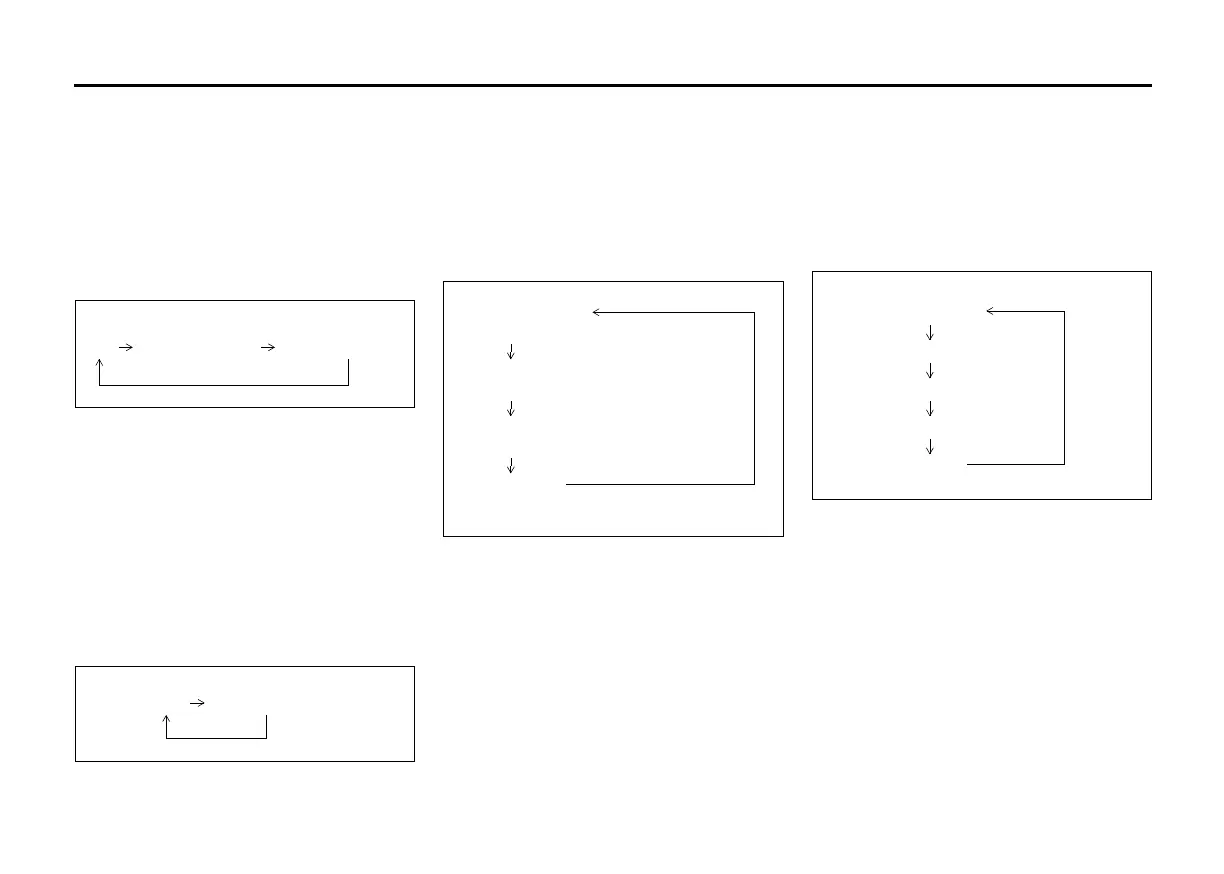
Random playback
Press the RDM button (6).
Each time the button is pressed, the mode
will change as follows:
• SONG RANDOM
The random indicator “RDM” will light.
The tracks in the iPod
®
will be played in
random order.
• ALBUM RANDOM
The random indicator “D.RDM” will light.
The albums in the iPod
®
will be played in
random order.
Repeat playback
Press the RPT button (5).
Each time the button is pressed, the mode
will change as follows:
• SONG REPEAT
The repeat indicator “RPT” will light.
The track currently being played will be
played repeatedly.
Display change
Press the DISP button (7).
Each time the button is pressed, display
will change as follows:
NOTE:
If text data contains more than 12 charac-
ters, the “>” mark will appear at the right
end. Holding down the DISP button (7) for
1 second or longer can display the next
page.
Playing Mode selection
1) Press the button numbered [6] of the
Preset buttons (8) for 1 second or lon-
ger.
2) Turn the TUNE FOLDER PUSH
SOUND knob (2).
Each time the knob is turned, the mode
will change as follows:
3) Press the TUNE FOLDER PUSH
SOUND knob (2) to select the desired
mode.
NOTE:
• When the button numbered [6] of the
Preset buttons (8) is pressed, the previ-
ous mode will be displayed.
OFF SONG RANDOM ALBUM RANDOM
Playlist name /
Track title (Playlist mode only)
Artist name /
Track title
Album name /
Track title
Track title /
Play time
PLAYLIST
ARTIST
ALBUM
SONGS
GENRE







 To Next Page