9.1 wxPropView 63
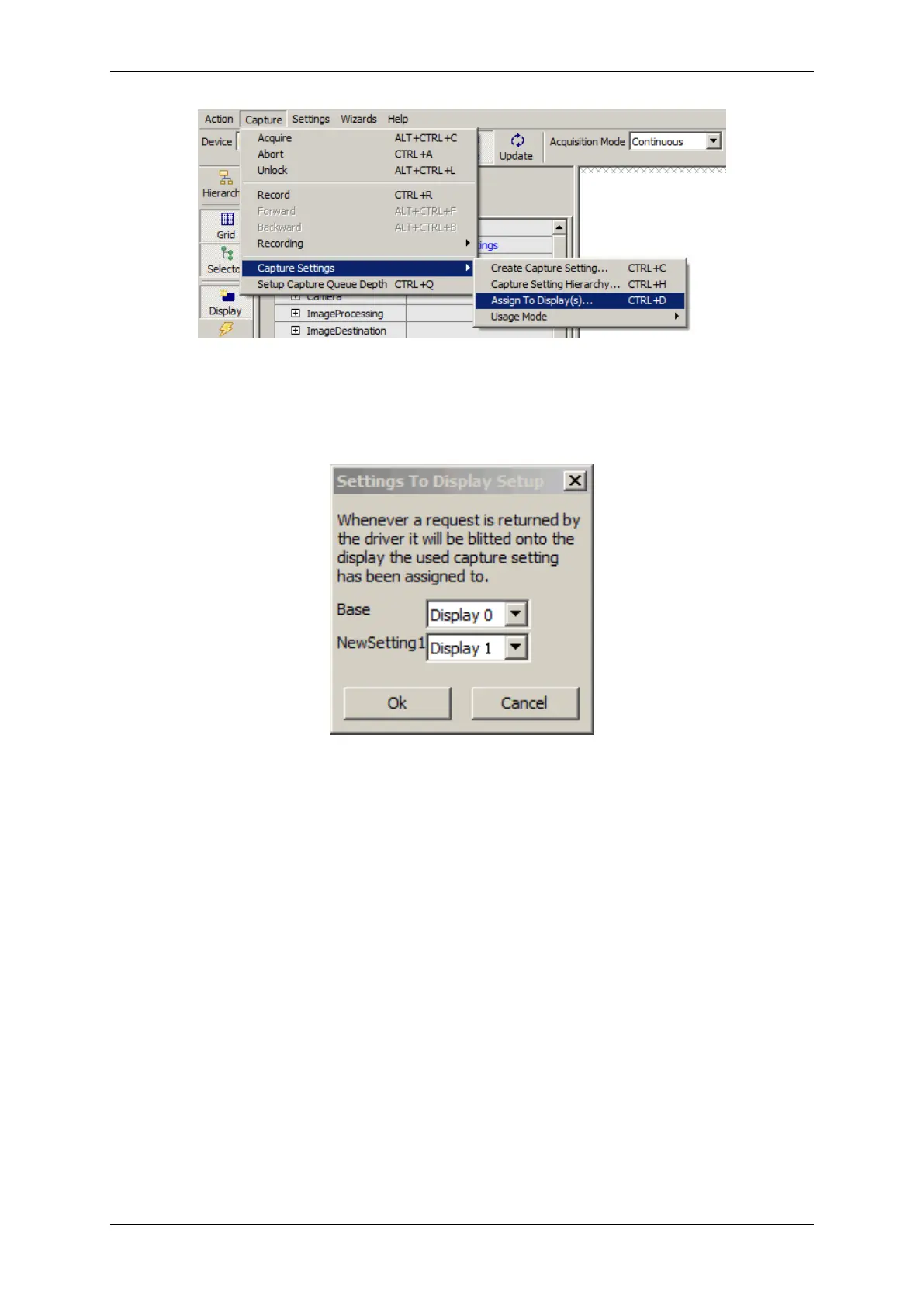
Figure 22: wxPropView - Assigning displays
Figure 23: wxPropView - Assigning displays
By default a new setting when created will be assigned to one of the available displays in a round-robin scheme,
thus when there are 3 displays, the first (Base) setting will be assigned to "Display 0", the next to "Display 1", the
next to "Display 2" and a fourth setting will be assigned to "Display 0" again. The setting to display relationships
can be customized via "Capture -> Capture Settings -> Assign to Display(s)".
As each image display keeps a reference to the request, this image belongs to the driver can't re-use the request
buffer until a new request is blitted into this display. Thus, it might be necessary to increase the number of request
objects the driver is working with if a larger number of displays are involved. The minimum number of requests
needed is 2 times the amount of images displays. The number of requests used by the driver can be set up in the
drivers property tree:
MATRIX VISION GmbH


 To Next Page