MENUS: 1Y.3 JOB7 - 5
D-MAXE with OI-TS www.maxcessintl.comMI 2-292 1 C
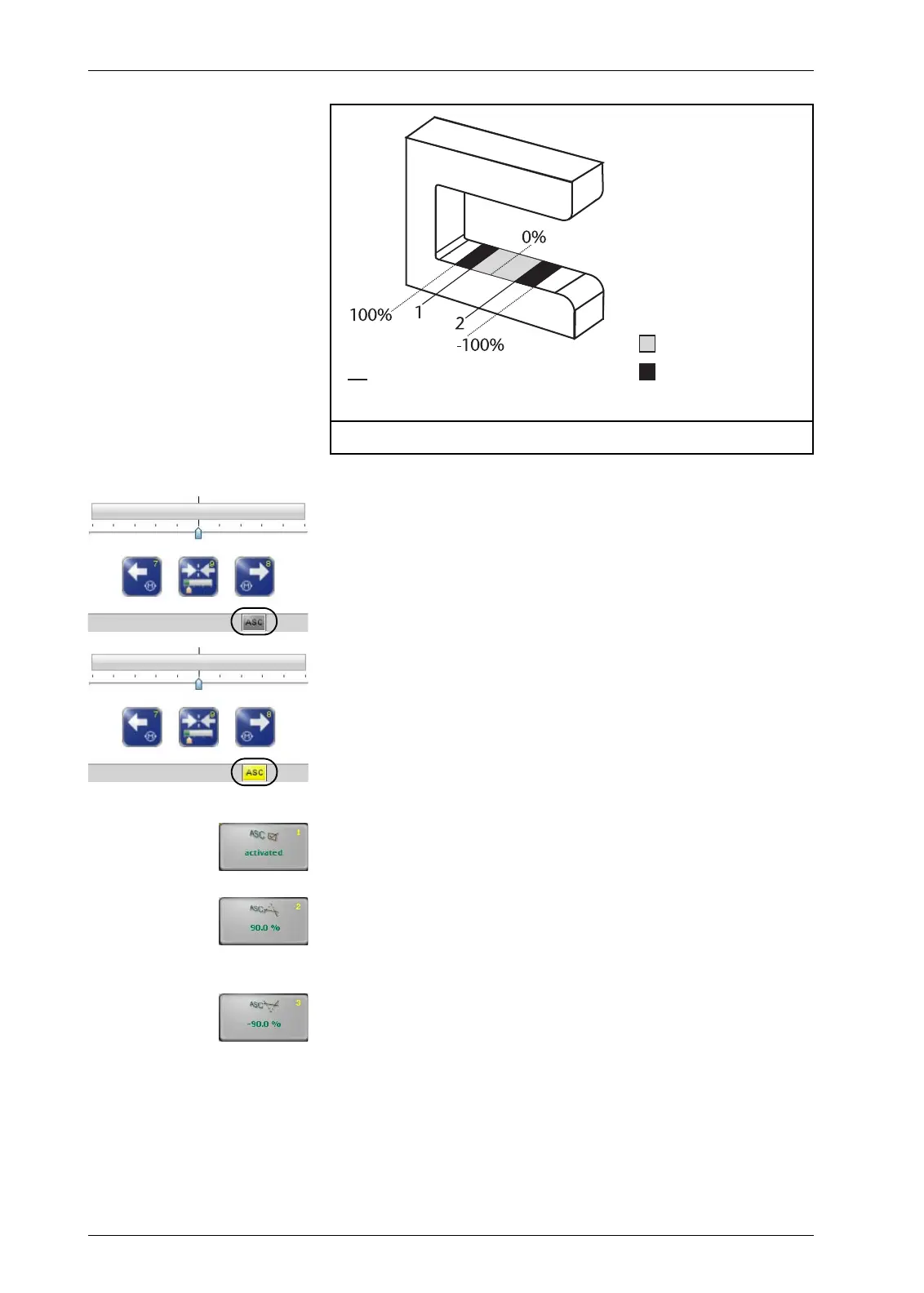
If the D-MAXE system is in "Automatic" mode and the ASC
parameter is activated, the web is guided as long as it is within
the restricted field of view of the sensor. This is indicated by the
gray “ASC“ icon in the status line.
If the web leaves the limited field of view of the sensor, guiding
is blocked. This is indicated by the yellow “ASC“ icon in the
status line.
1y.3.y6.1 Turn ASC on or off
The
ASC
parameter is activated or disabled.
1y.3.y6.2 Enter the limit value 1
The value that is entered must be positive.
Standard value = 90%
1y.3.y6.3 Enter the limit value 2
The value that is entered must be negative.
Standard value = -90%
Guiding working
Guiding locked
1 - Threshold 1 (pos.)
2 - Threshold 2 (neg.)
Figure 7.3: Example for the ASC parameter


 To Next Page