U36
CONTROL SYSTEM
ON-BOARD DIAGNOSTIC FUNCTION
A6E854001044T11
Outline
• Based on the sunlight intensity and temperature signals from the various sensors, the climate control unit
performs very complex control to the output actuation devices. Therefore, the operating condition of the output
devices may vary due to input conditions, even though the controls on the climate control unit are not changed.
As a result, when a malfunction occurs in the control system, it may be difficult to reproduce the symptom and
to isolate the malfunctioning part of the system. To avoid such difficulty, the climate control unit is programmed
with a on-board diagnostic function which input system is malfunctioning. It can also check the output system
separately from the input system.
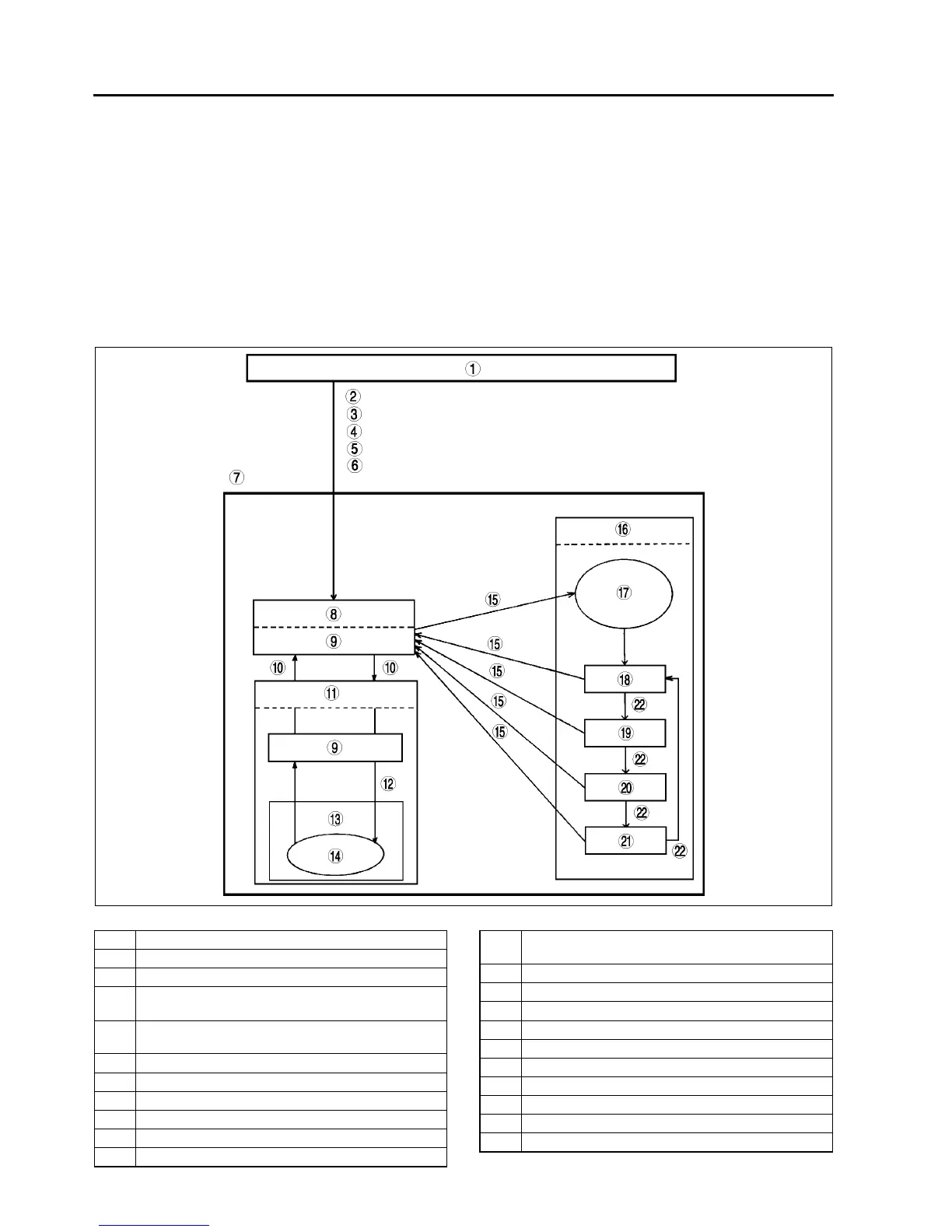
• The on-board diagnostic function has three modes: present failure indication, past failure indication, and output
device operation check.
• The climate control unit terminal 1F is connected to the body ground by the body grounding of the A/C check
connector, whereby voltage fluctuation occurs. The climate control unit detects this voltage fluctuation and
activates the on-board diagnostic function.
.
A6E8540T013
1Normal control
2 Warm up the engine
3 Turn the ignition switch to LOCK position
4 Short the A/C check connecotr to the body ground
using a jumper wire
5 Light the solar radiation sensor with 60 W lamp at a
distance 100 mm {3.9 in}
6 Start the engine
7 On-board diagnostic
8 Present failure indication
9 Diagnostic trouble code(s) indicated
10 A/C switch on
11 Past failure indication
12 Press REC/FRESH switch and AUTO switch at the
same time
13 Past failure memory deletion
14 Rear defroster indicator light flashes once
15 AUTO switch on
16 Output device operation check
17 Check indicator lights illuminate for 4 seconds.
18 Step 1
19 Step 2
20 Step 3
21 Step 4
22 REC/FRESH switch on


 To Next Page