20
Sirius Satellite Radio Operation (Option) (Continued)
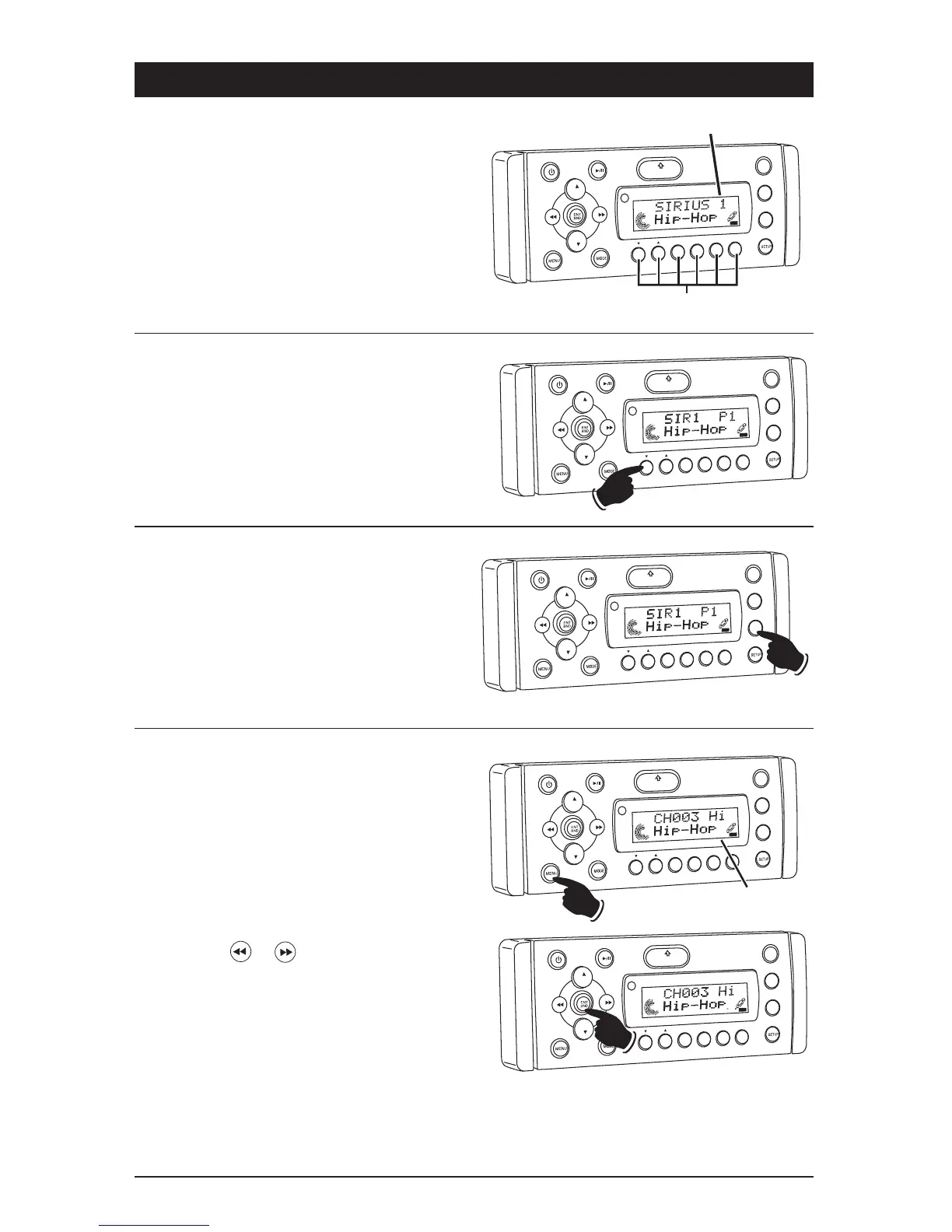
Memorizing a Preset Channel:
1. Press the ENT BND button to select either the
SIR1, SIR2 or SIR3 Sirius band. Each band
can memorize 6 channels for a total of 18
channels.
2. Tune-in the desired Sirius channel.
3. To memorize the channel press and hold any-
one of the six channel recall buttons until you
hear a beep.
Recalling Memorized Sirius Channel:
1. Press the ENT BND button to select either the
SIR1, SIR2 or SIR3 band.
2. Press and release the Sirius channel recall
button 1, 2, 3, 4, 5 or 6 to select the memo-
rized channel.
VOL
LOU
D
VOL
MU
TE
D
IM
S-MOD
Pod MEN
U
OPEN
1
2
3
4
5
6
ASM
DSP
EQ
SUB
W
SH
F
RPT
SCN
D R/CAT
SAT
C TEGORY
Sirius Channel Recall Buttons
VOL
LOU
D
VOL
MU
TE
DIM
S-MOD
Pod MEN
U
OPEN
1
2
3
4
5
6
ASM
DS
EQ
SUB W
SH
F
RPT
SC
N
DRCA
T
SAT
Preset Channel Indicator
CA
T
EGORY
Scanning Stored Sirius Channels:
Press the ASM button and the tuner will scan the
preset channels in the SIR1 band first, then
SIR2, and finally SIR3 - pausing for 5 seconds at
each channel. Scanning will continue until the
ASM button is pressed again. When a desired
channel is reached, press the ASM button again
to stop scanning.
VO
L
LOU
D
VOL
MU
TE
D
IM
S-MOD
Pod MEN
U
OPEN
1
2
3
4
5
6
ASM
DSP
EQ
SUB
W
SH
F
RPT
SC
N
D R/CAT
SAT
C TEGORY
Skipping Sirius Channel: You can program the
radio to skip a Sirius channel which you do not want.
1. Tune to the channel to be skipped (see Sirius
Satellite Radio Operation for more details).
2. Press the MENU button until “SKIP” appears
in the display.
3. Press the ENT BND button until “SKIP” flashes
in the display.
4. Press the or button and wait 10 sec-
onds and “SKIP” disappears from the display.
The channel will now be skipped.
VO
L
LOU
D
VOL
MU
TE
D
M
S-MOD
Pod MEN
U
OPEN
1
2
3
4
5
ASM
DSP
EQ
SUB
W
SHF
R
PT
SC
N
D R/CAT
ST
SK P
Skip Indicator
VO
L
VO
L
MU
TE
DM
SMOD
i
Pod ME
N
U
OPEN
1
2
3
4
5
6
ASM
DISP
EQ
UB
W
SHF
R
PT
SC
N
DIR CA
T
AT
SK P



 To Next Page