51
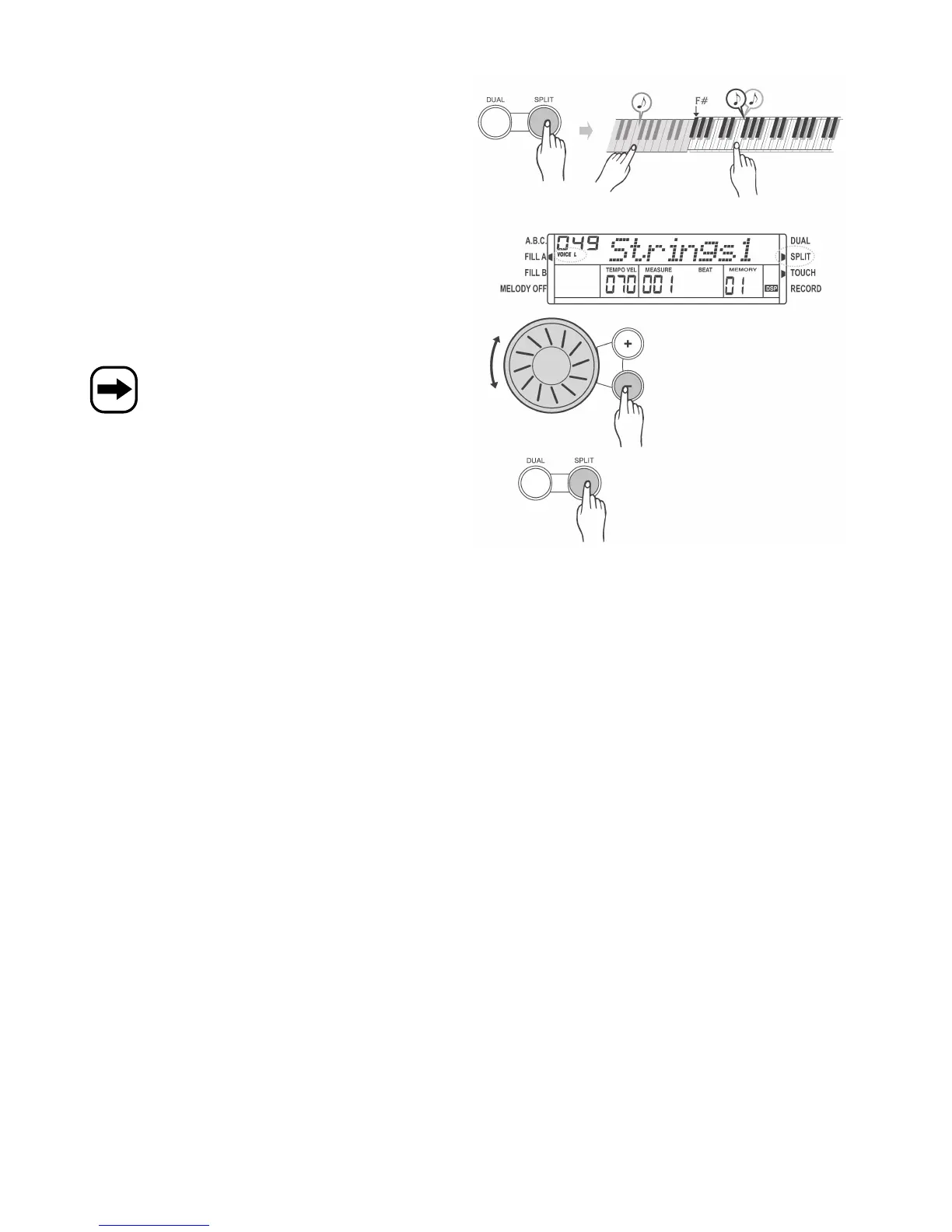
c) Split function, „SPLIT“ button
The keyboard can be split into two sections. You can, for example,
assign a drum instrument to the left section and a common instrument
to the right section.
This also applies to the dual sound effect. See chapter 12. b).
• First select instrument 1, e.g. „001“, if you have not already done so.
(See chapter 12. a)
• Press the „SPLIT“ button („SPLIT“ symbol is displayed in the top right-
hand corner).
„VOICE L“ is displayed in the top left-hand corner. The preset
instrument „049 Strings1“ is displayed.
The left section of the keyboard has now been assigned the second
instrument.
The keyboard is split at „F#“ which can be changed in the
function settings. See chapter 14. e).
• If desired, you can use the control wheel or the „+“ and „-“ buttons
next to it to select the second instrument for the left section of the
keyboard, e.g. „050“.
• To deactivate the function, press the „SPLIT“ button again. The „SPLIT“
symbol in the top right-hand corner of the display disappears.
.


 To Next Page