52
13. Accompaniment rhythms („STYLE“)
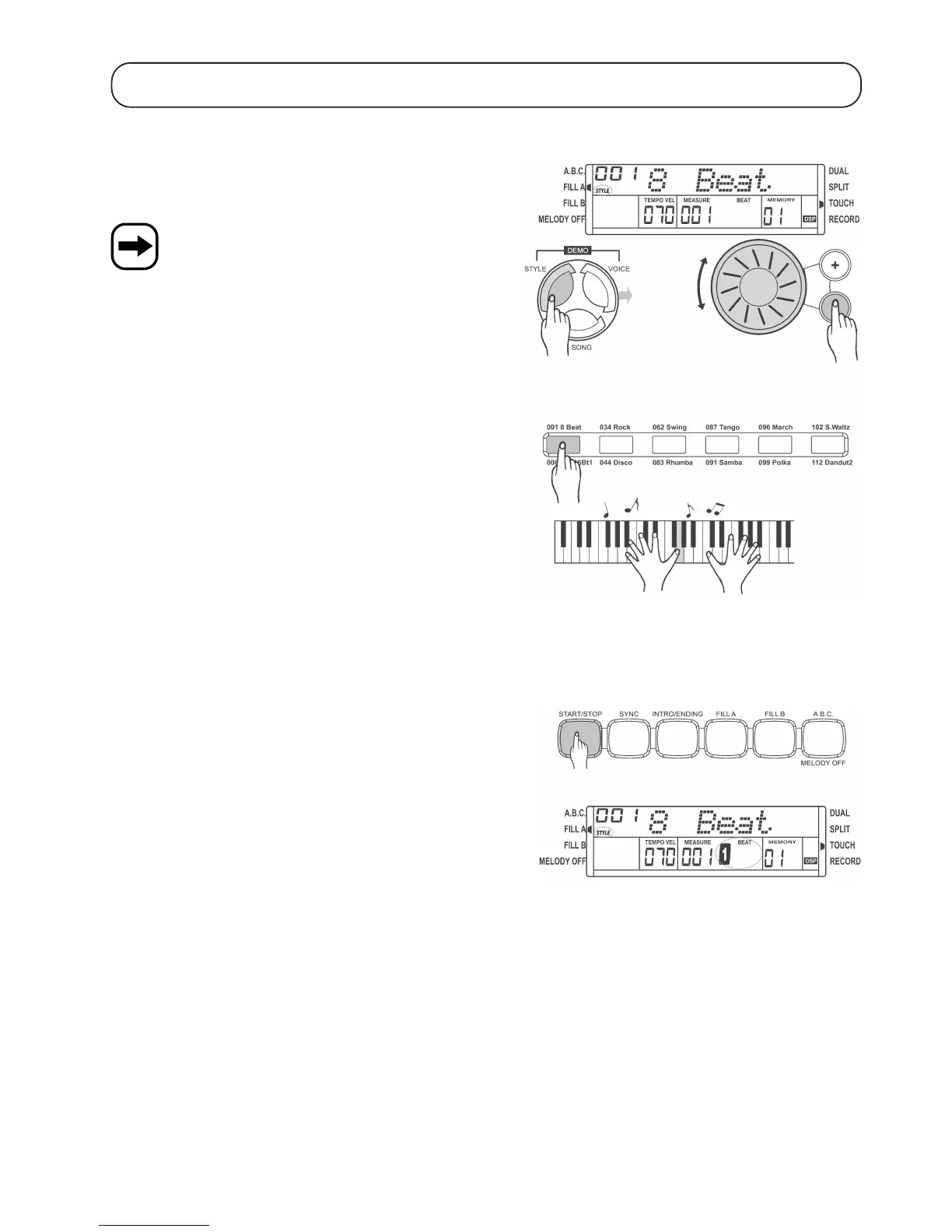
a) Select accompaniment rhythm
The digital piano provides a total of 120 different accompaniment
rhythms. The accompaniment rhythm selected can be played in the
background.
See the appendix for a list of all accompaniment rhythms.
To select an accompaniment rhythm („STYLE“), proceed as follows:
• Press the „STYLE“ button. This activates the accompaniment rhythm
settings.
• Use the control wheel or the „+“ and „-“ buttons next to it to select an
accompaniment rhythm.
• Some standard accompaniment rhythms are preset for the direct
selection buttons. Press this button once or twice to select the upper
or the lower accompaniment rhythm (see description above or below
the button).
b) Play/stop accompaniment rhythm, „START/STOP“ button
• Use the „START/STOP“ button to activate the accompaniment rhythm
selected as described in chapter 13. a). The beat display starts
flashing.
• Press the „START/STOP“ button again to stop playing the
accompaniment rhythm.


 To Next Page