55
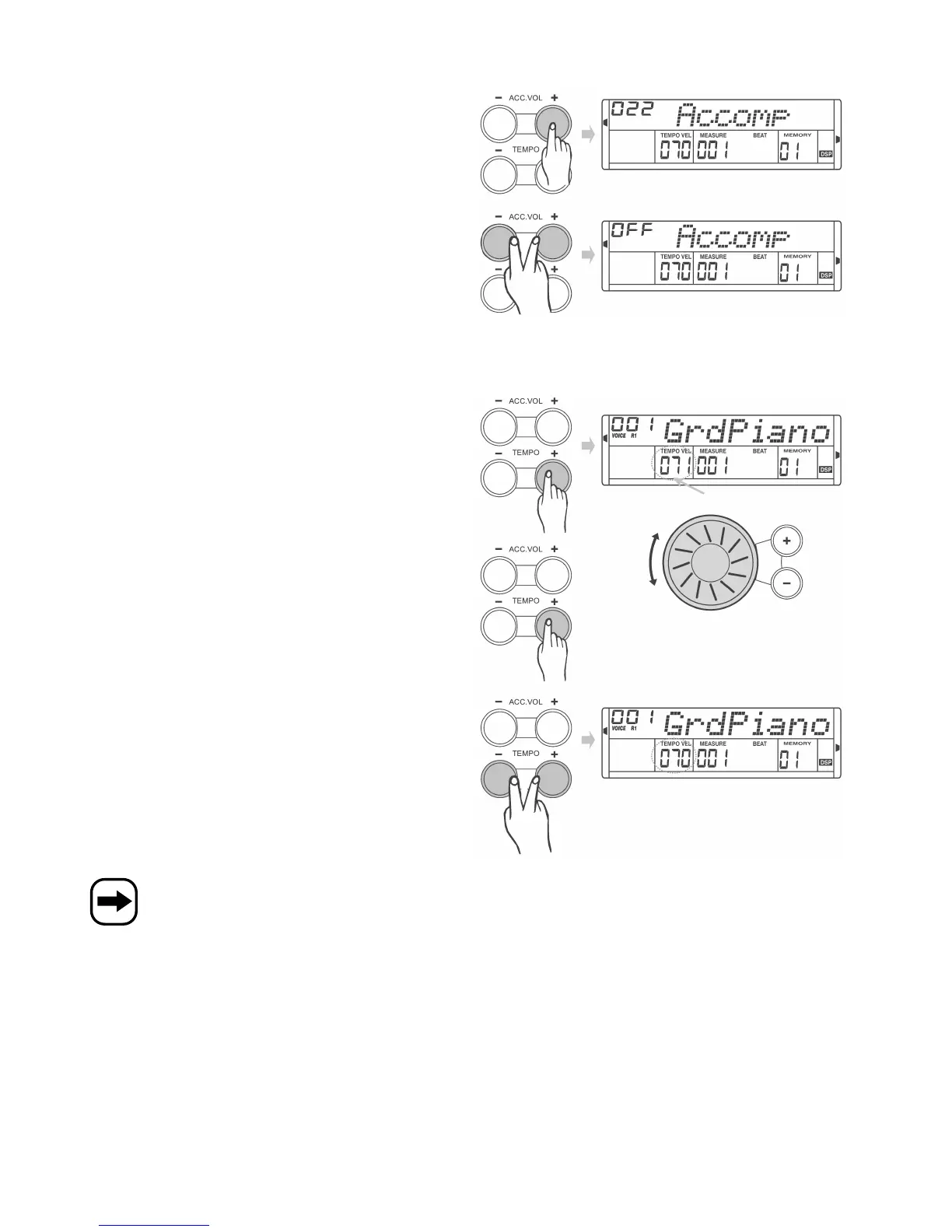
h) Set volume of accompaniment rhythm, „ACC. VOL“ buttons
• Use the „ACC. VOL +“ and „ACC. VOL -“ buttons to set the volume of
the accompaniment rhythm.
• Press the two buttons simultaneously to set the volume to „00“
(muting). „OFF“ is displayed in the top left-hand corner.
i) Set tempo of accompaniment rhythm, „TEMPO“ buttons
• Press the „TEMPO +“ or „TEMPO -“ button shortly. The tempo value
flashes in the display for about 2 seconds.
While the display is flashing, use the control wheel to set the tempo
of the accompaniment rhythm (range from 30 to 280).
• You can also hold down the „TEMPO +“ and „TEMPO -“ buttons to
set the tempo.
• Hold down the two buttons simultaneously to restore the standard
tempo for the current accompaniment rhythm.
If you switch from one accompaniment rhythm to another during playback, the current tempo is maintained!


 To Next Page