53
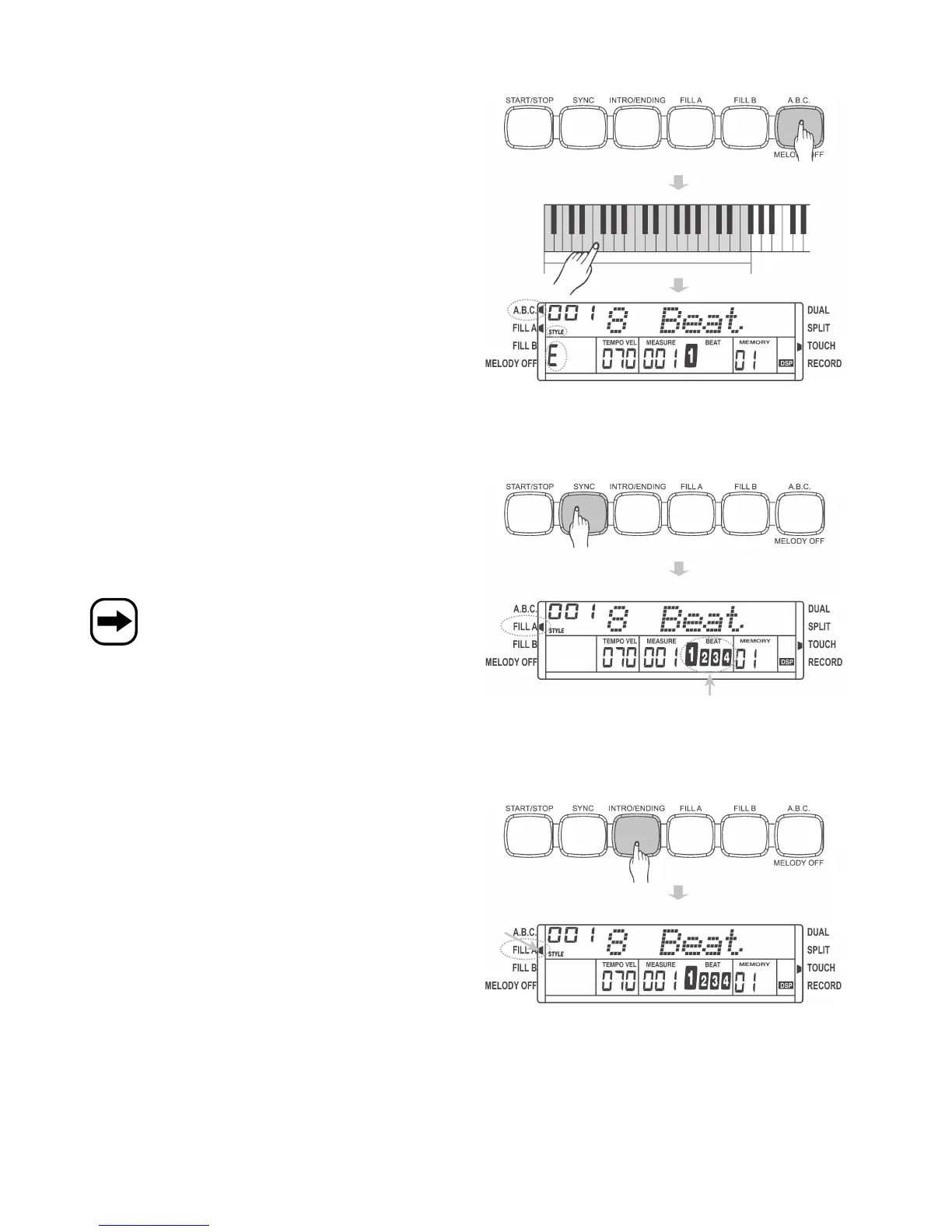
c) Automatic accompaniment, automatic bass chord, „A.B.C./MELODY OFF“ button
• Press the „A.B.C./MELODY OFF“ button to activate the „automatic
bass chord“ function (the „A.B.C.“ symbol is displayed in the top left-
hand corner).
Depending on the desired chord, press one or more keys in the left
keyboard section (see chapter 12. b).
• Press the „A.B.C.“ button again to deactivate the function.
d) Sync start, „SYNC“ button
This function starts playing the accompaniment rhythm when you start
playing on the keyboard (the rhythm starts when the first key is
pressed).
• Press the „SYNC“ button. The beat display starts flashing.
• The accompaniment rhythm starts when the first key is pressed.
If the „A.B.C.“ function is active (see chapter 13. c), playback
only starts when a chord is played in the left keyboard
section.
e) Intro start, „INTRO/ENDING“ button
The accompaniment rhythm can be introduced or finished with a special
sound/rhythm (depending on the selected accompaniment rhythm).
• „Intro“
Press the „INTRO/ENDING“ button before starting the accompaniment
rhythm.
If you now press the „START/STOP“ button, an intro sound is played
before the regular accompaniment rhythm begins.
• „Ending“
If the accompaniment rhythm is already being played, pressing the
„INTRO/ENDING“ button will stop playback automatically after playing
a special ending sound.


 To Next Page