62
18. Recording function
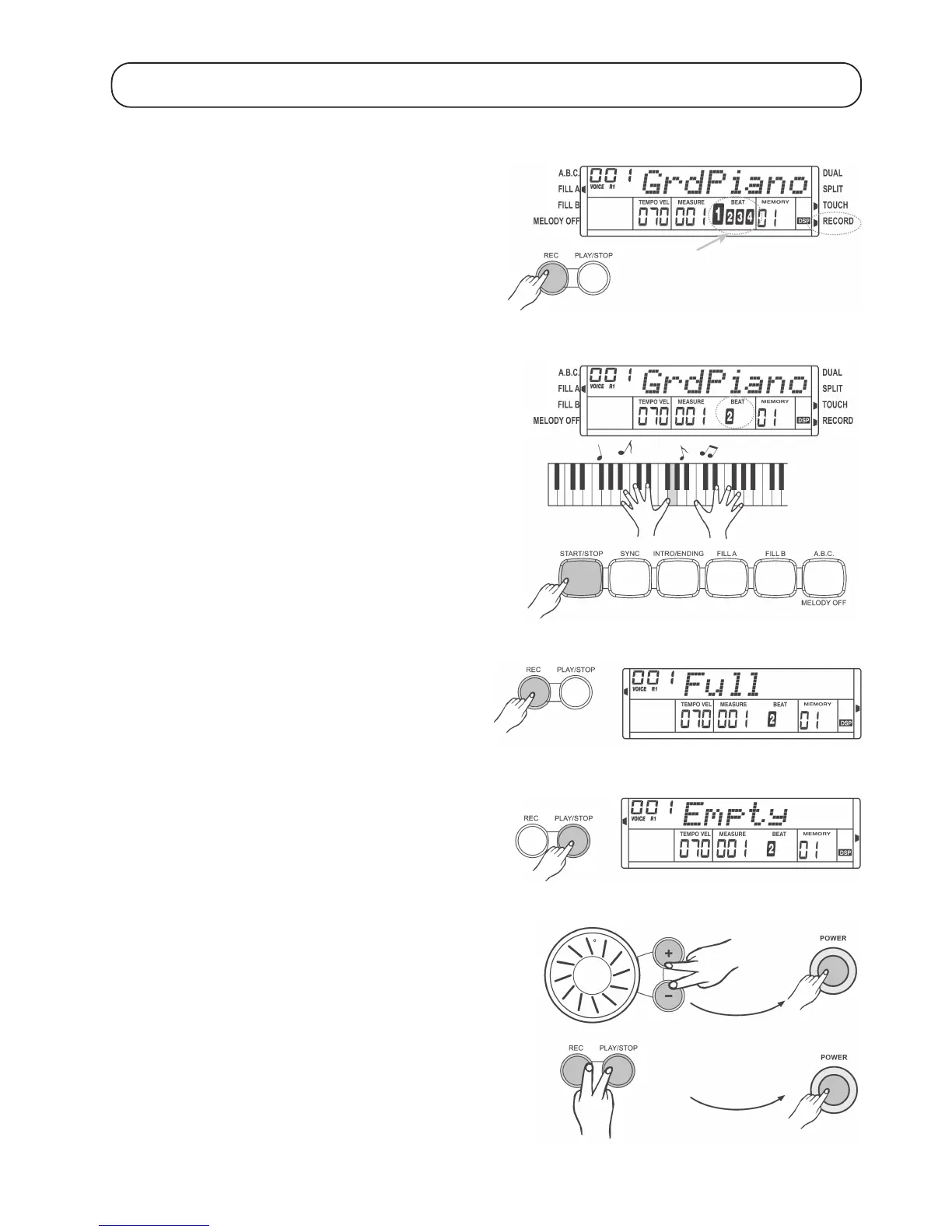
a) Prepare record mode
• Press the „REC“ button. The „RECORD“ symbol is displayed on the
right-hand side and the beat display starts flashing. The digital piano
is now ready for recording. However, the digital piano does not start
recording yet!
• If desired, you can now select another instrument or a different
accompaniment rhythm, set the tempo etc.
b) Start recording
To start recording, press the START/STOP button or start playing on
the keyboard.
c) Stop recording
Press the „REC“ button shortly to stop recording.
If memory is full, the recording stops automatically and „Full“ is displayed.
d) Play back recording
Press the „PLAY/STOP“ button shortly to play back the recording or
stop playback.
If no recording is available, „Empty“ is displayed.
e) Delete memory
Press the „+“ and „-“ buttons simultaneously and turn on the digital
piano to delete the recording and all memory positions from „M1“ to
„M4“. See chapter 16.
Hold down the „REC“ and „PLAY/STOP“ buttons simultaneously and
turn on the digital piano to delete the recording only.


 To Next Page