63
19. Songs
The digital piano provides 60 different songs. For every song you can disable the melody and play it yourself.
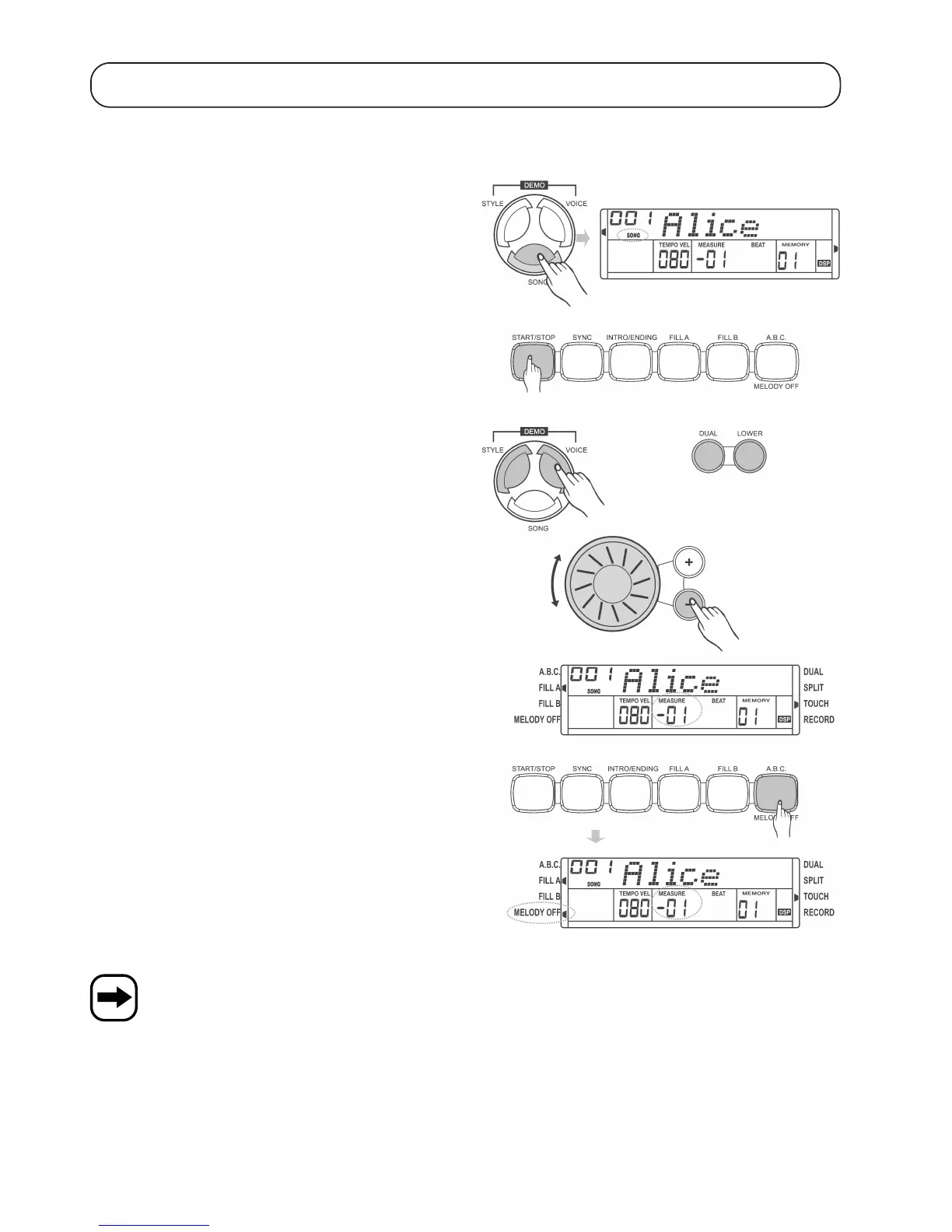
Press the „SONG“ button. „SONG“ is displayed.
Press the „START/STOP“ button the start the song or stop it.
When a song has been stopped, you can exit song mode by pressing
one of these buttons: „STYLE“, „VOICE“, „DUAL“ or „LOWER“.
Select the desired song using the control wheel or the „+“ and „-“ buttons.
The song starts with its individual intro rhythm (negative values in the
field marked on the right).
Press the „O.T.S./MELODY OFF“ button to turn on/off the melody of
the currently played song.
When the melody is turned off, „MELODY OFF“ is displayed on the
bottom left-hand side.
If you press the „SONG“ button to start playback, all songs are played one after another.
If you press the „START/STOP“ button to start a song, the song is played repeatedly.


 To Next Page