2--5
© 2015 Mobile Climate Control
T-367Re v. 05/2015
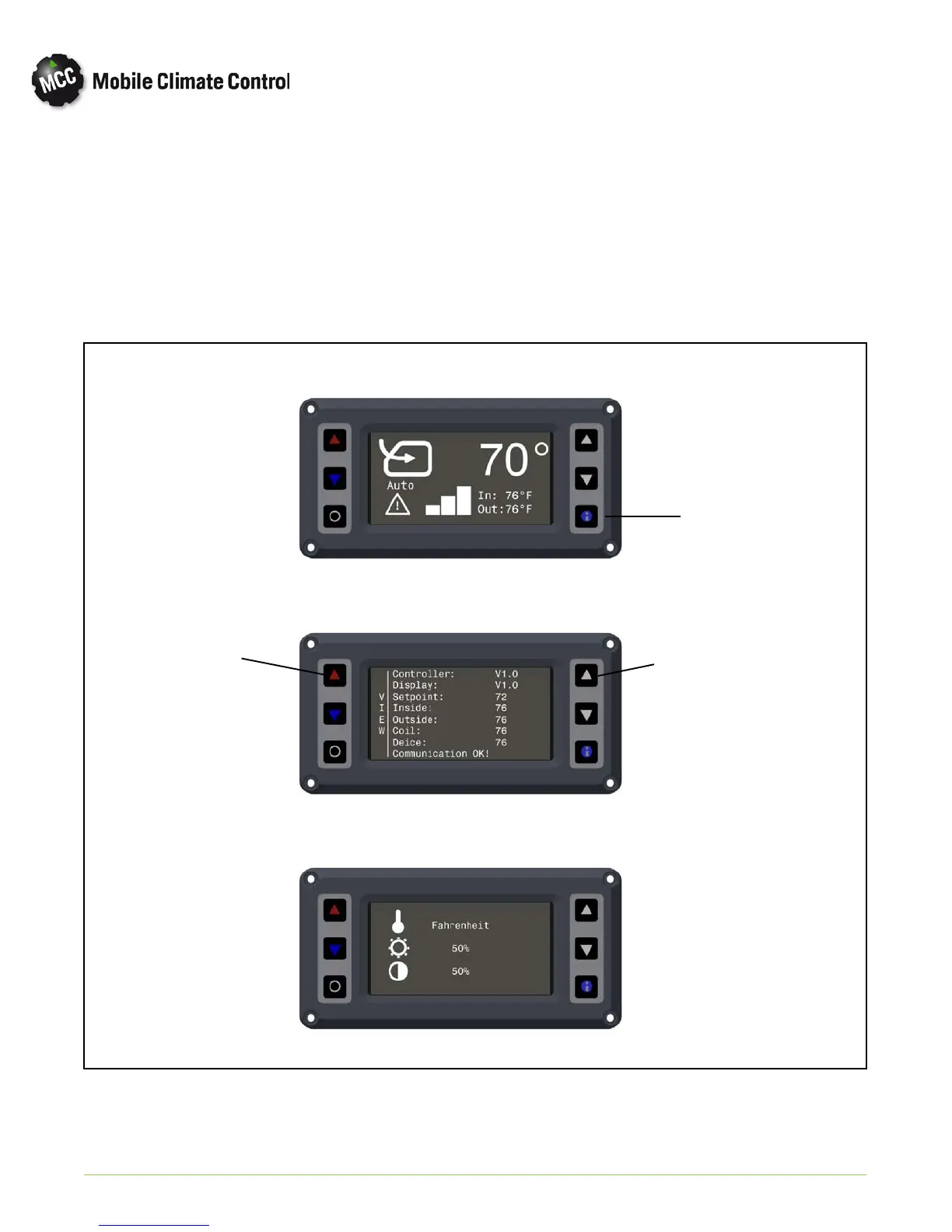
2.4.6 Display Settings
To adjust display settings, from the main menu:
a. Press the “Information” button to enter the
“View” screen (Item 4 in Figure 2-1).
b. Press and release both “Temperature ControlUP”
and “Cursor UP” buttons (Items 3 in Figure 2-4)
to access the display set- up screen.
c. To adjust settings, press the up or down cursor
keys to scroll to desired parameter (Item 3 in
Figure 2-1).
d. To adjust settings, press the up or down temperat
ure control keys to scroll to adjust parameter
e. After adjustment, press “Information” button
(Item 4 in Figure 2-1) to exit set-up screen.
Info Button
Main Menu Screen
View Screen
Display Set-Up Screen
Temperature
Control UP
Cursor UP
Figure 2-4 HVAC DISPLAY SETTINGS


 To Next Page