2--6
© 2015 Mobile Climate Control
T-367Rev05/2015
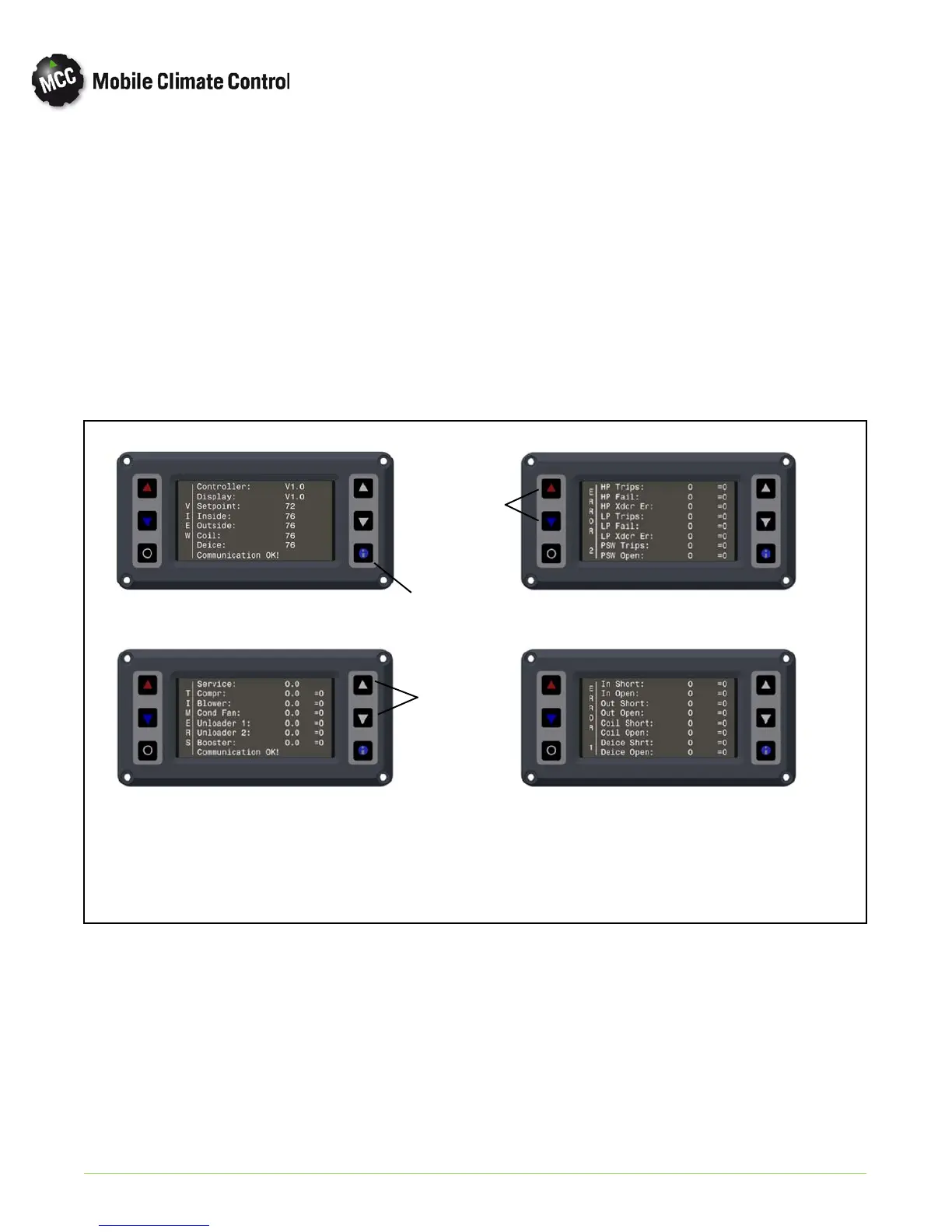
2.4.7 HVAC Information Screens
The information screens will allow user to view the
system parameters of temperature sensors,
operation hours of components and HVAC
equipment error logs. To enter the information
menu:
a. Press the “Information” button (Item 4 in
Figure 2-1).
b. To scroll through the “Information” screens, use
the “Up and Down Cursor” buttons (Items 3 in
Figure 2-1).
Examples of th e available screens can be seen in
Figure 2-5.
c. To reset individual error and timer hours, use tem
perature buttons (Item 2 in Figure 2-1). to select
parameter and press On/Off button (Item 1 in
Figure 2-1) to reset the parameter.
d. To reset all error and timer hours shown on a
screen, press u p or down temp erature button
(Item 2 in Figure 2-1) until all “=0” flashes on
screen. To reset all parameters shown, press On/
Offbutton(Item1inFigure2-1).
e. To exit the Information screens, press the “In
formation” button (Item 4 in Figure 2-1).
VIEW Screen
Equipment TIMERS
Equipment ERRORS 1
Equipment ERRORS 2
Cursor
Buttons
Info Button
Temperature
Buttons
Figure 2-5 HVAC INFORMATION SCREENS


 To Next Page