4-2
© 2015 Mobile Climate Control
T-367 Rev. 05/2015
4.2 OPENING TOP COVER (EVAPORATORS)
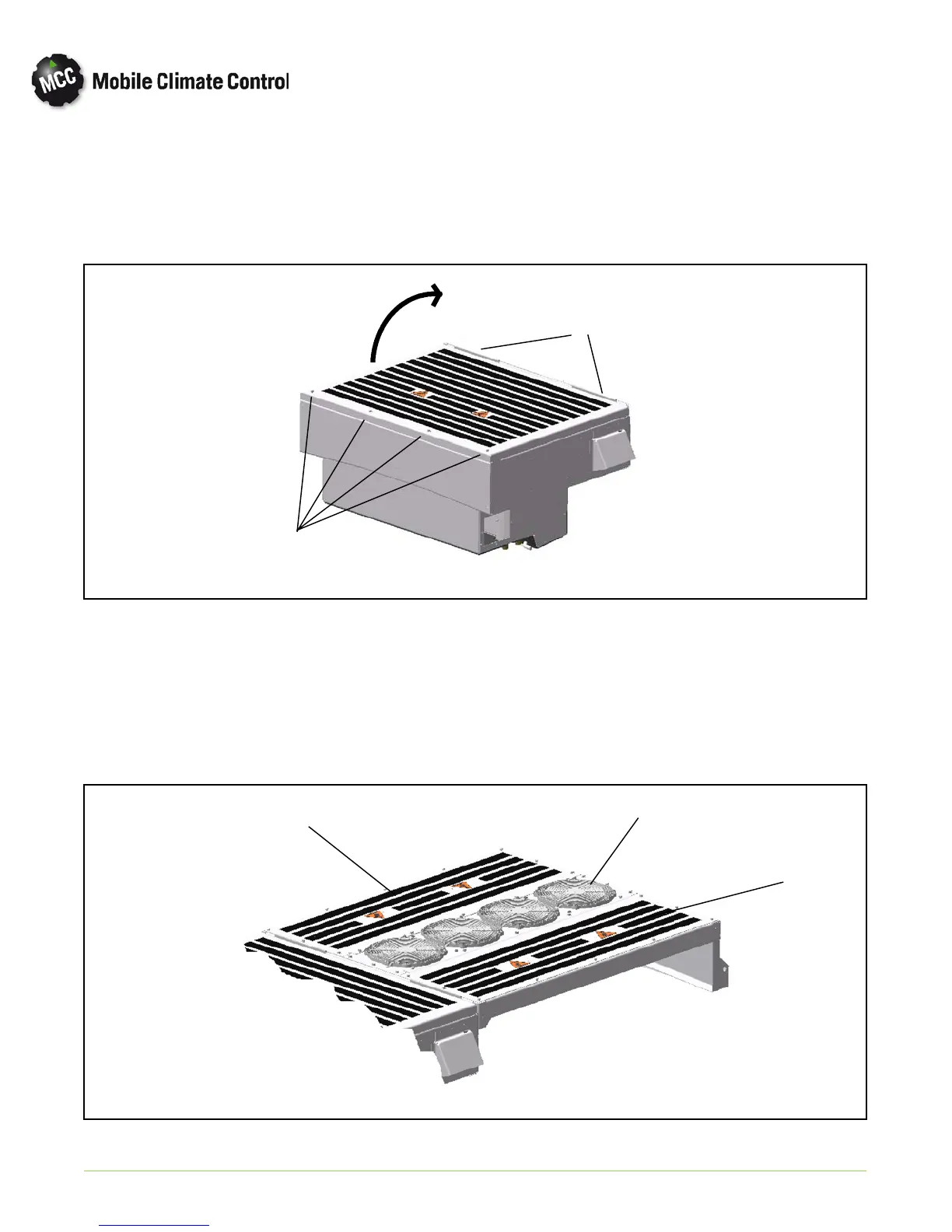
To open the evaporator assembly cover do the following: (See Figure 4-1.)
a. Remove all 4 of the (5/16” x 18 x 1”) retaining bolts at front end of cover.
b. Grasp the front cover section under the bottom edge and lift up. Cover will pivot on the 2 hinges at rear of
cover.
Hinges
Retaining
Bolts
Figure 4-1 Opening Top Cover (Evaporator)
4.3 REMOVING TOP COVERS (CONDENSER)
The condenser cover consist of the condenser fan deck and 2 side covers.
a. To remove the side covers, remove the 14- (5/16” x 18 x 1”) from each cover and carefully lift covers off.
(Item 1 & 2 in Figu re 4-2)
b. To remove the fan deck, remove the 3- (5/16” x 18 x 1”) from each end of fan deck assembly, and carefully
lift and unplug fan assemblies from the harness. (Item 3 in Figure 4-2)
1
2
3
Figure 4-2 Removing Top Covers (Condenser)


 To Next Page