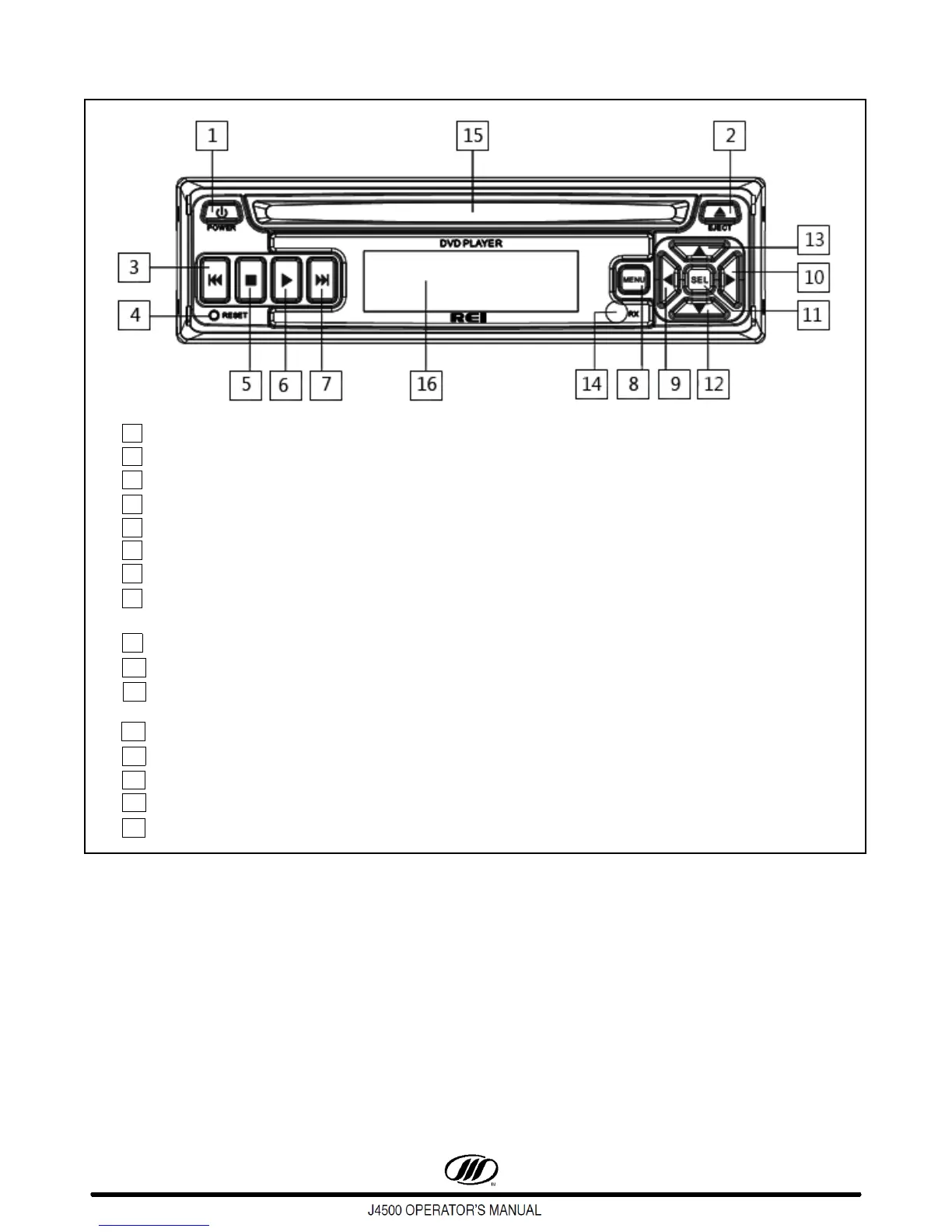
Figure 85. REI DVD Player Dual Zone Controls
1. Press POWER to turn the unit ON or OFF.
2. Eject button.
3. Press to skip back one track / title / chapter.
4. Pressing RESET button will perform a hardware reset on player.
5. Press to stop playback.
6. Begin playback.
7. Press to skip to the next track / title / chapter.
8. Display the root menu that is stored on the DVD disc. Selects between PBC ON and PBC OFF
on a VCD.
9. In MENU mode, this button moves the cursor to the left.
10. In MENU mode, this button moves the cursor to the right.
11. Confirm the Track / Chapter selected with the number key or selected with the cursor buttons
on the monitor, or return to playback.
12. In MENU mode, this button moves the cursor down.
13. In Menu mode, this button moves the cursor up.
14. IR sensor.
15. Disc slot.
16. LCD panel ( anti-glare feature ).



 To Next Page