1-13
• Servicing
Servicing or maintenance of these units must be carried out by experienced personnel with specific training in refrigeration.
Repeatedly check the safety devices and continuous cycling of control components. These items must be analyzed and
corrected before being reset.
The simple design of the refrigeration circuit totally eliminates potential problems during normal unit operation. No mainte-
nance work is needed on the refrigeration circuit as long as the unit is operating normally.
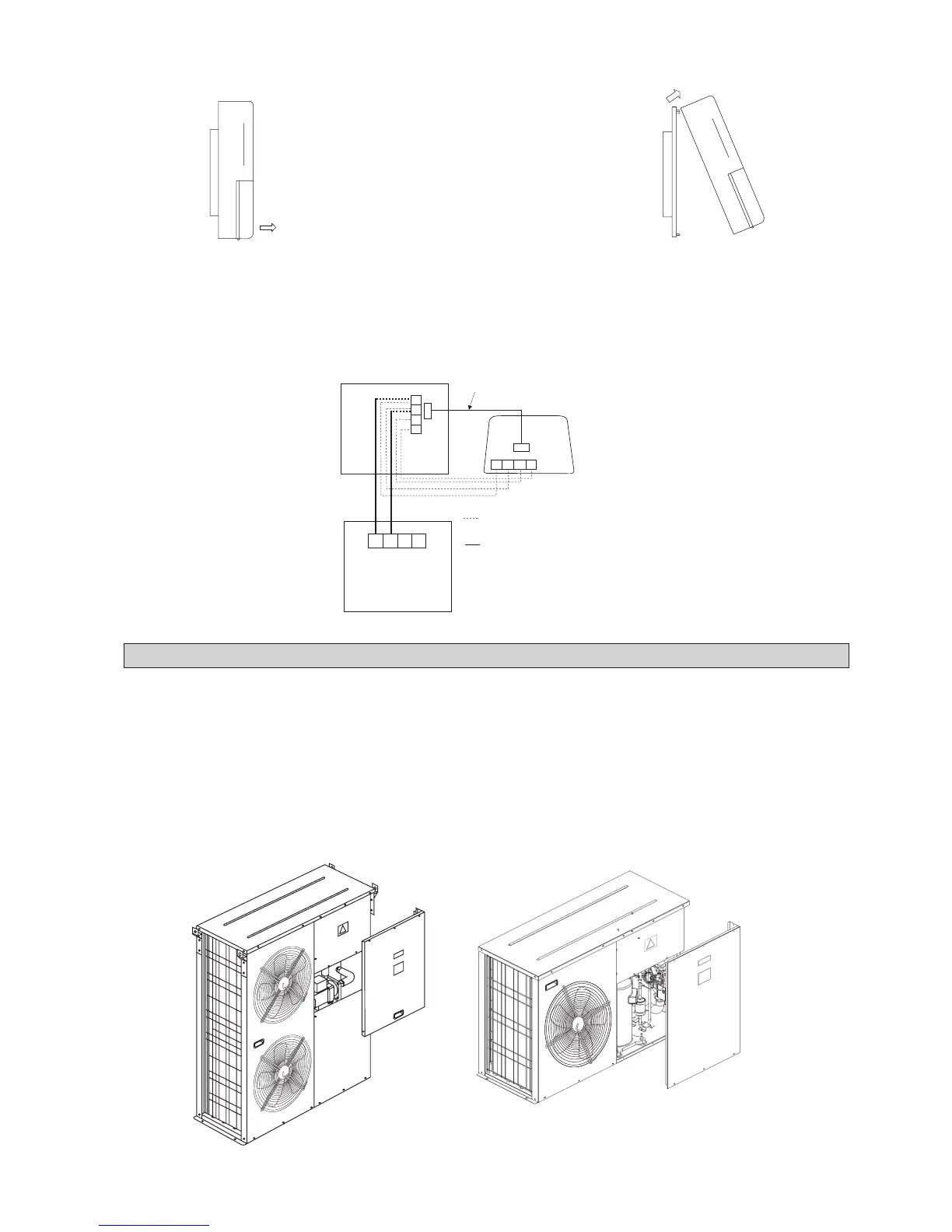
Ease of maintenance has been taken into consideration during the design stage such that the unit is easily accessible from the
service panels. The electrical components are especially easy to access since it is located in the terminal box in the front
service panel (Figure 7).
SERVICING AND MAINTENANCE
Figure 7
1. A 3V DC battery is supplied with the LCD. It is used to ensure that the LCD displays real time once the timer is set.
2. The LCD is wired to the main board via CN8 connection. (This is factory installed)
If the wiring between the LCD and PCB must be longer, an alternative is used. Use a 4-core wire of the desired length and
connect this wire between the terminal block CN2 on the LCD to the terminal block CN5 on the PCB. Ensure that the
correct wire terminals are connected.
3. Networking between chillers can be carried out. Connect the wire as shown
When removing the LCD panel from the bracket,
Step 1 Step 2
Remove the LCD panel
from the bottom part first
with help of a screw driver
Remove the
LCD panel
Factory installed
Alternative wiring between LCD panel and PCB
For networking only
A
A
A
B
B
B
12V
12V
12V
GND
GND
GND
JP13
CN8
CN2
CN5
Main Board Unit 00
LCD Panel
PCB Unit 01



 To Next Page