Chapter 4 Operation
- 31 -
adjust the position of the Main Unit and measure again. The bladder projection image is consistent
with the bladder projection of the Main Unit, see § 4.2.4.4 Bladder Projection Image for details.
4.3.9 Save
After measurement on a patient, click the SAVE key in the Main Interface to save the case record.
At this point, the progress bar popping up on the Main Interface prompts "Please Wait While
Saving ...", when the words of the progress bar disappear, the record is successfully saved,
meanwhile, the patient’s case information is saved to the patient medical record database. The
saved record includes the patient information (name, sex, age and ID), 12 bladder ultrasound
images, bladder projection, measurement results, measurement time and operator's name.
4.3.10 Case Report
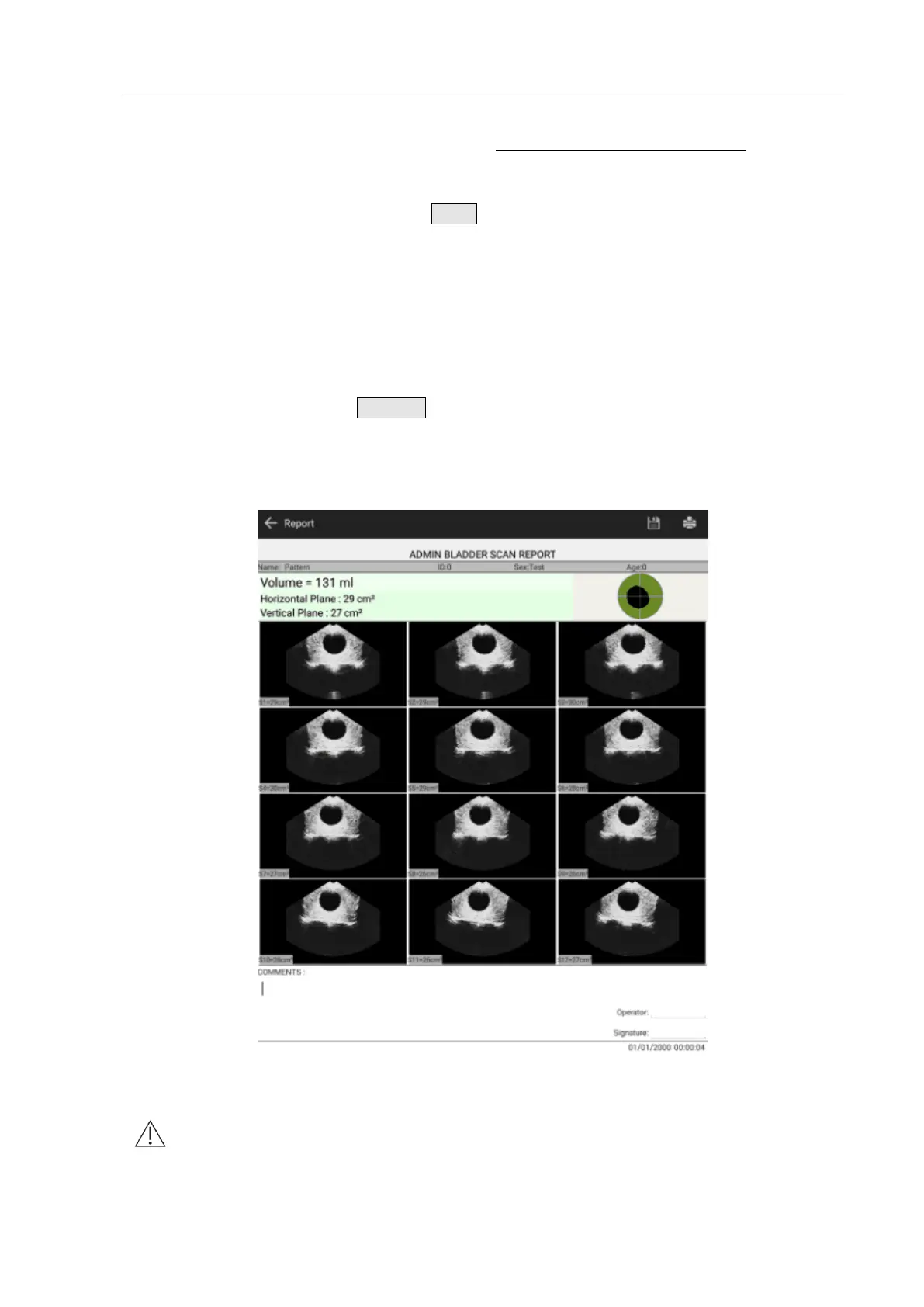
After a patient's scan, click the REPORT key in the Main Interface to display the report, as shown
in Fig. 4.28. Case reports from top to bottom include hospital name, patient information (name, sex,
age and ID), measured volume, bladder projection image, report image, comment, operator
signature and current time.
Fig. 4.28 Case Report
Note: The vertical plane and the horizontal plane refer to two scanning planes that are
at an angle of 90 degrees to each other.


 To Next Page